
TL;DR

Prime made for students and young adults
- Fast, free delivery for dorm and study essentials
- Prime Video and Amazon Music included
- Member-only deals
Prebuilt AI workstations now often match or beat DIY builds on price, support, and reliability. Building offers customization and control but requires time and expertise. Your choice hinges on priorities like speed, flexibility, and risk tolerance.
Ever wonder if you should build your own AI workstation or just buy one ready-made? The answer isn’t as straightforward as it used to be. With the AI boom pushing component prices sky-high, the classic DIY bargain is no longer a given.
This article breaks down the real tradeoffs—cost, control, speed, and support—so you can pick what’s best for your workload and budget. Whether you’re eyeing a sleek prebuilt or eager to assemble your own, you’ll get the clarity you need to make a confident call.
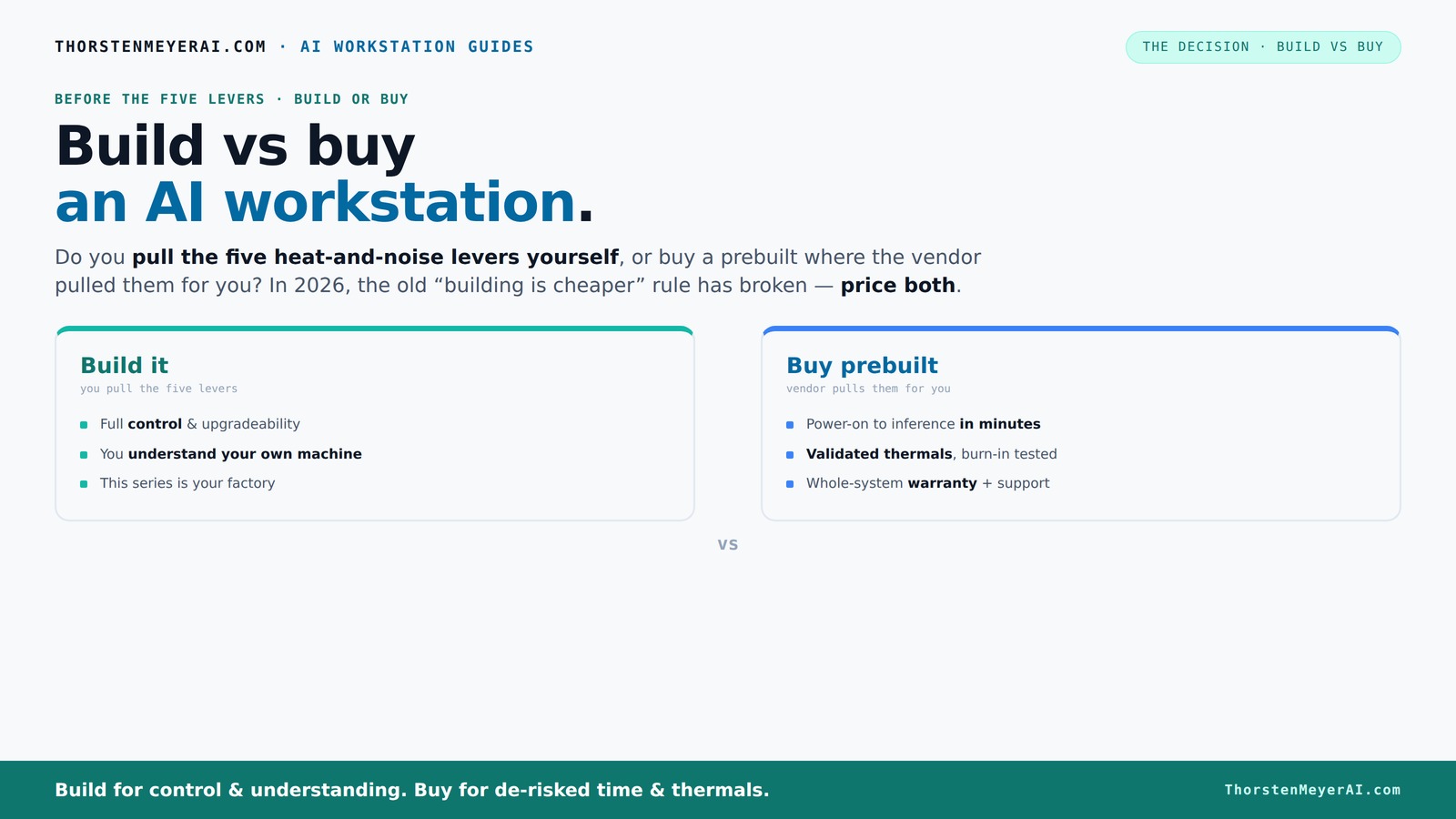
Build vs buy
an AI workstation.
The real question behind this whole series: do you pull the five heat-and-noise levers yourself, or buy a prebuilt where the vendor pulled them for you? And in 2026, the old “building is cheaper” rule has broken. Match your situation in Part 3.
Key Takeaways
- Component shortages in 2026 make prebuilt AI workstations often cost-competitive or cheaper than DIY builds.
- Prebuilts save time, reduce risk, and offer validated thermals, ideal for professional workflows with uptime needs.
- Building your own gives maximum control, upgradeability, and customization—best for hobbyists and long-term planners.
- GPU VRAM is critical; choose based on your model size, with 24GB+ ideal for training large AI models.
- Support and warranty options in prebuilts can significantly reduce downtime during hardware failures.
Popular right now

Vitamix Propel Series 510 Professional-Grade Blender, 3 Programs, Black

Dyson Cyclone V10 Origin Cordless Vacuum

De'Longhi Stilosa Compact Manual Espresso Machine with Milk Frother
As an affiliate, we earn on qualifying purchases.
Why Building Your Own AI Workstation No Longer Always Cheaper
Building a rig used to be the go-to for saving cash. But in 2026, that’s no longer a given. The global chip shortage and inflation have driven up prices for key components like GPUs, DDR5 RAM, and SSDs. A project that once cost $1,000 might now push past $1,250 before even adding an OS.
Meanwhile, big vendors bought in bulk before prices soared. They leverage economies of scale to offer systems at prices that can beat piecemeal assembly—sometimes by hundreds of dollars. So, the old rule, "Build is cheaper," now needs a second look.
For example, a popular high-end GPU like the RTX 4090 used to be $1,200; now it's often $1,600 or more. A prebuilt from a reputable vendor might include that card and more for around $2,500, with validation and support included. You may find it hard to match that price building your own.
The Five Levers: How Thermal Control Shapes Your Choice
Running an AI workstation cool and quiet is a balancing act. The core question: do you pull the five levers yourself or let the vendor handle them? Those levers are undervolting the GPU, matching cooling solutions, optimizing airflow, tuning fans, and placement.
Buy a prebuilt → the vendor pulls these levers, validating thermals and noise levels before shipping. Brands like BIZON or Lambda run extensive testing, ensuring the system won’t throttle under load and stays whisper-quiet. They often include water-cooling, which is costly and complex to DIY.
Build it yourself → you choose your parts and tune everything. You’ll learn how to undervolt the GPU ([see how here](https://thorstenmeyerai.com/undervolt-gpu-local-inference/)), select quiet cooling ([see options here](https://thorstenmeyerai.com/quiet-cpu-coolers-ai-workstation/)), and perfect airflow ([see setup tips](https://thorstenmeyerai.com/quiet-case-fans-airflow-setup/)). This gives you precise control but demands time and expertise.
Prebuilt vs. DIY: Who Should Pick Which?
Choosing between build and buy depends on your priorities. If you want a plug-and-play system ready to run in minutes, a prebuilt is your best bet. It comes with OS, software stack, and validated thermals—perfect if your time is precious.
On the other hand, if you crave full control over every component—say, a specific VRAM size or cooling solution—and enjoy tinkering, building is still king. It’s ideal for hobbyists, students, or professionals who want to customize their setup for unique AI workloads.
For example, a data scientist training large models might prefer a prebuilt with optimized cooling and warranty. Meanwhile, a researcher experimenting with custom GPU configurations might prefer to build their own to tweak every detail.
Cost Breakdown: Building vs. Buying — What’s the Real Price?
Let’s compare. Building your own AI workstation can cost anywhere from $1,200 to over $3,000, depending on specs. You buy parts separately—GPU, CPU, RAM, storage—and add assembly and potential troubleshooting time.
Prebuilts often cost a bit more upfront—say, $2,500 to $4,000—but include validation, support, and warranty. Sometimes, with current prices, a prebuilt can match or beat DIY costs, especially when factoring in the time saved and the risk reduction.
Understanding the true costs involves considering not just the initial purchase but also the potential time investment, troubleshooting, and future upgrade expenses. DIY might seem cheaper initially, but hidden costs such as compatibility issues, warranty gaps, and maintenance can make it more expensive over time. Conversely, prebuilts, while more costly upfront, often offset these hidden costs with support and reliability, leading to better long-term value.
VRAM and GPU Choices: What Matters Most for AI?
For AI, GPU choice is king. You need enough VRAM for your models—8GB might suffice for small inference, but training large models demands 24GB or more. The GPU also determines your performance ceiling.
If you build, you can pick exactly the GPU and VRAM you need, like a RTX 4090 with 24GB VRAM. Prebuilts often come with a selection of GPUs, but some might be constrained by vendor stock or proprietary parts.
Consider how much VRAM your models require. For instance, running a GPT-3 sized model locally might need 48GB VRAM, which is rare and expensive. Your choice of GPU directly impacts your workload’s feasibility and speed. Balancing VRAM with GPU performance and cost is crucial—underestimating VRAM needs can bottleneck your projects, while overspending on top-tier cards might not be justified if your workload is lighter.
Future-Proofing and Upgradability: Which Path Wins?
Building your own system generally offers better upgrade paths. You can swap out GPUs, add more RAM, or upgrade storage with fewer hurdles. Proprietary designs in prebuilts can limit these options.
For example, some OEMs use custom power supplies or connectors, making future upgrades costly or impossible. DIY builds, with standard parts, tend to be more flexible over time. This flexibility allows you to adapt to evolving AI workloads, hardware advancements, or changing project requirements without needing a complete overhaul. The tradeoff is that upgrading a DIY system requires more technical skill and time, but it can extend the useful life of your setup significantly. If your goal is to keep pace with rapidly advancing AI tech, building provides a strategic advantage in future-proofing your investment.
Support, Warranty, and Downtime: Why They Matter
Prebuilts often come with manufacturer warranties—up to 5 years in some cases. If hardware fails, you call support, and they handle repairs. This reduces downtime, especially during critical AI training or inference runs. Reliable support means less time troubleshooting hardware issues, which can be costly in professional environments where time is money. It ensures continuity of your AI projects and minimizes productivity loss.
Building yourself means you’re on your own. Troubleshooting compatibility, BIOS settings, or thermal issues falls on your shoulders. While you gain control, you also accept the risk of longer downtime if something breaks. This can be mitigated if you have technical skills or support networks, but it’s a factor to consider when relying on your own expertise versus vendor-backed support. For mission-critical operations, the peace of mind that comes with professional support can outweigh the premium cost, ensuring your AI workloads stay on track.
Upgrade Paths & Longevity: How Future-Ready Is Your System?
If you want to keep your AI workstation relevant for years, building generally offers better upgrade options. Standard motherboards and power supplies make swapping out GPUs or adding RAM straightforward.
Prebuilts with proprietary parts or limited space can make upgrading tricky. Some OEMs use custom cases or non-standard connectors, which complicate future expansion. This restricts your ability to adapt to new AI models or hardware improvements, potentially forcing costly replacements sooner than expected. For long-term value, a system that can evolve with your needs reduces total cost and maximizes your investment. If you anticipate rapid growth or frequent hardware updates, a DIY build provides the flexibility to extend the system's lifespan, ensuring you stay current without frequent complete replacements.
Avoiding Pitfalls: Compatibility and Hidden Costs
Building your own AI workstation isn’t just about picking parts. Compatibility issues—like mismatched motherboard slots or power supplies—can trip you up. Planning your build carefully prevents costly errors. These issues can cause delays, additional expenses, or even damage to components if overlooked. Ensuring compatibility requires diligent research and sometimes compromises on certain parts, which can affect performance or future upgradability.
Prebuilts help avoid these pitfalls but may include proprietary or less-reliable components. Also, hidden costs like shipping, cable management, or troubleshooting add up. For example, proprietary cooling solutions might be expensive or incompatible with future upgrades. Checking component compatibility ([see how here](https://thorstenmeyerai.com/low-noise-pc-cases-airflow/)) and comparing total costs before buying or building can save you from unexpected expenses and ensure your system performs reliably from day one.
What Does ‘AI Workstation’ Really Mean?
An AI workstation isn’t just a powerful PC. It’s a machine optimized for AI tasks—training, inference, or data processing. Key features include high VRAM GPUs, fast storage, and efficient cooling.
For example, a workstation with a NVIDIA A100 GPU, 256GB RAM, and NVMe SSDs is built for intensive AI workloads. The choice between build and buy hinges on how much control you want over these features.
Understanding your workload—whether inference or training—helps you pick the right specs and decide if a prebuilt or custom build suits your needs best.
How to Compare Specs Without Falling for the Hype
Specs can be confusing. Focus on real-world performance indicators: VRAM, CUDA cores, memory bandwidth, and cooling solutions. Don’t just chase the biggest numbers.
Use benchmarks and reviews—look for real AI workload tests. For example, compare training times or inference latency on similar setups.
Also, check for features like thermal validation and support services. These often matter more than raw specs for sustained AI tasks. Prioritize consistent performance and reliability over raw numbers that can be inflated or misleading.
Frequently Asked Questions
Is it cheaper to build or buy a prebuilt AI workstation?
In 2026, component prices and shortages have shifted the balance. Prebuilts often match or beat DIY costs when factoring in time and support. Always price your specific configuration first.
Which option offers better performance for AI workloads?
Performance depends on your parts and tuning. Building allows custom GPU and cooling choices, but high-end prebuilts are now validated for sustained heavy loads, offering excellent performance out of the box.
How much VRAM do I need for local AI models?
For small inference tasks, 8-12GB VRAM might suffice. Large training models, like GPT-3, require 24GB or more. Your workload determines the GPU VRAM you should aim for.
Are prebuilt workstations reliable enough for professional use?
Yes, if you buy from reputable vendors. They run extensive testing, provide warranties, and offer support—crucial for minimizing downtime during critical AI tasks.
Will a prebuilt limit future upgrades?
Prebuilts sometimes use proprietary parts, which can restrict upgrades. DIY systems with standard parts are generally more flexible and easier to expand over time.
Conclusion
Choosing between build and buy isn’t just about the sticker price anymore. It’s about weighing control against convenience, long-term flexibility against immediate deployment. The best choice depends on your workload, skills, and how much operational risk you’re willing to accept.
Remember: a well-chosen system—whether built or bought—will keep your AI projects running smoothly and help you stay ahead in this fast-moving field. What will your next move be?