
🔍 Read the full analysis: Can These 10 Best AI Mini PCs Handle Local Workloads In 2026? on ThorstenMeyerAI.com

Prime made for students and young adults
- Fast, free delivery for dorm and study essentials
- Prime Video and Amazon Music included
- Member-only deals
TL;DR
A 2026 comparison of ten AI-capable mini PCs ranks the GEEKOM A9 Max (Ryzen AI 9 HX 470, 32GB DDR5, 2TB SSD) as the best overall pick, with the GMKtec EVO-X3 standing out for its 128GB of memory. The review emphasizes that memory capacity, memory type, cooling, and connectivity matter as much as processor branding when choosing a compact system for local AI workloads.
A new 2026 comparison of ten AI-capable mini PCs names the GEEKOM A9 Max — equipped with a Ryzen AI 9 HX 470 processor, 32GB of DDR5 memory, and a 2TB SSD — as the best overall pick for running local AI workloads. The review, published by ThorstenMeyerAI.com, concludes that memory capacity, memory type, cooling, and connectivity shape what a compact PC can handle far more than processor labels alone, and highlights the GMKtec EVO-X3’s 128GB of memory as the standout option for large models and datasets.
The comparison evaluated mini PCs on processor class, installed memory, memory type, storage capacity, and expansion options. The GEEKOM A9 Max earned the top spot for its balanced out-of-box configuration, avoiding the immediate upgrades that smaller or less fully equipped systems may require. The GMKtec EVO-X3 was placed in a specialist role thanks to its 128GB of LPDDR5X memory, which the reviewer describes as giving it a distinct position for workloads that need large models or datasets held in memory.
The GMKtec K15 with Oculink was recognized for buyers who want a route to external graphics, though it pairs that connectivity with a smaller 512GB SSD, compared with the 1TB drive listed on the NucBox K15 configuration. Both K15 variants use an Intel Core Ultra 5 125U processor. Several other premium options in the lineup — including the GEEKOM GT15 Max, GEEKOM IT15, and MINISFORUM AI X1 Pro — arrive with 32GB of RAM, and the review advises buyers to match capacity to their workload rather than assume the highest-tier processor is always the best fit.
The reviewer explicitly cautions that product names and specifications alone do not establish benchmark performance, cooling behavior, or software compatibility, and the ranking deliberately avoids treating those as proven advantages. Performance claims from vendors without independent workload results are described as a reason to investigate, not a guarantee of speed.
The 10 picks
- 1
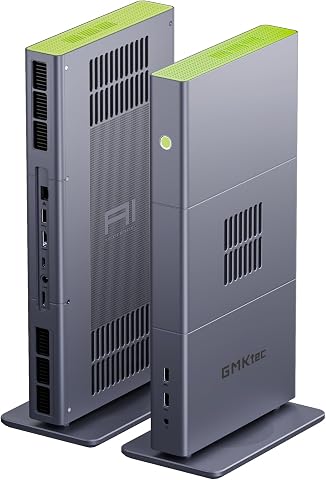 GMKtec EVO-X3 Mini PC with AMD Ryzen AI Max+ 395, 128GB LPDDR5X, and 2TB PCIe…View on Amazon →
 - 2
 GMKtec EVO-X2 AI Mini PC AMD Ryzen AI Max+ 395, Up to 5.1GHz, 16C/32TView on Amazon →
 - 3
 GEEKOM A9 Max Top AI Mini PC, AMD Ryzen AI9 HX470, 32GB DDR5, 2TB SSDView on Amazon →
 - 4
 GEEKOM IT15 Mini PC with Intel Ultra 9 285H, 32GB DDR5, 1TB SSD, Arc 140T GPU…View on Amazon →
 - 5
 MINISFORUM AI X1 Pro-370 Mini PC with AMD Ryzen AI 9 HX370, 32GB DDR5, 1TB SS…View on Amazon →
 - 6
 GEEKOM GT15 Max Business & Professional Mini PC with Intel Core Ultra 9, 32GB…View on Amazon →
 - 7
 GEEKOM IT13 MAX AI Mini PC with Intel Ultra 9 185H, 24GB LPDDR5, 500GB SSDView on Amazon →
 - 8
 Glorlin Mini PC with AMD Ryzen 7 Pro 8845HS, 16GB DDR5 RAM, and 1TB SSDView on Amazon →
 - 9
 GMKtec K15 AI Mini PC Oculink Intel Ultra 5 125U 32GB DDR5 512GB SSD, Desktop…View on Amazon →
 - 10
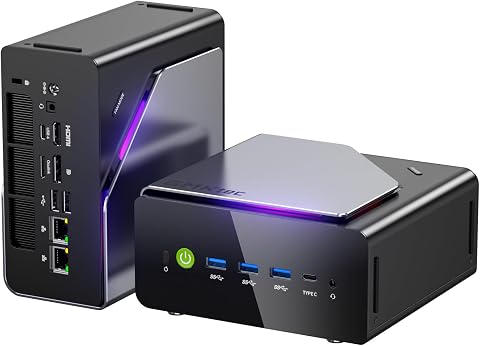 GMKtec K15 Mini PC AI Ultra 5 125U, 12-Core, 32GB DDR5, 1TB PCIe 4.0 SSDView on Amazon →
Why Memory Decides Local AI Capability
The comparison reflects a broader shift in how buyers should evaluate compact PCs for AI. As the review notes, system memory often decides whether a model or dataset fits before processor speed becomes the main concern. A fast processor helps with general compute, but available memory sets a harder limit on model size and multitasking. This matters because AI-branded processor tiers can make compact PCs sound interchangeable when their actual capabilities vary by chip and software support.
The findings are practical for buyers on a budget. A large memory figure does not guarantee a particular model will run well — software support, memory bandwidth, and processing method also matter. The review also flags that soldered memory in compact PCs can leave little room to adapt later, so checking whether memory is replaceable before buying can determine how long a system stays useful.
Popular right now

Shark Rocket Pet Plus Corded Stick Vacuum, Bordeaux, HV322

Sony WH-1000XM6 Wireless Noise-Canceling Over-Ear Headphones, Blue, Bundle

Breville Barista Pro Espresso Machine with Grinder, Brushed Stainless Steel
As an affiliate, we earn on qualifying purchases.
How the Ten Picks Were Ranked
The ranking prioritizes balanced capability and practical fit for AI-related work, then recognizes models serving a clear specific need such as unusually high memory or Oculink expansion. The A9 Max leads as the most balanced listed package; the EVO-X3 holds a specialist position for memory-heavy tasks; and less powerful or less fully equipped configurations rank lower for demanding local AI use.
The review’s selection method focused on factors that change what a buyer can actually do with AI locally. Beyond processor class and memory, the reviewer considered how ready each listed configuration is for immediate use, since a large SSD or high memory capacity can save an early upgrade. Storage received particular attention: local models and datasets consume space quickly, and the 2TB configurations in the lineup offer more room from the start than the 500GB and 512GB options.
“Processor labels alone do not tell the whole story: memory capacity, memory type, cooling, and connectivity shape what each compact PC can handle.”
— ThorstenMeyerAI.com review
What the Spec Sheets Don’t Prove
Several things remain unclear from listed specifications alone. The review does not include independent benchmark results, cooling measurements, or software compatibility testing for any of the ten systems, and it states plainly that specs do not establish these outcomes. How each mini PC performs under sustained local inference workloads — where thermal throttling in compact chassis can matter — is not verified.
It is also not yet clear how well specific AI tools support each processor’s acceleration features. The review notes that a processor with a newer name may not help if a buyer’s chosen tools do not support its acceleration features, and buyers need to verify this themselves. Finally, whether the Oculink path on the GMKtec K15 works smoothly with a given graphics enclosure and card — including connection and power requirements — requires confirmation before purchase.
Before You Buy: Verification Steps
Buyers planning a purchase should take several steps the review recommends. First, match memory capacity to the specific models and datasets they expect to run, including room for the operating system, applications, and context. Second, check whether memory is soldered or replaceable, since that determines future adaptability. Third, verify that their AI tools support the acceleration features of the specific chip in the system they are considering.
For storage, the review advises estimating space for all models expected to be kept available at once, not just the first one, and checking whether the SSD can be replaced or supplemented. Buyers interested in the K15 with Oculink should confirm support for their intended graphics enclosure and card before committing. As more independent testing of these systems emerges during 2026, performance claims that currently rest on specifications may be confirmed or challenged.
Key Questions
Which AI mini PC is the best overall pick in 2026?
According to the comparison, the GEEKOM A9 Max is the best overall pick, pairing a Ryzen AI 9 HX 470 processor with 32GB of DDR5 memory and a 2TB SSD in a balanced out-of-box configuration.
Which mini PC has the most memory for large AI models?
The GMKtec EVO-X3 leads with 128GB of LPDDR5X memory, which the review says suits workloads that need large models or datasets held in memory.
Is a higher-tier processor always better for local AI?
No. The review advises matching the whole configuration to the workload, since memory capacity often limits model size before processor speed becomes the main constraint, and newer processor names do not guarantee software support for their acceleration features.
What is Oculink and why does it matter?
Oculink is a connection that can provide a path to an external graphics enclosure on supported mini PCs, such as the GMKtec K15 with Oculink. The review treats it as a specific expansion decision that involves extra hardware, desk space, and setup, not an automatic advantage.
Do these rankings reflect benchmark testing?
No. The comparison is based on listed specifications and configurations, and it explicitly states that product names and specifications do not establish benchmark performance, cooling behavior, or software compatibility. Independent workload results were not part of the evaluation.
Source: ThorstenMeyerAI.com