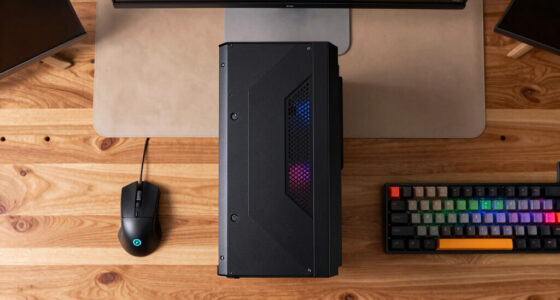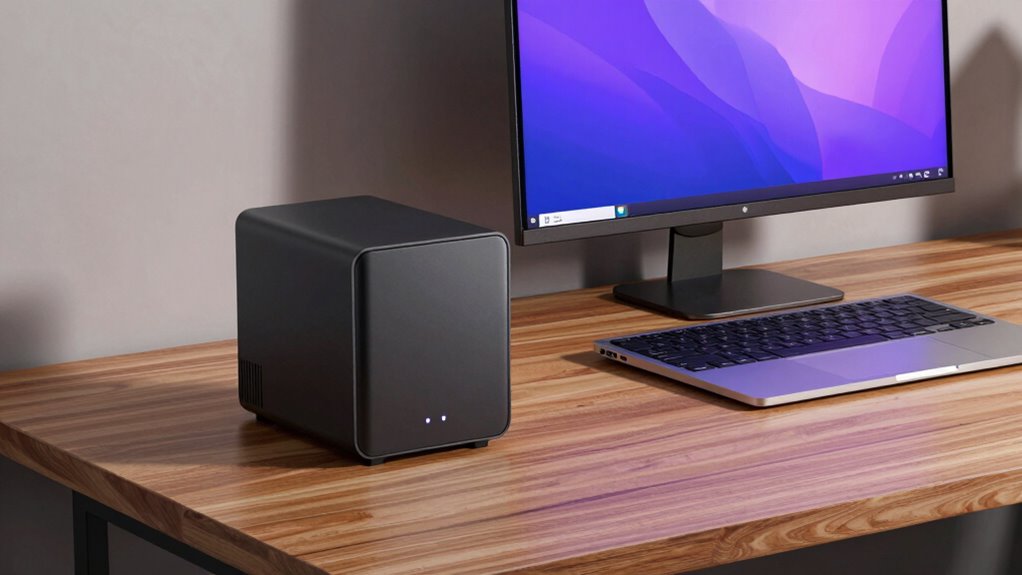

Choosing the right mini PC for a home lab involves balancing performance, size, and cost. The TK Node Mini PC with AMD Ryzen is our top overall pick, thanks to its versatile hardware and expandable storage. The GMKtec G3S stands out as a solid budget choice with reliable Intel processing, while the AOOSTAR NAS Mini PC offers robust networking and storage for more advanced setups. These options highlight the key tradeoffs: raw power versus affordability, expandability versus compactness, and performance versus ease of use. Continue reading for a detailed comparison to help you find the best fit for your home lab needs.

Prime made for students and young adults
- Fast, free delivery for dorm and study essentials
- Prime Video and Amazon Music included
- Member-only deals
Key Takeaways
- Performance varies significantly based on CPU choice, with AMD Ryzen often offering better multitasking for complex labs.
- Expandability and storage options are critical for future-proofing a home lab build.
- Size remains a key factor—compact units save space but may limit upgrade potential.
- Price ranges widely, with premium models offering more power at a higher cost—balance your needs accordingly.
- Built-in networking features like dual gigabit ports or 2.5G LAN can improve connectivity for more demanding setups.
| TK Node Mini PC – Proxmox + Home Assistant, AMD R2514, 16GB RAM, 256GB SSD |  | Best Overall for Home Lab Versatility | Processor: AMD R2514 | RAM: 16GB (expandable to 64GB) | Storage: 256GB SSD | VIEW ON AMAZON | See Our Full Breakdown |
| GMKtec G3S Mini PC with Intel N95 Processor, 8GB RAM, 256GB SSD |  | Best for Office and Routine Tasks | Processor: Intel N95 (12th Gen, 4 cores, up to 3.4GHz) | RAM: 8GB DDR4 | Storage: 256GB M.2 SSD | VIEW ON AMAZON | See Our Full Breakdown |
| TK Node Mini PC – Home Assistant, AMD R2514, 8GB RAM, 256GB SSD | | Best for Smart Home Automation and Continuous Operation | Processor options: AMD R2314, AMD R2514, Intel Core i3-1215U | RAM: 8GB (up to 64GB supported) | Storage: 256GB SSD (supports up to 4TB NVMe) | VIEW ON AMAZON | See Our Full Breakdown |
| MeLE Quieter DL Fanless Mini PC N150 with Windows 11 Pro |  | Best Silent Operation for Quiet Environments | Processor: Intel N150 | Operating System: Windows 11 Pro | Memory: 8GB DDR4 (upgradable to 32GB) | VIEW ON AMAZON | See Our Full Breakdown |
| TK Node Mini PC – Home Assistant, AMD R2514, 16GB RAM, 512GB SSD |  | Best for Home Automation and Virtualization with Storage | Processor: AMD R2514, 8-thread, 2.1 GHz (up to 3.7 GHz) | RAM: 16GB DDR4 (expandable to 64GB) | Storage: 512GB SSD (supports up to 4TB NVMe) | VIEW ON AMAZON | See Our Full Breakdown |
| AOOSTAR WTR PRO 4+2 Bay NAS Mini PC with AMD Ryzen 7 5825U, Dual 2.5G LAN, M.2 Slots, Barebone |  | Best for Advanced NAS and Home Server Builds | Processor: AMD Ryzen 7 5825U 8-core/16-thread, up to 4.5GHz | Memory: Supports up to 64GB DDR4 RAM (2 slots) | Storage: Supports 4 SATA drives and 2 M.2 NVMe SSDs, up to 96TB | VIEW ON AMAZON | See Our Full Breakdown |
| Dell Optiplex 3060 Micro PC, Intel Core i3-8100T, 16GB DDR4 RAM, 256GB NVMe SSD, Windows 11 Pro (Renewed) |  | Best for Reliable, Everyday Home Lab Tasks | Processor: Intel Core i3-8100T 3.10 GHz | RAM: 16GB DDR4 | Storage: 256GB NVMe SSD | VIEW ON AMAZON | See Our Full Breakdown |
| Dell OptiPlex 3040 Micro PC Mini Desktop, Intel Core 6th Gen, 8GB RAM, 256GB SSD, Windows 11 Pro (Renewed) |  | Best Budget Mini PC for Entry-Level Home Labs | Processor: Intel Core i3-6100t, 2 cores, 3.2 GHz | RAM: 8 GB | Storage: 256 GB SSD | VIEW ON AMAZON | See Our Full Breakdown |
| HP EliteDesk 705 G4 Mini Desktop Computer with Ryzen 5 Pro 2400GE |  | Best for Business-Oriented Home Labs and Virtualization | Processor: AMD Ryzen 5 Pro 2400GE up to 3.8GHz | RAM: 8GB DDR4 | Storage: 256GB SSD | VIEW ON AMAZON | See Our Full Breakdown |
| Dell OptiPlex 7050 Micro Computer, Intel Quad Core i5-6500T, 16GB DDR4, 256GB SSD, Windows 11 Pro (Renewed) |  | Best for High-Performance Multi-Monitor Home Labs | Processor: Intel Quad Core i5-6500T up to 3.1GHz | RAM: 16GB DDR4 | Storage: 256GB SSD | VIEW ON AMAZON | See Our Full Breakdown |
| mini pcs for home lab | Storage | Processor | RAM | Operating System |
|---|---|---|---|---|
| TK Node Mini PC | 256GB SSD | AMD R2514 | 16GB (expandable to 64GB) | Proxmox VE |
| GMKtec G3S Mini PC with Intel | 256GB M.2 SSD | Intel N95 (12th Gen, 4 cores, up to 3.4GHz) | 8GB DDR4 | — |
| TK Node Mini PC | 256GB SSD (supports up to 4TB NVMe) | — | 8GB (up to 64GB supported) | — |
| MeLE Quieter DL Fanless Mini P | 128GB eMMC, M.2 NVMe slot (up to 4TB) | Intel N150 | — | Windows 11 Pro |
| TK Node Mini PC | 512GB SSD (supports up to 4TB NVMe) | AMD R2514, 8-thread, 2.1 GHz (up to 3.7 GHz) | 16GB DDR4 (expandable to 64GB) | — |
| AOOSTAR WTR PRO 4+2 Bay NAS Mi | Supports 4 SATA drives and 2 M.2 NVMe SSDs, up to 96TB | AMD Ryzen 7 5825U 8-core/16-thread, up to 4.5GHz | — | — |
| Dell Optiplex 3060 Micro PC | 256GB NVMe SSD | Intel Core i3-8100T 3.10 GHz | 16GB DDR4 | Windows 11 Pro |
| Dell OptiPlex 3040 Micro PC Mi | 256 GB SSD | Intel Core i3-6100t, 2 cores, 3.2 GHz | 8 GB | Windows 11 Pro |
| HP EliteDesk 705 G4 Mini Deskt | 256GB SSD | AMD Ryzen 5 Pro 2400GE up to 3.8GHz | 8GB DDR4 | Windows 11 Pro |
| Dell OptiPlex 7050 Micro Compu | 256GB SSD | Intel Quad Core i5-6500T up to 3.1GHz | 16GB DDR4 | Windows 11 Pro |
More Details on Our Top Picks
TK Node Mini PC – Proxmox + Home Assistant, AMD R2514, 16GB RAM, 256GB SSD
This model stands out for its combination of pre-installed virtualization with Proxmox and home automation via Home Assistant, making it a strong choice for those who want an all-in-one mini server. Compared to the GMKtec G3S, it offers more flexible expansion options and supports multiple 4K displays, but its base 256GB SSD may be limiting for extensive storage needs. The absence of a dedicated GPU keeps costs down, but could hinder high-end graphics tasks. Its compact size and multiple video outputs make it adaptable for various deployment scenarios, though it requires some technical knowledge to optimize fully.
Pros:- Preinstalled with virtualization and automation platforms for quick setup
- Supports multiple 4K displays with versatile video outputs
- Expandable RAM and storage for future upgrades
- Compact size suitable for various deployment environments
Cons:- Limited to 256GB SSD storage in the base configuration
- Requires technical knowledge for optimal setup and maintenance
- No dedicated GPU for high-end graphics or gaming
Best for: Advanced home lab enthusiasts who want an integrated virtualization and automation setup with room to grow
Not ideal for: Beginners seeking a plug-and-play solution or users needing large storage out of the box, since initial storage is limited and setup is technical
- Processor:AMD R2514
- RAM:16GB (expandable to 64GB)
- Storage:256GB SSD
- Operating System:Proxmox VE
- Dimensions:5 x 5 x 1.7 inches
- Video Output:HDMI, DisplayPort, USB-C
Our verdict“This mini PC is ideal for experienced users who want a versatile, expandable platform for virtualization and home automation.”
GMKtec G3S Mini PC with Intel N95 Processor, 8GB RAM, 256GB SSD
The GMKtec G3S makes sense for users who need a reliable, compact PC for everyday tasks, supporting dual 4K displays and offering good connectivity. Unlike the TK Node, it lacks pre-installed virtualization or automation tools, focusing instead on straightforward performance. Its 12th Gen Intel N95 processor provides solid performance for multitasking, but the limited 8GB RAM might hinder heavy multitasking or future-proofing. Its small footprint and dual display support make it suitable for home offices or media centers, though it isn’t designed for intensive workloads or virtualization.
Pros:- Powerful 12th Gen Intel N95 processor for responsive performance
- Supports dual 4K@60Hz displays for multitasking
- Rich connectivity including USB 3.2, HDMI, WiFi 5, and Bluetooth 5.0
- Compact and versatile for various home setups
Cons:- Limited to 8GB RAM, which may restrict multitasking
- No mention of upgradeability for RAM or storage
- No dedicated GPU for graphics-intensive tasks
Best for: Home users needing a compact, capable machine for office work, media, and light multitasking
Not ideal for: Power users or home lab builders requiring virtualization, automation, or higher RAM capacity, as the limited memory and lack of upgrade options may fall short
- Processor:Intel N95 (12th Gen, 4 cores, up to 3.4GHz)
- RAM:8GB DDR4
- Storage:256GB M.2 SSD
- Graphics:Intel UHD Graphics (up to 1000MHz)
- Connectivity:WiFi 5, Bluetooth 5.0, Gigabit Ethernet
- Display Support:Dual 4K@60Hz
Our verdict“This mini PC appeals to users who want a capable, space-saving device for daily computing and media, but not for heavy multitasking or virtualization.”
TK Node Mini PC – Home Assistant, AMD R2514, 8GB RAM, 256GB SSD
This version of the TK Node is tailored for smart home automation and reliable server use, with a focus on continuous 24/7 operation. Its size and support for multiple 4K displays make it flexible for various environments, especially for those deploying in tight spaces. Compared to the 16GB variant, this model’s 8GB RAM may be limiting for more demanding automation tasks or future expansion, but its 2-year US-based warranty offers peace of mind. Setup may require some technical skill, especially for storage optimization or advanced configurations.
Pros:- Compact size suitable for flexible placement
- Supports up to three 4K displays for versatile use
- Expandable RAM and storage for future needs
- Reliable 24/7 performance with a 2-year warranty
Cons:- Limited default storage at 256GB, may need upgrades for large datasets
- Requires technical setup and configuration
- Processor options may not handle very high workloads
Best for: Home automation enthusiasts and small business owners seeking a reliable, compact automation hub
Not ideal for: Users who need extensive storage or high-performance computing for complex workloads, due to its default 256GB SSD and modest RAM
- Processor options:AMD R2314, AMD R2514, Intel Core i3-1215U
- RAM:8GB (up to 64GB supported)
- Storage:256GB SSD (supports up to 4TB NVMe)
- Display support:Up to three 4K displays
- Connectivity:Gigabit Ethernet, WiFi, Bluetooth
- Warranty:2-year US-based limited warranty
Our verdict“This mini PC excels as a dependable, space-efficient platform for home automation and continuous operation, especially for users with moderate workload needs.”
MeLE Quieter DL Fanless Mini PC N150 with Windows 11 Pro
The MeLE Quieter DL stands out as an ideal choice for those prioritizing noise-free operation, thanks to its fanless design. Its dual 2.5GbE ports make it perfect for network-heavy roles like home servers or virtualization without requiring active cooling. While it offers expandable RAM and storage, its default 8GB RAM and limited storage (128GB eMMC plus M.2 slot) may be insufficient for heavy workloads or large datasets. Its basic specs and lack of a dedicated GPU mean it’s less suited for graphics-intensive or demanding computing tasks, but it’s excellent for stable, quiet operation in a home lab environment.
Pros:- Fanless and silent operation perfect for quiet environments
- Dual 2.5GbE ports for high-speed networking and storage
- Expandable RAM and storage options
- VESA mountable for flexible placement
Cons:- Limited to 8GB RAM by default, upgradable with effort
- No dedicated GPU, limiting graphics capabilities
- Basic internal storage may require upgrades for large datasets
Best for: Users needing a silent, dedicated network or server device in a quiet home or office setting
Not ideal for: Power users requiring high RAM, large storage, or graphics performance, as it’s limited in these areas
- Processor:Intel N150
- Operating System:Windows 11 Pro
- Memory:8GB DDR4 (upgradable to 32GB)
- Storage:128GB eMMC, M.2 NVMe slot (up to 4TB)
- Network:Dual 2.5GbE ports
- Dimensions:6.6 x 3.73 x 0.84 inches
Our verdict“This mini PC is best suited for network-centric roles where silent operation and stability are priorities over raw power.”
TK Node Mini PC – Home Assistant, AMD R2514, 16GB RAM, 512GB SSD
This version of the TK Node is tailored for users who need a more substantial storage setup while maintaining a focus on automation and virtualization. Its 512GB SSD provides a better foundation for larger datasets or more complex setups than the 256GB base model, and the 16GB RAM boosts multitasking and future-proofing. Similar to the 16GB version, it supports multiple 4K displays and expandable hardware, but its slightly larger SSD makes it a better choice for those with higher storage demands. It remains compact and reliable, ideal for continuous home lab or smart home use.
Pros:- Larger 512GB SSD for more extensive storage needs
- Supports multiple 4K displays for versatile setups
- Expandable RAM and storage for future upgrades
- Reliable 24/7 operation with a 2-year warranty
Cons:- Default storage may still be limited for very large datasets
- Requires technical skill for hardware upgrades
- No dedicated GPU, limiting graphics-intensive tasks
Best for: Home automation users and small-scale virtual environments requiring more storage and memory capacity
Not ideal for: Users with extensive graphics needs or those requiring dedicated GPU power, as it lacks high-end graphics hardware
- Processor:AMD R2514, 8-thread, 2.1 GHz (up to 3.7 GHz)
- RAM:16GB DDR4 (expandable to 64GB)
- Storage:512GB SSD (supports up to 4TB NVMe)
- Dimensions:5 x 5 x 1.7 inches
- Video Output:HDMI, DisplayPort, USB-C
- Connectivity:Gigabit Ethernet, WiFi, Bluetooth
Our verdict“This mini PC is well-suited for home automation and virtualization environments that need more storage and RAM without sacrificing size or reliability.”
AOOSTAR WTR PRO 4+2 Bay NAS Mini PC with AMD Ryzen 7 5825U, Dual 2.5G LAN, M.2 Slots, Barebone
The AOOSTAR WTR PRO stands out for its powerful AMD Ryzen 7 5825U CPU, making it ideal for multitasking, media hosting, and NAS setups. Compared to the Dell Optiplex 3060, which has a less capable CPU, this model offers significantly better processing power for demanding home lab tasks. Its ability to support multiple SATA drives and M.2 NVMe SSDs provides extensive storage flexibility, perfect for media servers or virtualization. However, since it’s a barebone system, users must purchase and install RAM and drives separately, which could be a hurdle for those unfamiliar with building or upgrading PCs. The extensive connectivity, including dual 2.5G LAN ports and multiple display outputs, creates opportunities for complex network and multi-monitor configurations. Still, its lack of pre-installed OS and potential Linux SATA link issues demand more technical know-how than simpler, pre-configured options.
Pros:- High-performance AMD Ryzen 7 5825U processor for multitasking and media workloads
- Expandable storage with support for 4 SATA drives and 2 M.2 NVMe slots
- Multiple high-resolution display outputs for multi-monitor setups
- Dual 2.5G LAN ports for fast network connectivity
Cons:- Requires separate purchase and installation of RAM and storage drives
- No pre-installed OS, adding setup complexity
- Potential Linux SATA link power management issues
Best for: Power users who want a customizable, high-performance home lab server with expansive storage and networking options.
Not ideal for: Beginners or those seeking a plug-and-play mini PC, since it requires assembly and configuration.
- Processor:AMD Ryzen 7 5825U 8-core/16-thread, up to 4.5GHz
- Memory:Supports up to 64GB DDR4 RAM (2 slots)
- Storage:Supports 4 SATA drives and 2 M.2 NVMe SSDs, up to 96TB
- Graphics:Radeon Vega integrated graphics
- Network:Dual 2.5G LAN ports (Intel I226-V)
- Display Outputs:Triple 4K via DP 1.4, HDMI, Type-C
- Power Consumption:15W to 25W
- Form Factor:Mini PC, barebone
Our verdict“This mini PC suits experienced users seeking a flexible, powerful home lab or NAS server, despite requiring assembly and configuration.”
Dell Optiplex 3060 Micro PC, Intel Core i3-8100T, 16GB DDR4 RAM, 256GB NVMe SSD, Windows 11 Pro (Renewed)
The Dell Optiplex 3060 Micro offers a dependable platform for basic home labs, especially for users who prefer Windows pre-installed. Its Intel Core i3-8100T CPU, while less powerful than the Ryzen 7 in the AOOSTAR, provides sufficient performance for light virtualization, testing, or server duties. Compared with the HP EliteDesk 705 G4, which has a slightly newer processor, this Dell model delivers a familiar Windows environment and includes a decent amount of RAM for multitasking. The system’s compact size and multiple ports make it versatile for different setups, but its basic configuration limits heavy multitasking or intensive workloads. As a renewed product, warranty and longevity vary, so it suits those who prioritize reliability in a straightforward package over raw power.
Pros:- Reliable performance with Intel Core i3-8100T processor
- Pre-installed Windows 11 Pro for ease of setup and security
- Includes 16GB DDR4 RAM for multitasking
- Compact design with multiple connectivity options
Cons:- Renewed product may have limited warranty and wear
- Limited CPU power for heavy workloads or virtualization
- Basic configuration might fall short for intensive multitasking
Best for: Home lab enthusiasts seeking a straightforward, Windows-based mini PC for light server or testing tasks.
Not ideal for: Power users needing high processing power or extensive expansion options, since it’s limited by its CPU and RAM capacity.
- Processor:Intel Core i3-8100T 3.10 GHz
- RAM:16GB DDR4
- Storage:256GB NVMe SSD
- Graphics:Intel UHD Graphics 630
- Operating System:Windows 11 Pro
- Ports:2 x USB-A 2.0, 4 x USB-A 3.0, 1 x DisplayPort, 1 x HDMI
Our verdict“This mini PC is well-suited to users who want a dependable, Windows-based machine for light home lab tasks and testing.”
Dell OptiPlex 3040 Micro PC Mini Desktop, Intel Core 6th Gen, 8GB RAM, 256GB SSD, Windows 11 Pro (Renewed)
The Dell OptiPlex 3040 offers solid basic performance with its 6th gen Intel Core i3, making it a good choice for those starting out in home labs or testing environments. Compared to the more recent Dell 3060, this model’s older processor limits its multitasking and virtualization potential. Its 8GB RAM is adequate for basic tasks but may restrict heavier workloads. The system’s multiple ports and WiFi/Bluetooth support make it flexible for connecting various peripherals and network equipment. The included keyboard and mouse add immediate usability, but as a refurbished unit, its appearance and longevity depend on prior use. Overall, this mini PC is a practical entry-level choice with a focus on affordability rather than raw power.
Pros:- Affordable, entry-level performance with 6th gen Intel Core i3
- Includes WiFi and Bluetooth for wireless connectivity
- Comes with keyboard and mouse, ready to use
- Supports Windows 11 Pro out of the box
Cons:- Refurbished condition may vary and affect longevity
- Limited CPU power for intensive tasks
- Older generation hardware may lack future-proofing
Best for: Beginners or students setting up a simple home lab on a budget who need a reliable Windows machine.
Not ideal for: Advanced users or those requiring virtualization or heavy multitasking, due to its older CPU and limited RAM.
- Processor:Intel Core i3-6100t, 2 cores, 3.2 GHz
- RAM:8 GB
- Storage:256 GB SSD
- Operating System:Windows 11 Pro
- Connectivity:WiFi, Bluetooth
- Video Ports:2 x USB 2.0, 4 x USB 3.0, 1 x DisplayPort, 1 x HDMI
Our verdict“Ideal for beginners or casual users wanting a budget-friendly Windows mini PC for basic home lab setups.”
HP EliteDesk 705 G4 Mini Desktop Computer with Ryzen 5 Pro 2400GE
The HP EliteDesk 705 G4 offers robust performance with its Ryzen 5 Pro 2400GE processor, making it suitable for business applications, virtualization, and multitasking. Compared with the Dell Optiplex 3060, which has a less capable CPU, this HP model delivers better processing power for more demanding home lab environments. The pre-installed Windows 11 Pro ensures security and compatibility for professional workflows. Its small footprint and tested, reliable hardware make it a good choice for business-oriented setups. The main tradeoff is that, with only 8GB RAM, it might not handle very heavy virtualization or multiple VM instances efficiently. As a refurbished unit, users should verify condition and warranty coverage.
Pros:- Powerful AMD Ryzen 5 Pro 2400GE processor for multitasking
- Pre-installed with Windows 11 Pro for security and management
- Compact design suitable for limited spaces
- Proven, tested refurbished hardware
Cons:- Limited to 8GB RAM, restricting virtualization scale
- Refurbished condition may vary
- No dedicated graphics card for GPU-heavy workloads
Best for: Home lab users focused on business applications, virtualization, and stable, professional-grade performance.
Not ideal for: Those needing extensive RAM or GPU-intensive tasks, since it’s limited to 8GB RAM and no dedicated graphics card.
- Processor:AMD Ryzen 5 Pro 2400GE up to 3.8GHz
- RAM:8GB DDR4
- Storage:256GB SSD
- Operating System:Windows 11 Pro
- Form Factor:Mini desktop
Our verdict“This mini PC suits professionals or advanced home lab users seeking reliable business-grade performance with room for moderate virtualization.”
Dell OptiPlex 7050 Micro Computer, Intel Quad Core i5-6500T, 16GB DDR4, 256GB SSD, Windows 11 Pro (Renewed)
The Dell OptiPlex 7050 offers a significant upgrade with its quad-core i5-6500T CPU, making it well-suited for demanding multitasking, virtualization, and 4K display setups. Compared to the Dell 3060, which has a less powerful CPU, this model delivers better performance for intensive tasks within a small footprint. Its 16GB RAM supports multiple VM instances and heavy multitasking, while the support for dual 4K monitors expands its usefulness for complex home lab environments. The included ports and Windows 11 Pro installation provide immediate productivity. However, as a refurbished device, it may have cosmetic imperfections and a limited 90-day warranty, so buyers should consider potential wear and tear.
Pros:- Quad-core Intel i5-6500T processor for high multitasking performance
- Supports dual 4K display output for complex setups
- Includes 16GB RAM for virtualization and heavy multitasking
- Pre-installed with Windows 11 Pro
Cons:- Refurbished condition may include cosmetic wear
- Limited to a 90-day warranty for peace of mind
- Older processor architecture compared to newer models
Best for: Home lab enthusiasts who need a reliable, powerful mini PC capable of running multiple VMs and supporting dual 4K displays.
Not ideal for: Users seeking a brand-new device or with budget constraints, due to its refurbished nature and limited warranty.
- Processor:Intel Quad Core i5-6500T up to 3.1GHz
- RAM:16GB DDR4
- Storage:256GB SSD
- Ports:1 x RJ-45, 1 x HDMI, 1 x DisplayPort, 6 x USB 3.0
- Operating System:Windows 11 Pro
- Warranty:Minimum 90 days
Our verdict“Ideal for users who require a high-performance, multi-monitor capable home lab PC with reliable, tested hardware.”

How We Picked
I evaluated these mini PCs based on core factors that matter in a home lab environment: processing power, expandability, size, power efficiency, and value. Reliability and build quality also played a role, especially for continuous use. I prioritized models that balance performance with ease of setup and maintenance, as home labs often require flexibility and future upgrades. The ranking reflects a combination of hardware versatility, user reviews, and price-to-performance ratio, ensuring each pick serves a distinct use case or budget level.| mini pcs for home lab | Operating System |
|---|---|
| TK Node Mini PC | Proxmox VE |
| GMKtec G3S Mini PC with Intel | — |
| TK Node Mini PC | — |
| MeLE Quieter DL Fanless Mini P | Windows 11 Pro |
| TK Node Mini PC | — |
| AOOSTAR WTR PRO 4+2 Bay NAS Mi | — |
| Dell Optiplex 3060 Micro PC | Windows 11 Pro |
| Dell OptiPlex 3040 Micro PC Mi | Windows 11 Pro |
| HP EliteDesk 705 G4 Mini Deskt | Windows 11 Pro |
| Dell OptiPlex 7050 Micro Compu | Windows 11 Pro |
Factors to Consider When Choosing Mini Pcs For Home Labs
When selecting a mini PC for your home lab, consider several key factors that influence usability and longevity. First, processor choice impacts how well the system can handle virtualization, containers, or multiple services running simultaneously. Storage expandability ensures you won’t run out of space as your lab grows, making it worth investing in models with M.2 slots or additional bays. Size and form factor matter, especially if space is limited; compact units save space but may sacrifice upgradability. Power consumption is also important for a 24/7 setup, affecting ongoing electricity costs. Lastly, networking features like dual Ethernet ports or 2.5G LAN can improve data transfer speeds and connectivity for complex lab environments.Processor and Performance
The CPU determines how well your mini PC can handle virtualization, multiple containers, or network services. AMD Ryzen chips generally offer better multi-threaded performance, making them suitable for more demanding home labs. Intel processors tend to be more energy-efficient and better supported with software, but may fall short on raw power for heavy workloads. Choosing a processor with at least four cores is advisable for multitasking, while higher-end models provide headroom for future growth. Remember, a more powerful CPU often means higher cost and potentially increased power consumption.
Expandability and Storage
Future-proofing your home lab depends on how easily you can add or upgrade storage and RAM. Look for models with M.2 slots or 2.5G bays that support SSD upgrades, as these allow faster data access and more storage capacity. Some compact mini PCs limit upgrade options, which can be frustrating as your lab scales. Balancing size with expandability is key—smaller units are easier to fit into tight spaces but may lock you into initial specs. Consider your projected storage needs now and in the future to avoid costly replacements or upgrades down the line.
Size and Form Factor
Space constraints often influence mini PC choices, especially in home environments. Ultra-compact units save space but might restrict internal upgrades or cooling options, which can impact long-term reliability. Larger mini PCs tend to have better cooling and more expansion slots, but they take up more room. Think about your available space and whether you prioritize a clean desktop setup or future flexibility. Remember, a slightly larger device might offer more longevity and easier maintenance, which can be valuable for a home lab running 24/7.
Power Efficiency and Noise
Home labs often run continuously, so energy consumption and noise levels matter. More efficient models reduce electricity bills and heat output, prolonging component lifespan. Fanless or low-noise units like the MeLE Quieter DL minimize disturbance, especially in quiet home environments. However, less cooling may lead to thermal throttling under heavy loads, affecting performance. Evaluate your workload expectations against the noise and power profile of each mini PC to choose a model that balances silence, efficiency, and performance.
Networking Capabilities
Fast and reliable network connections are vital for a home lab, especially when running servers, NAS, or virtualization. Dual Ethernet ports or 2.5G LAN options on models like the AOOSTAR NAS PC provide higher throughput and better network segmentation. Built-in Wi-Fi can be convenient but may not offer the stability or speed required for serious lab tasks. Consider your networking environment and whether wired connections or advanced features are necessary for your setup to avoid bottlenecks and ensure smooth data flow.
Frequently Asked Questions
Can I run multiple virtual machines on a mini PC for my home lab?
Yes, many mini PCs, especially those with AMD Ryzen or Intel Core i5/i7 processors and ample RAM, are capable of running multiple virtual machines. The key is choosing a model with at least 8GB of RAM, though 16GB or more is preferable for heavier workloads. Storage speed and capacity also influence VM performance, so look for SSD options and expandability. Keep in mind that thermal management and power supply stability are important, as running multiple VMs can generate heat and increase power draw.
Is a fanless mini PC suitable for a home lab with heavy workloads?
Fanless mini PCs like the MeLE Quieter DL excel in low-noise environments and are suitable for light to moderate workloads. However, their passive cooling limits thermal headroom, which can cause throttling under heavy use or prolonged high loads. If your home lab involves intensive tasks like virtualization or data processing, a fan-cooled model with robust cooling might serve better. Balance your noise sensitivity with the need for sustained performance when selecting a fanless unit.
How important is expandability in choosing a mini PC for my home lab?
Expandability is often a critical factor because it allows your home lab to grow without replacing the entire system. Models with additional M.2 slots, RAM slots, or drive bays can adapt to increasing storage or processing demands. Limited expandability might save space initially but can lead to higher costs over time if upgrades require replacing the entire unit. Consider your future needs carefully—investing in a more expandable model can provide significant savings and flexibility.
Should I prioritize power efficiency over raw performance?
Deciding between power efficiency and raw performance depends on your workload and energy considerations. For a home lab running 24/7, lower power consumption reduces electricity costs and minimizes heat output, extending component life. However, sacrificing performance could limit your ability to run multiple virtual machines or handle intensive tasks. Striking a balance—selecting a CPU and power-efficient design that meets your current needs while allowing future upgrades—is often the best approach.
What networking features should I look for in a mini PC for a home lab?
For a robust home lab, networking features like dual Ethernet ports, 2.5G LAN, or Wi-Fi 6 capabilities can significantly improve data transfer speeds and reliability. These features are particularly important if you plan to run NAS, virtualization, or containerized services that require high bandwidth and low latency. The right networking hardware ensures your lab runs smoothly, handles multiple simultaneous connections, and scales with your growing setup.
Conclusion
For users seeking the best overall performance and flexibility, the TK Node Mini PC with AMD Ryzen is the ideal choice. Those on a budget or starting out will find the GMKtec G3S offers great value, while the AOOSTAR NAS Mini PC suits those with advanced storage and networking needs. Beginners should prioritize models with straightforward setup, like the Dell Optiplex 3060, whereas tech-savvy users demanding maximum expandability might prefer larger, more versatile options. Ultimately, your choice depends on balancing performance, size, and future growth to build a home lab tailored to your specific goals.
As an affiliate, we earn on qualifying purchases.Halloween Picks
halloween