🔍 Read the full analysis: A Closer Look At 8 High Refresh Gaming Monitors For 2027 on ThorstenMeyerAI.com

Prime made for students and young adults
- Fast, free delivery for dorm and study essentials
- Prime Video and Amazon Music included
- Member-only deals
TL;DR
ThorstenMeyerAI.com compares eight high-refresh gaming monitors, from the MSI MAG 272URDFA E16’s 4K, 320Hz combination to compact 1080p options and larger curved displays. The source presents them as different use-case picks, not as a confirmed 2027 product launch or a verified ranking based on independent testing.
ThorstenMeyerAI.com has published a buying guide comparing eight high-refresh gaming monitors, including 4K, QHD and 1080p models, as well as OLED, curved and ultrawide options. The guide’s central point is that a high refresh-rate number alone does not determine the best fit: buyers must also match resolution and screen size to their graphics card, games and desk setup.
The guide names the MSI MAG 272URDFA E16 as its best overall pick, citing its unusual pairing of 4K resolution and a 320Hz refresh rate. That combination offers high resolution and substantial refresh headroom on paper, but the source cautions that reaching high frame rates at 4K requires a capable graphics card. It does not provide benchmark results showing how the monitor performs with particular GPUs or games. For more options, see this high-refresh gaming monitor roundup.
For a less demanding resolution, the AOC Q27G41ZE is presented as a QHD option with a 240Hz native refresh rate and a 260Hz overclocked mode. The guide also singles out the Samsung Odyssey OLED G6 for its QD-OLED panel, positioning it as an image-quality alternative to the IPS-focused speed options. No price comparisons, measured response times or test methodology results are included in the supplied material.
The other models cover different sizes and formats: the ASUS VG259QM5A and Dell SE2426HG are described as 24-inch-class 1080p choices; the Sceptre 34-inch ultrawide and 32-inch SANSUI offer larger viewing formats; and the AOC C27G4ZH combines a 27-inch curved screen with 1080p resolution. The source does not specify a complete model number for the Sceptre or SANSUI displays, limiting direct product identification. A monitor selection guide can help buyers compare key considerations.
The 8 picks
- 1
 Samsung 27" Odyssey OLED G6 (G61SH) QD-OLED Gaming MonitorView on Amazon →
- 2
 msi MAG 272URDFA E16 27-inch 3840 x 2160 (UHD) Gaming Office Monitor, 320Hz,…View on Amazon →
- 3
 Sceptre C345B-QU240T 34-inch Curved Ultrawide Gaming MonitorView on Amazon →
- 4
 SANSUI 32 Inch Curved 240Hz Gaming Monitor High Refresh Rate, FHD 1080PView on Amazon →
- 5
 AOC 27" Gaming Monitor QHD 240Hz Overclocked IPS NVIDIA G‑Sync Q27G41ZEView on Amazon →
- 6
 AOC C27G4ZH 27-Inch Curved FHD Gaming MonitorView on Amazon →
- 7
 ASUS TUF Gaming VG259QM5A 24.5-Inch 1080p 240Hz Gaming MonitorView on Amazon →
- 8
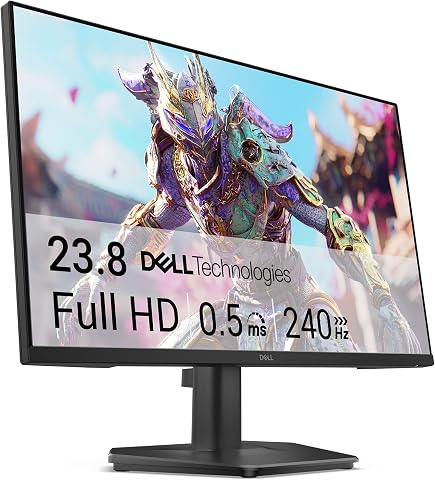 Dell 24 240Hz Gaming Monitor – SE2426HG – 23.8-inch FHD (1920×1080) 240Hz Dis…View on Amazon →
Matching Refresh Rates to Real Builds
The comparison highlights a practical buying issue: a monitor’s maximum refresh rate is not the same as the frame rate a PC can deliver. A system that cannot produce very high, stable frame rates may not make full use of a 260Hz or 320Hz mode. Conversely, a lower-resolution display can make high frame rates more attainable in demanding games, depending on the hardware and settings.
Screen size and pixel density matter alongside speed. The source argues that 1080p is a more natural fit for compact competitive displays, while the same resolution spread across a larger screen may appear less crisp at close viewing distances. For buyers, the relevant choice is not simply the fastest listed monitor, but the model whose resolution, panel and format suit both their PC and the games they play.
Popular right now

Samsung S85H 48-Inch 4K OLED Smart TV (2026)

KitchenAid Artisan 5-Qt Tilt-Head Stand Mixer – Almond Cream (KSM150PS)

Dyson V12 Detect Slim Absolute Cordless Stick Vacuum
As an affiliate, we earn on qualifying purchases.
Eight Models, Several Gaming Priorities
The guide says its ordering weighs how refresh rate, resolution and screen format work together, along with panel type, adaptive-sync support where specified, connectivity and adjustment details. It says it does not assume features that are not listed in product details. The material supplied for this article, however, does not include a full specification table or independent test data for each display.
Its recommendations follow distinct use cases: 4K and high refresh for the MSI, QHD speed for the AOC Q27G41ZE, QD-OLED for the Samsung, and 1080p options for buyers prioritizing attainable frame rates. The larger curved and ultrawide models are framed around immersion and screen area, with potential tradeoffs in sharpness and game compatibility.
“I ranked these monitors by how well their refresh rate, resolution, and screen format work together, rather than treating the largest refresh number as an automatic win.”
— ThorstenMeyerAI.com buying guide
Prices, Testing and Availability
The source material does not identify a confirmed 2027 release, launch event or new product announcement. It also gives no prices, retailer links, regional availability or publication date, so readers cannot use it to establish which models are currently on sale or how their costs compare. The headline’s 2027 framing is not supported by specific product-launch information in the material provided.
It is also unclear how the models compare under controlled testing. The guide provides no measured input lag, response time, brightness, color accuracy or results for adaptive-sync performance. Its recommendation labels should therefore be read as the source’s buying-guide judgments rather than as verified outcomes from a documented review test. Complete specifications for the Sceptre and SANSUI models are not supplied.
Check Local Listings and Full Specifications
Before buying, readers should confirm each monitor’s full model number, current price, availability and regional specifications with the manufacturer or retailer. They should also check whether the listed refresh rate is native or requires an overclocked mode, and whether the model supports the adaptive-sync features they want.
The next useful step is to compare independent testing and check performance in the games the buyer actually plays. In particular, buyers considering 4K at very high refresh rates should establish whether their PC can sustain the frame rates they expect; ultrawide shoppers should verify support in their main games. The supplied source does not name a follow-up review, test or announcement date.
Key Questions
Is this an announcement of new 2027 monitors?
No such launch is confirmed in the supplied material. It describes a buying-guide comparison of eight monitors, but provides no release dates or announcement details.
Which model does the guide call its best overall pick?
It names the MSI MAG 272URDFA E16, citing its 4K resolution and 320Hz refresh-rate combination. The guide also warns that high frame rates at 4K require a capable graphics card.
What is the AOC Q27G41ZE’s stated refresh rate?
The guide lists 240Hz natively, with a 260Hz overclocked mode. It does not provide independent testing of that mode.
Does the source compare prices or provide test results?
No. The supplied material includes no prices or controlled performance measurements, so it does not establish which model offers the best value or how the displays compare in measured response and image quality.
Source: ThorstenMeyerAI.com