Choosing the best educational robotics kits requires balancing mechanical complexity with software accessibility. My top recommendation is the Makeblock mBot Ultimate because it offers the most scalable learning path, bridging the gap between block-based coding and Python. For younger children, the Sillbird 12-in-1 Solar Robot stands out as a low-barrier entry point that teaches basic mechanics without requiring a computer. The main tradeoff in this category is between ease of assembly and depth of programming; simpler kits often limit long-term engagement, while advanced kits can frustrate beginners with wiring errors. Below, I break down these 13 options to help you match the right kit to your child’s age, skill level, and learning goals.

Prime made for students and young adults
- Fast, free delivery for dorm and study essentials
- Prime Video and Amazon Music included
- Member-only deals
Key Takeaways
- The Makeblock mBot Ultimate wins for scalability, allowing users to progress from visual block coding to Python without replacing the hardware.
- Kits like the Sillbird 12-in-1 Solar Robot excel at teaching pure mechanics and energy concepts but lack programmable logic, making them better for younger ages.
- The ELEGOO UNO R3 is the only pick that fully embraces open-source electronics, offering unlimited project potential but requiring significant troubleshooting skills.
- Assembly time varies drastically; kits with pre-soldered modules reduce frustration, while full mechanical builds like the Smartivity Robotic Hand demand patience and fine motor skills.
- App connectivity is a major differentiator; robust companion apps provide guided tutorials, whereas kits without software support rely entirely on the user’s existing knowledge.
| Opmind 5-in-1 STEM RC Robot Building Kit, 408 Pieces |  | Best for Multi-Model Variety | Brand: Opmind | Model: 8028 | Number of pieces: 408 | VIEW LATEST PRICE | See Our Full Breakdown |
| Thames & Kosmos Robotics: Smart Machines Coding Set |  | Best for Structured Learning | Brand: Thames & Kosmos | Recommended age: 8–15 years | Educational objective: STEM | VIEW LATEST PRICE | See Our Full Breakdown |
| Sillbird 12-in-1 Solar Robot Building Kit, 190 Pieces |  | Best for Renewable Energy Concepts | Brand: Sillbird | Model Number: US-SB-SolarRobot | Buildable Models: 12 | VIEW LATEST PRICE | See Our Full Breakdown |
| Butterfly EduFields 40-in-1 STEM Robotics Kit for Kids |  | Best for Electronics Exploration | Brand: Butterfly EduFields | Projects: 40+ | Parts: 100+ | VIEW LATEST PRICE | See Our Full Breakdown |
| Smartivity Robotic Mechanical Hand STEM Toy for Kids Ages 8–14 |  | Best Screen-Free STEM Activity | Brand: Smartivity | Recommended Age: 8–14 years | Theme: Anatomy, Robotics | VIEW LATEST PRICE | See Our Full Breakdown |
| ELEGOO UNO R3 Smart Robot Car Kit V4 with Camera |  | Best for Advanced Coding Enthusiasts | Controller: UNO R3 | Camera Module: ESP32-WROVER-based | Battery: 2000 mAh rechargeable lithium-ion | VIEW LATEST PRICE | See Our Full Breakdown |
| EggTailz Smart Robot Car Kit for Kids Ages 8+ |  | Best for Younger Beginners | Brand: EggTailz | Recommended Age: 8 years and up | Drive System: 2WD with self-balancing | VIEW LATEST PRICE | See Our Full Breakdown |
| Makeblock mBot Ultimate 10-in-1 Robot Building Kit |  | Best for Versatility and Growth | Brand: Makeblock | Model: Ultimate 2.0 | Robot Models: 10 | VIEW LATEST PRICE | See Our Full Breakdown |
| Makeblock mBot Programmable STEM Robot Kit for Kids Ages 8+ | 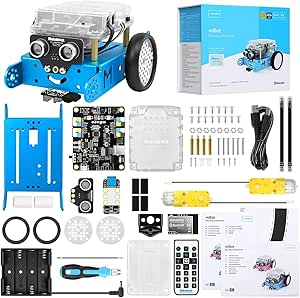 | Best Classroom Standard | Brand: Makeblock | Model: 90053 | Recommended Age: 8 years and up | VIEW LATEST PRICE | See Our Full Breakdown |
| Sillbird 5-in-1 Programmable STEM Robot Building Kit with App and Remote Control |  | Best for Multi-Model Variety | Brand: Sillbird | Model: B883 | Pieces: 488 | VIEW LATEST PRICE | See Our Full Breakdown |
| Makeblock mBot Ranger 3-in-1 Coding Robot Building Kit for Kids |  | Best for Multi-Design Versatility | Brand: Makeblock | Model: MBR-K01-01 | Robot designs: Land Raider, Nervous Bird, Dashing Raptor | VIEW LATEST PRICE | See Our Full Breakdown |
| Teach Tech HydroBot Arm STEM Hydraulic Building Kit |  | Best for Mechanical Engineering Focus | Brand: Teach Tech | Model Number: TTR-632 | Age Range: 12 years and up | VIEW LATEST PRICE | See Our Full Breakdown |
| Tsomtto 6-in-1 Robotics STEM Kit for Kids Ages 8–12 |  | Best Budget Starter Set | Brand: Tsomtto | Age Range: 8–12 years | Set Name: 6-in-1 Robotics STEM Set | VIEW LATEST PRICE | See Our Full Breakdown |
| educational robotics kit | Brand | Recommended age |
|---|---|---|
| Opmind 5-in-1 STEM RC Robot Bu | Opmind | — |
| Thames & Kosmos Robotics: Smar | Thames & Kosmos | 8–15 years |
| Sillbird 12-in-1 Solar Robot B | Sillbird | 10 years and up |
| Butterfly EduFields 40-in-1 ST | Butterfly EduFields | 8–17 years |
| Smartivity Robotic Mechanical | Smartivity | 8–14 years |
| ELEGOO UNO R3 Smart Robot Car | — | 12 years and up |
| EggTailz Smart Robot Car Kit f | EggTailz | 8 years and up |
| Makeblock mBot Ultimate 10-in- | Makeblock | — |
| Makeblock mBot Programmable ST | Makeblock | 8 years and up |
| Sillbird 5-in-1 Programmable S | Sillbird | 8–16 years |
| Makeblock mBot Ranger 3-in-1 C | Makeblock | 10 years and up |
| Teach Tech HydroBot Arm STEM H | Teach Tech | — |
| Tsomtto 6-in-1 Robotics STEM K | Tsomtto | — |
More Details on Our Top Picks
Opmind 5-in-1 STEM RC Robot Building Kit, 408 Pieces
This kit stands out for its 408-piece inventory, offering significantly more structural variety than the Sillbird 12-in-1 Solar Robot. While Sillbird focuses on solar mechanics, Opmind integrates Bluetooth app control with gravity-sensor modes, bridging the gap between mechanical assembly and digital interaction. The inclusion of five distinct models allows for extended engagement, though the app programming depth is lighter than advanced options like the Makeblock mBot. It is a robust middle-ground choice, but the remote control range may struggle on textured surfaces compared to dedicated RC kits.
Pros:- Large piece count allows for complex structural builds
- App includes gravity-sensor modes for interactive play
- Five distinct models provide variety without additional purchases
Cons:- Remote control performance degrades on carpet or uneven floors
- Programming capabilities are limited compared to professional STEM kits
Best for: Parents seeking a balance between mechanical building and basic app-based coding without a steep learning curve.
Not ideal for: Advanced coders who need Python or C++ support, as the app interface is simplified for younger users.
- Brand:Opmind
- Model:8028
- Number of pieces:408
- Models:5
- Control:Remote control and Bluetooth app
- Remote control distance:Over 20 meters
- Age recommendation:8 years and up
- Dimensions:9.5 x 2.5 x 12 inches
Our verdict“This kit is the ideal choice for families who want substantial building volume and basic app connectivity in a single package.”
Thames & Kosmos Robotics: Smart Machines Coding Set
Unlike the Butterfly EduFields 40-in-1, which emphasizes electrical components, this set prioritizes mechanical engineering and visual programming. The 64-page illustrated manual provides a guided educational path that supports classroom use or independent study. The ultrasonic sensor introduces real-world robotics concepts like obstacle avoidance, a feature absent in simpler kits like the Tsomtto 6-in-1. However, the requirement for a separate smartphone or tablet adds a logistical hurdle, making it less accessible for households without spare devices.
Pros:- Detailed 64-page manual supports independent learning
- Ultrasonic sensor teaches practical robot behavior
- Visual programming app lowers the barrier to entry
Cons:- Smartphone or tablet is not included and must be purchased separately
- App compatibility varies by device, requiring pre-purchase verification
Best for: Educators and parents who value a structured curriculum with detailed manuals and sensor-based logic.
Not ideal for: Buyers looking for a standalone kit, as it strictly requires a compatible iOS or Android device.
- Brand:Thames & Kosmos
- Recommended age:8–15 years
- Educational objective:STEM
- Models:8 motorized machines
- Connectivity:Bluetooth
- Sensor:Ultrasonic
- Manual:64-page illustrated manual
- Included components:Ultrasonic sensor, Bluetooth battery box, motors, gears, building blocks, and part separator tool
Our verdict“This set is best for those who want a curriculum-aligned robotics experience and already have a compatible mobile device.”
Sillbird 12-in-1 Solar Robot Building Kit, 190 Pieces
This kit distinguishes itself by eliminating batteries entirely, relying on solar power to drive 12 unique models. Compared to the Opmind 5-in-1, which uses traditional electronics, Sillbird focuses on renewable energy principles and mechanical gear ratios. The 190 pieces are manageable for beginners, though the dependency on light means indoor play requires strong artificial sources. It is a specialized tool for teaching environmental science through robotics, rather than a general-purpose coding platform.
Pros:- Solar power eliminates battery costs and waste
- 12 models introduce varied mechanical engineering concepts
- No coding required makes it accessible for younger children
Cons:- Performance drops significantly in low-light environments
- Lacks digital programming or app connectivity
Best for: Parents and teachers focused on introducing renewable energy and mechanical physics without electronic programming.
Not ideal for: Children who want to play indoors in low-light conditions or those seeking digital coding features.
- Brand:Sillbird
- Model Number:US-SB-SolarRobot
- Buildable Models:12
- Pieces:190
- Power Source:Solar or strong artificial light
- Material:ABS
- Recommended Age:10 years and up
- Dimensions:10.24 x 7.87 x 2.56 inches
Our verdict“This kit is the perfect entry point for students interested in solar mechanics and environmental science.”
Butterfly EduFields 40-in-1 STEM Robotics Kit for Kids
With 100+ electronic components, this kit offers broader hardware exposure than the Thames & Kosmos Smart Machines. It introduces IR, flame, and touch sensors, allowing kids to build home automation gadgets and line-following cars. The plug-and-play assembly removes the barrier of soldering, making it accessible for ages 8–17. However, the lack of coding means it teaches circuit logic rather than software programming, setting it apart from app-driven kits like the Makeblock mBot.
Pros:- Extensive range of sensors supports diverse project types
- Plug-and-play design eliminates soldering risks
- Reusability of components allows for multiple project iterations
Cons:- Requires separate AA batteries and excludes Duracell brands
- No programming interface limits software learning opportunities
Best for: Students interested in electronics, sensors, and home automation concepts without programming complexities.
Not ideal for: Those looking for coding skills, as the kit relies entirely on pre-wired plug-and-play modules.
- Brand:Butterfly EduFields
- Projects:40+
- Parts:100+
- Sensors:IR, flame, touch, LDR, and others
- Assembly:Plug-and-play; no soldering or coding required
- Recommended age:8–17 years
- Battery:AA alkaline batteries; Duracell not compatible
- Item dimensions:8 x 5 x 1 inches
Our verdict“This kit is ideal for young engineers who want to experiment with various sensors and circuits without writing code.”
Smartivity Robotic Mechanical Hand STEM Toy for Kids Ages 8–14
This kit offers a stark contrast to digital-focused options like the Opmind RC Robot by providing a purely analog, screen-free experience. Constructed from engineered wood, it teaches biomechanics and tendon-based movement through physical assembly. While it lacks the programmability of the Thames & Kosmos set, the lifetime replacement parts policy adds long-term value for fragile components. It is a niche product for anatomy enthusiasts rather than a general robotics toolkit.
Pros:- Screen-free assembly promotes focus and fine motor skills
- Teaches practical biomechanics and anatomy concepts
- Lifetime replacement parts reduce long-term ownership stress
Cons:- Limited to a single model with no expansion potential
- Wooden components require careful handling to avoid breakage
Best for: Families seeking a tactile, anatomy-focused STEM project that avoids screen time completely.
Not ideal for: Kids interested in coding, electronics, or building multiple types of robots, as it focuses on a single model.
- Brand:Smartivity
- Recommended Age:8–14 years
- Theme:Anatomy, Robotics
- Material:Engineered wood
- Dimensions:11.81 x 9.8 in
- Model Number:SMRT1135
- Manufacturer:Smartivity Labs Pvt Ltd
Our verdict“This kit is a specialized tool for teaching anatomy and mechanics without any digital interface.”
ELEGOO UNO R3 Smart Robot Car Kit V4 with Camera
This kit stands out for its ESP32-WROVER-based camera module, which enables first-person view (FPV) streaming—a feature absent in simpler options like the EggTailz Smart Robot Car Kit. While the EggTailz focuses on basic obstacle avoidance, the ELEGOO UNO R3 offers a more complex engineering challenge by requiring users to assemble and program the entire system from scratch. This depth makes it ideal for older students who want to learn actual Arduino coding rather than just following assembly instructions. The inclusion of line tracking and auto-follow modes provides multiple layers of functionality, though the assembly process is significantly more involved than plug-and-play alternatives.
Pros:- Includes a Wi-Fi camera for real-time video streaming and FPV control.
- Offers extensive sensor suite including ultrasonic and infrared for versatile navigation.
- Supports both app-based and IR remote control for flexible operation.
- Comprehensive tutorials guide users through both hardware assembly and software coding.
Cons:- Assembly and setup require significant technical patience and adult supervision.
- The learning curve is steep compared to snap-together or pre-wired kits.
- Documentation can be dense for users unfamiliar with Arduino IDE environments.
Best for: Teenagers and adults with prior coding experience who want to build a camera-equipped robot with custom app integration.
Not ideal for: Young children or complete beginners who may be frustrated by the lack of pre-assembled components and complex wiring.
- Controller:UNO R3
- Camera Module:ESP32-WROVER-based
- Battery:2000 mAh rechargeable lithium-ion
- Key Features:FPV video, line tracking, obstacle avoidance, auto follow
- Control Methods:App and IR remote
- Recommended Age:12 years and up
- Dimensions:8 x 7 x 6 inches
- Weight:1.23 kg
- Warranty:Half year
Our verdict“Choose this kit if you prioritize learning real-world robotics engineering over quick assembly.”
EggTailz Smart Robot Car Kit for Kids Ages 8+
The EggTailz Smart Robot Car Kit simplifies the entry point into robotics by focusing on self-balancing technology and two-wheel drive stability. Unlike the Makeblock mBot Ultimate, which requires managing multiple complex models, this kit offers a single, streamlined build that is less likely to overwhelm an eight-year-old. Its ultrasonic obstacle avoidance works automatically, allowing children to focus on driving and interaction rather than debugging code. However, the playtime varies significantly between one and four hours, meaning users should monitor battery levels closely during longer sessions. It serves as a gentle introduction before moving to more programmable platforms.
Pros:- Self-balancing design provides stable movement on various surfaces.
- Automatic obstacle avoidance reduces the need for manual piloting skills.
- Rechargeable battery eliminates the recurring cost of disposable cells.
- Simple assembly process supports STEM learning without excessive frustration.
Cons:- Playtime duration is inconsistent, dropping to as low as one hour.
- Limited programming depth compared to Arduino or Scratch-based kits.
- Requires AA batteries for the remote, adding minor maintenance overhead.
Best for: Children aged 8–10 who need a manageable assembly process and immediate interactive feedback without complex coding.
Not ideal for: Older students or teachers looking for advanced programming capabilities or multi-model versatility.
- Brand:EggTailz
- Recommended Age:8 years and up
- Drive System:2WD with self-balancing
- Obstacle Avoidance:Ultrasonic radar
- Control Modes:Auto-Go and remote control
- Battery:Rechargeable (2-hour charge)
- Playtime:1–4 hours per charge
- Remote Batteries:2 AA batteries included
- Model Number:265-A
Our verdict“This is the ideal starter kit for younger kids who want a working robot quickly.”
Makeblock mBot Ultimate 10-in-1 Robot Building Kit
The Makeblock mBot Ultimate distinguishes itself through sheer versatility, allowing users to construct 10 distinct robot models, including a robotic arm and tank. This variety contrasts sharply with the Sillbird 5-in-1 Kit, which offers fewer configurations and less robust structural integrity due to its plastic components. The mBot Ultimate uses aluminum alloy parts, making it durable enough for repeated disassembly and reassembly over years. While it supports advanced languages like Python and C++, the block-based mBlock software ensures beginners are not left behind. It is a long-term investment for classrooms or homes where the robot needs to evolve with the student’s skill level.
Pros:- Builds 10 different robots, providing years of varied learning projects.
- Durable aluminum alloy construction withstands frequent rebuilding.
- Seamless progression from mBlock to Arduino IDE and Python.
- Compatible with Raspberry Pi for expanded computational power.
Cons:- Requires six AA batteries, which are not included in the box.
- Higher price point reflects the complexity and material quality.
- Assembly of complex models like the robotic arm can be time-consuming.
Best for: Schools and parents seeking a single kit that can support students from beginner block coding to advanced Python projects.
Not ideal for: Users on a tight budget who only need a basic car robot and do not require multiple model configurations.
- Brand:Makeblock
- Model:Ultimate 2.0
- Robot Models:10
- Controller:MegaPi
- Compatibility:Arduino and Raspberry Pi
- Coding Platforms:mBlock, Arduino IDE, Python
- Material:Aluminum alloy
- Power:Requires 6 AA batteries (not included)
- Age Range:12+
Our verdict“The most robust and versatile option for serious long-term robotics education.”
Makeblock mBot Programmable STEM Robot Kit for Kids Ages 8+
The original Makeblock mBot remains the benchmark for classroom robotics due to its 15-minute assembly time and extensive support ecosystem. Compared to the ELEGOO UNO R3, which demands hours of wiring and debugging, the mBot allows teachers to start coding lessons almost immediately. Its integration with Scratch makes it accessible to children with no programming background, while still offering an upgrade path to Arduino. The kit’s reliability and widespread adoption mean that troubleshooting resources are abundant. While it lacks the advanced sensor array of the mBot Ultimate, its simplicity ensures high completion rates among young learners.
Pros:- Quick 15-minute assembly keeps students engaged and on task.
- Deep integration with Scratch and mBlock for visual programming.
- Extensive online resources and community support for troubleshooting.
- Proven reliability in educational settings worldwide.
Cons:- Does not include batteries for the robot or the remote control.
- Limited to three core functions: line following, obstacle avoidance, and remote control.
- Plastic construction is less durable than the aluminum mBot Ultimate.
Best for: Teachers and parents who prioritize ease of setup and a proven curriculum for introducing coding concepts.
Not ideal for: Students seeking high-speed performance or advanced hardware capabilities beyond basic navigation.
- Brand:Makeblock
- Model:90053
- Recommended Age:8 years and up
- Programming Platforms:Scratch and Arduino
- Build Time:About 15 minutes
- Robot Batteries:4 AA batteries, not included
- Remote Battery:CR2025, not included
- Functions:Remote control, line following, obstacle avoidance
- Included Components:Robot kit
Our verdict“The safest and most reliable choice for introducing coding to a group of beginners.”
Sillbird 5-in-1 Programmable STEM Robot Building Kit with App and Remote Control
The Sillbird 5-in-1 Kit appeals to children who enjoy changing their robot’s appearance, offering builds like a dinosaur and a tank alongside the standard car. This 488-piece inventory provides more creative freedom than the focused design of the Makeblock mBot, which stays as a single chassis. The kit supports app-based programming, allowing kids to sequence commands visually. However, the 40-minute battery life is a significant constraint compared to the 1–4 hour range of the EggTailz or the rechargeable capacity of the ELEGOO. Users must plan for frequent charging breaks, which can interrupt the flow of play and learning.
Pros:- Includes 488 pieces for five distinct model builds.
- App-based control and programming simplify interaction for younger users.
- Rechargeable battery eliminates the need to buy disposable cells.
- Step-by-step instructions guide users through complex structural builds.
Cons:- Short 40-minute playtime requires frequent recharging.
- Plastic components may feel less sturdy than metal alternatives.
- Programming depth is limited compared to full Arduino-compatible kits.
Best for: Creative kids who prefer building different types of vehicles and creatures over mastering a single robotic platform.
Not ideal for: Classes or users who need extended continuous play sessions without frequent charging interruptions.
- Brand:Sillbird
- Model:B883
- Pieces:488
- Builds:Robot, dinosaur, car, tank, and more
- Control:Bluetooth app or remote
- Battery Life:Up to 40 minutes per charge
- Recommended Age:8–16 years
- Dimensions:6 x 7 x 8 inches
- Weight:1.8 pounds
Our verdict“A fun, creative option for kids who value variety in design over deep technical coding.”
Makeblock mBot Ranger 3-in-1 Coding Robot Building Kit for Kids
This kit stands out because it transforms three distinct mechanical configurations from a single set of parts, offering significant replay value compared to single-model competitors. While the Makeblock mBot Ultimate offers more pieces, the Ranger’s focused three designs prevent the overwhelming component fatigue that often stalls younger builders. The inclusion of Arduino support alongside Scratch creates a clear growth path, allowing learners to graduate from block coding to text-based programming without buying new hardware. However, the complexity is real; unlike the simpler Makeblock mBot Programmable STEM Robot Kit, the Ranger requires precise assembly of sensors and motors, which can frustrate beginners. The need for six AA batteries also adds an ongoing maintenance layer that some families will find annoying compared to rechargeable alternatives.
Pros:- Three distinct robot configurations from one kit
- Supports both Scratch and Arduino coding environments
- Rich sensor suite enables interactive projects
- Robust metal chassis withstands frequent rebuilding
Cons:- Requires six AA batteries not included in box
- Assembly process is complex for younger users
- Bluetooth connectivity can be inconsistent on older devices
Best for: Students ages 10+ who want to explore both visual and text-based coding through varied mechanical challenges.
Not ideal for: Young children under 10 or parents who prefer plug-and-play simplicity without assembly hurdles.
- Brand:Makeblock
- Model:MBR-K01-01
- Robot designs:Land Raider, Nervous Bird, Dashing Raptor
- Programming languages:Scratch and Arduino
- Mainboard:Me Auriga
- Included modules:Ultrasonic sensor, line-tracking sensor, 2 light sensors, gyroscope, 12 RGB LEDs, buzzer, temperature sensor, Bluetooth module
- Recommended age:10 years and up
- Batteries:6 AA or lithium batteries required; not included
- Warranty:1 year against manufacturer defects
Our verdict“Choose this kit if you want a single purchase that teaches coding progression through three unique mechanical builds.”
Teach Tech HydroBot Arm STEM Hydraulic Building Kit
This kit diverges sharply from the electronic-centric options like the ELEGOO UNO R3 Smart Robot Car Kit V4 by teaching pure mechanics through fluid dynamics. Instead of writing code, builders learn how pressure and levers create motion, a fundamental engineering concept often overlooked in digital robotics. The water-powered hydraulic system eliminates battery anxiety, offering an eco-friendly and quiet operation that suits classroom settings where noise is a concern. However, the lack of programmability means it does not teach logic or coding skills, limiting its utility for computer science curricula. The 50g lifting capacity is also quite restrictive, meaning it cannot handle heavier objects, which might disappoint kids hoping for a powerful grabber.
Pros:- Teaches hydraulic principles without electricity
- Eco-friendly water power source requires no batteries
- Develops fine motor skills through detailed assembly
Cons:- No coding or electronic components included
- Assembly takes multiple hours
- Low 50g lifting capacity limits play options
Best for: Middle school students interested in physics, hydraulics, and mechanical design rather than computer programming.
Not ideal for: Families seeking a coding-focused STEM kit or those needing a robot that can lift significant weight.
- Brand:Teach Tech
- Model Number:TTR-632
- Age Range:12 years and up
- Power Source:Water (Hydraulics)
- Axes:6
- Base Rotation:270 degrees
- Wrist Rotation:180 degrees
- Vertical Reach:16.35 inches
- Horizontal Reach:12.42 inches
- Lifting Capacity:50g
- Gripper Gap:47mm (1.89 inches)
- Warranty:1 Year
- Assembly Time:Multiple hours
Our verdict“This is the ideal choice for introducing mechanical engineering concepts through hands-on hydraulic construction.”
Tsomtto 6-in-1 Robotics STEM Kit for Kids Ages 8–12
For parents hesitant to invest in complex electronics, this kit offers a low-risk entry point into robotics through simple mechanical builds. Unlike the Thames & Kosmos Robotics: Smart Machines Coding Set, which requires app interaction and software setup, the Tsomtto kit relies on physical assembly and basic motorized functions, keeping the learning curve gentle. The inclusion of six distinct projects provides variety, allowing kids to explore different shapes and functions like a bubble machine or fiber lamp. However, the educational depth is limited; without programmable logic or advanced sensors, it teaches construction more than computer science. The parts are also less durable than the metal-heavy Butterfly EduFields 40-in-1 STEM Robotics Kit, so expect a shorter lifespan if handled roughly.
Pros:- Affordable entry point into STEM robotics
- Six varied projects encourage creative building
- Includes basic tools and step-by-step guides
Cons:- Lacks coding capabilities or advanced sensors
- Plastic components may break under stress
- Some builds require adult supervision for younger kids
Best for: Parents looking for an affordable, screen-free introduction to basic robotics for children aged 8-12.
Not ideal for: Older children or schools needing programmable robots that teach coding logic and sensor integration.
- Brand:Tsomtto
- Age Range:8–12 years
- Set Name:6-in-1 Robotics STEM Set
- Number of Items:6
- Educational Objectives:Concentration, construction skills, creativity, hand-eye coordination, logical thinking, motor skills, problem solving, STEM
- Included Components:Six robot-building science experiment kits
- Manufacturer Part Number:6-06
Our verdict“A solid, low-cost option for introducing basic mechanical construction before moving to programmable robots.”
How We Picked
I evaluated these kits based on three core pillars: pedagogical depth, build quality, and longevity. Pedagogical depth measures whether the kit teaches transferable skills like logic, circuitry, or mechanical advantage, rather than just following instructions. I prioritized kits that offer multiple modes of interaction, such as combining physical building with digital coding or remote control. Build quality was assessed by examining material durability, particularly how well plastic joints withstand repeated disassembly and reassembly. Longevity refers to the age range and skill ceiling; a kit that a child outgrows in two weeks offers less value than one that remains challenging for years.
I also filtered out products with poor software support or incomplete documentation, as these create significant friction for self-guided learners. The ranking favors kits that provide a clear progression path, allowing users to start simple and advance in complexity. Products that require external purchases to function were penalized unless the open-ended nature justified the extra cost and effort.
Factors to Consider When Choosing Best Educational Robotics Kits
Selecting the right robotics kit depends heavily on the learner’s current skill set and interest area. Here are the key factors to weigh before purchasing.Mechanical Complexity vs. Coding Focus
Some kits prioritize the physical build, teaching gear ratios, leverage, and structural integrity, while others focus on logic, sensors, and algorithms. If the learner enjoys engineering and construction, a kit like the Butterfly EduFields 40-in-1 offers satisfying tactile feedback. Conversely, if the goal is to teach computer science concepts, the Makeblock mBot series provides a stronger software foundation. Mixing these expectations can lead to boredom; a child expecting to code will be frustrated by a kit that only assembles, and vice versa. Identify whether your primary goal is mechanical understanding or computational thinking to narrow the field.
Software Ecosystem and Language Support
The programming interface defines the learning curve. Block-based languages like Scratch or mBlock are intuitive for ages 6–10, allowing users to drag and drop commands without syntax errors. For older children or those with prior coding experience, support for Python or C++ is vital for real-world application. Kits that lock users into a proprietary, limited app may feel restrictive after a few months. Look for kits that offer a seamless transition from visual blocks to text-based code, which prevents the need to buy a new system when skills advance.
Power Source and Connectivity Requirements
Consider how the kit connects to a device. Bluetooth and Wi-Fi are standard for coding kits, but they require a tablet or computer and can suffer from connection instability. Infrared or radio-frequency remote controls are simpler but offer less programming flexibility. Solar-powered kits, like the Sillbird option, remove battery anxiety and teach renewable energy concepts but often lack electronic programmability. Ensure your household has the necessary devices and that the kit’s connectivity method matches the learner’s environment; classroom settings may need robust, interference-free connections that home Wi-Fi cannot provide.
Scalability and Future-Proofing
A good educational kit should grow with the user. Entry-level kits often become toys once the initial build is complete. Advanced kits, such as the ELEGOO UNO R3, allow for infinite modifications by adding new sensors or actuators. If budget is a concern, investing in a modular system with expandable ports is smarter than buying multiple single-use kits. Check if the manufacturer sells compatible add-on parts and if the community supports custom projects. This ensures the initial investment continues to provide value over several years of learning.
Instructional Quality and Support Resources
Step-by-step guides vary widely in clarity. Digital manuals with animated 3D assembly views significantly reduce assembly errors compared to static, low-resolution PDFs. Look for kits that include video tutorials or active community forums. Poor documentation can turn a fun learning experience into a source of conflict. If the learner is doing this independently, robust support resources are non-negotiable. For classroom use, teacher guides and lesson plans are equally important to integrate the kit into a structured curriculum.
Frequently Asked Questions
What is the best robotics kit for a child who has never coded before?
For absolute beginners, the Makeblock mBot is the strongest choice because it uses a visual, drag-and-drop interface that requires no prior syntax knowledge. The robot comes largely pre-assembled, reducing frustration, and the companion app provides step-by-step coding challenges that introduce logic concepts gradually. Unlike complex mechanical kits, the immediate feedback of seeing the robot move after a single block addition reinforces learning. This low barrier to entry helps maintain interest while building foundational computational thinking skills.Are solar-powered robot kits better than battery-powered ones for education?
Solar kits, like the Sillbird 12-in-1, are superior for teaching specific physics concepts like energy conversion and sustainability. However, they are generally less capable for learning programming or complex logic because they lack the consistent power delivery needed for microcontrollers and sensors. If your goal is to teach coding or electronics, a battery-powered kit with a microcontroller is far more versatile. Solar kits are best used as supplemental tools for specific science lessons rather than primary robotics platforms.Can these kits be used in a classroom setting with multiple students?
Yes, but you must distinguish between individual kits and classroom sets. Kits like the Makeblock mBot Ultimate are durable and modular, making them suitable for shared use if managed carefully. However, many budget kits have small, easily lost parts that make classroom management difficult. For groups, look for kits with larger components and robust cases. Additionally, consider the software licensing; some apps require individual accounts, while others allow offline use, which is critical for schools with limited internet bandwidth.How do I know if a kit is too advanced for my child?
If the kit requires soldering, breadboard wiring, or reading text-based code without a guided tutorial, it is likely too advanced for beginners. Signs of a mismatch include the child giving up during assembly or becoming frustrated by connection errors that are not mechanical. A good kit should offer a ‘success moment’ within the first hour of use. Start with block-based coding and pre-soldered modules. If your child completes these quickly and asks for more complexity, then move to kits like the ELEGOO UNO R3 that involve deeper electronics work.Do educational robotics kits help with future career skills?
They provide a foundation, but they are not a complete career preparation on their own. These kits teach problem-solving, logical sequencing, and basic mechanical principles, which are transferable skills relevant to engineering and computer science. However, professional robotics involves advanced math, physics, and software frameworks not covered here. The kits serve as a spark for interest and a way to develop resilience through trial and error. They are most effective when viewed as the first step in a longer educational journey rather than the final destination.Conclusion
Choosing the right educational robotics kit depends on your specific learning objectives. For a balanced approach that covers both coding and mechanics, the Makeblock mBot Ultimate is the best overall pick due to its scalability and robust ecosystem. If you are on a tighter budget or want a simpler introduction, the Makeblock mBot offers the best value without sacrificing core functionality. For younger children who need a tactile, non-digital introduction to engineering, the Sillbird 12-in-1 Solar Robot is the ideal choice. Those seeking a premium, open-ended experience for older teens or adults should look at the ELEGOO UNO R3 for its unlimited project potential. Finally, for a unique mechanical engineering focus, the Smartivity Robotic Mechanical Hand provides a distinct, hands-on challenge that differs significantly from standard programmable robots.