Choosing the right educational coding robots for kids depends heavily on your child’s age and interest in screen time versus tactile play. The Wonder Workshop Dash Coding Robot stands out as the best overall pick because it balances robust app integration with durable hardware that survives rough handling. For parents seeking a strictly screen-free introduction, the Learning Resources Code & Go Robot Mouse remains the gold standard for preschoolers who need to understand sequencing without digital distractions. Meanwhile, the Makeblock mBot serves older children ready to bridge the gap between building physical robots and writing Python code. The main tradeoff in this category is between ease of use and depth of learning; simpler toys teach logic but lack scalability, while complex kits require parental support to master. Read on to see how these fifteen options compare in durability, educational value, and long-term engagement.

Prime made for students and young adults
- Fast, free delivery for dorm and study essentials
- Prime Video and Amazon Music included
- Member-only deals
Key Takeaways
- Screen-free robots like the Code & Go Mouse and TaleBot Pro are superior for children under 6, as they remove the temptation of passive screen consumption while teaching pure logic.
- Robots with modular hardware, such as the Makeblock mBot and VinciBot, offer better long-term value because they allow hardware upgrades and sensor additions as the child’s skills progress.
- App-based platforms like Wonder Workshop Dash provide the most extensive library of pre-made lessons, but they require a stable Wi-Fi connection and a compatible tablet, which can be a barrier for some households.
- Build-it-yourself kits like the Teach Tech Mech-5 demand significant parental involvement for assembly, making them poor choices for independent play but excellent for guided STEM projects.
- Durability is a critical differentiator; plastic-cased robots often break after minor impacts, whereas metal-chassis or heavily reinforced plastic models withstand the rough handling typical of elementary-aged users.
| Makeblock Codey Rocky Interactive Coding Robot for Kids |  | Best for Growing Into Text-Based Coding | Brand: Makeblock | Model: P1030024 | Recommended age: 6 years and up | VIEW LATEST PRICE | See Our Full Breakdown |
| Learning Resources Botley 2.0 Coding Robot Activity Set |  | Best Screen-Free Activity Set | Brand: Learning Resources | Model: LER2938 | Age range: 5–10 years | VIEW LATEST PRICE | See Our Full Breakdown |
| Sillbird 5-in-1 Programmable STEM Robot Building Kit with App and Remote Control |  | Best for Build-and-Rebuild Play | Brand: Sillbird | Model: B883 | Number of pieces: 488 | VIEW LATEST PRICE | See Our Full Breakdown |
| Wonder Workshop Dash Coding Robot for Kids Ages 6 and Up |  | Best for App-Based Coding Variety | Brand: Wonder Workshop | Recommended age: 6 years and up | Coding concepts: Sequencing, loops, algorithms, and variables | VIEW LATEST PRICE | See Our Full Breakdown |
| Learning Resources Botley 2.0 The Coding Robot |  | Best Starter Robot for Young Learners | Brand: Learning Resources | Age guidance: Ages 5 and up | Activity set: 46 pieces | VIEW LATEST PRICE | See Our Full Breakdown |
| Educational Insights PYXEL Coding Robot |  | Best for Learning Blockly and Python | Recommended age: 8–14 years | Coding languages: Blockly and Python | Connectivity: Password-protected Wi-Fi; no internet connection or app required | VIEW LATEST PRICE | See Our Full Breakdown |
| Teach Tech Mech-5 STEM Coding Robot Building Kit for Kids Ages 10+ |  | Best for Mechanical Building and Coding | Age range: 10 years and up | Programming method: Snap coding buttons onto a mechanical coding wheel | Robot actions: Move forward and backward, rotate 360 degrees, throw, lift, kick, and draw | VIEW LATEST PRICE | See Our Full Breakdown |
| Learning Resources Code & Go Robot Mouse |  | Best for First Coding Concepts | Age range: 4–7 years | Included components: Programmable robot mouse, 30 double-sided coding cards, and activity guide | Mouse length: 4 inches | VIEW LATEST PRICE | See Our Full Breakdown |
| VinciBot Coding Robot for Kids Ages 8–12 |  | Best for Expandable Robotics Projects | Recommended age: 8 years and up | Programming languages: Scratch and Python | Sensors: 8 | VIEW LATEST PRICE | See Our Full Breakdown |
| Learning Resources Code & Go Robot Mouse Activity Set | 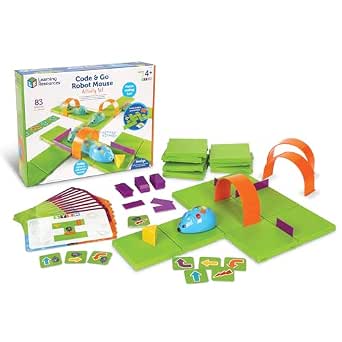 | Best for Classroom and Group Maze Play | Age range: 4 years and up | Maze grids: 16 grids; build a 20 × 20-inch board | Maze walls: 22 | VIEW LATEST PRICE | See Our Full Breakdown |
| Educational Insights Artie Max the Coding & Drawing Robot |  | Best for Creative Integration | Coding Languages: Blockly, Snap!, JavaScript, Python, C++ | Age Range: 8–12 years | Connectivity: Built-in Wi-Fi hotspot (no internet required) | VIEW LATEST PRICE | See Our Full Breakdown |
| Makeblock mBot STEM Coding Robot Kit for Kids Ages 8–12 |  | Best for Hands-On Assembly | Assembly Time: Approximately 15 minutes | Programming Platforms: Scratch, Arduino, mBlock | Key Functions: Remote control, line following, obstacle avoidance | VIEW LATEST PRICE | See Our Full Breakdown |
| TaleBot Pro Coding Robot for Kids 3-5, Screen-Free STEM Toy | 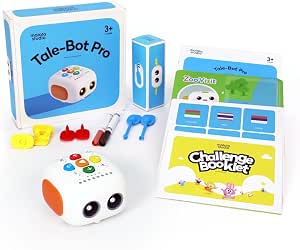 | Best for Preschoolers | Age Range: 3–5 years | Interface: Physical buttons and interactive maps | Features: Voice recording, dance, draw, sing | VIEW LATEST PRICE | See Our Full Breakdown |
| Thames & Kosmos My Robotic Pet: Coding Chameleon Kit |  | Best for Biomimicry Interest | Recommended Age: 8–12 years (adult help suggested for younger builders) | Assembly: Plastic building parts with 48-page guide | Sensors: Color sensor, infrared sensor | VIEW LATEST PRICE | See Our Full Breakdown |
| Ozobot Ozo at Home Interactive STEM Coding Robot for Kids Ages 5+ |  | Best for Early Transition to Screen Coding | Age Range: 5 years and up | Coding Methods: Color markers, magnetic tiles, Blockly | Included Components: Ozo robot, charging cable, protective case | VIEW LATEST PRICE | See Our Full Breakdown |
| educational coding robots for kid | Age range |
|---|---|
| Makeblock Codey Rocky Interact | — |
| Learning Resources Botley 2.0 | 5–10 years |
| Sillbird 5-in-1 Programmable S | — |
| Wonder Workshop Dash Coding Ro | — |
| Learning Resources Botley 2.0 | — |
| Educational Insights PYXEL Cod | — |
| Teach Tech Mech-5 STEM Coding | 10 years and up |
| Learning Resources Code & Go R | 4–7 years |
| VinciBot Coding Robot for Kids | — |
| Learning Resources Code & Go R | 4 years and up |
| Educational Insights Artie Max | 8–12 years |
| Makeblock mBot STEM Coding Rob | 8 years and up |
| TaleBot Pro Coding Robot for K | 3–5 years |
| Thames & Kosmos My Robotic Pet | — |
| Ozobot Ozo at Home Interactive | 5 years and up |
More Details on Our Top Picks
Makeblock Codey Rocky Interactive Coding Robot for Kids
Codey Rocky stands out for a learning path that can move from Scratch to Python, giving children room to progress beyond basic command sequences. Its expressive reactions and sound effects make coding feedback more engaging, while building-block compatibility adds a hands-on play option. Compared with Botley 2.0, which focuses on screen-free route planning with cards and a remote, Codey Rocky is better suited to kids ready to explore coding through a digital interface. That also means it depends more on a child’s readiness for app-based learning. The listed information does not specify included lessons or accessories, so families may need to check what learning materials accompany the robot. Python is a longer-term advantage, not an easy starting point for every child; younger or brand-new learners may prefer Botley’s tactile, screen-free approach.
Pros:- Supports both Scratch and Python, allowing a progression from visual to text-based coding.
- Expressions and sound effects provide engaging responses to commands.
- Building-block compatibility adds a hands-on construction option.
- Designed around STEM learning, problem-solving, and logical thinking.
Cons:- Python may be difficult for children without prior coding experience.
- The product details do not specify which lessons or accessories are included.
Best for: Families seeking a robot for children age 6 and up who can start with Scratch and may later want to explore Python.
Not ideal for: Caregivers who want a confirmed set of guided lessons, included activity materials, or a fully screen-free first coding toy.
- Brand:Makeblock
- Model:P1030024
- Recommended age:6 years and up
- Programming languages:Scratch and Python
- Set contents:1 robot
- Warranty:1 year against manufacturer defects
Our verdict“Choose Codey Rocky for a child ready to grow from Scratch toward Python, but favor Botley 2.0 for screen-free, card-based coding practice.”
Learning Resources Botley 2.0 Coding Robot Activity Set
Botley 2.0 makes coding tangible without requiring a phone or tablet: children send commands with a remote and arrange coding cards to guide the robot through routes. The 78-piece activity set, including double-sided boards and obstacles, gives families materials for setting up challenges rather than having to invent every activity from scratch. Compared with Wonder Workshop Dash, which uses apps to teach concepts such as loops and variables, Botley is a better fit for parents prioritizing screen-free play and physical sequencing. Its object sensing, turns, lights, and sounds add variety as children move beyond simple paths. The tradeoff is a more bounded, route-focused experience than app-based coding, and the kit requires batteries that are not listed among the included components. No manufacturer warranty is specified, which may matter to buyers looking for added support.
Pros:- Teaches sequencing and problem-solving without an app or device.
- Includes 40 coding cards, six double-sided boards, and obstacle pieces for creating routes.
- Object sensing and 45-degree turns add variety to path challenges.
- Features can support play from simple sequences to more advanced routes.
Cons:- Requires batteries, and the listed included components do not specify them.
- No manufacturer warranty is specified.
- Its card-and-route format offers less app-based coding progression than Dash.
Best for: Families and early-years educators seeking a screen-free coding kit with ready-made boards, cards, and obstacles for children ages 5–10.
Not ideal for: Children ready to write or explore app-based code, or buyers who want a manufacturer warranty and batteries included.
- Brand:Learning Resources
- Model:LER2938
- Age range:5–10 years
- Pieces:78
- Included components:Coding robot, remote programmer, 40 coding cards, 6 double-sided boards, and obstacle pieces
- Features:Screen-free coding, object sensing, 45° turns, lights, sounds, and music
- Warranty:No manufacturer warranty specified
Our verdict“Pick this Botley set for hands-on, screen-free route coding with ample activity pieces; choose Dash if app-based coding concepts are the priority.”
Sillbird 5-in-1 Programmable STEM Robot Building Kit with App and Remote Control
Sillbird puts construction at the center of the coding experience: children assemble a model from 488 pieces, then can rebuild it as one of five forms, including a robot, dinosaur, car, or tank. That makes it a different proposition from Makeblock Codey Rocky, which arrives as a single interactive robot and puts more emphasis on moving from Scratch toward Python. Sillbird is a stronger match for kids who enjoy following building instructions before experimenting with app or remote control and basic programming. Its rechargeable battery supports up to 40 minutes of play per charge, but that session limit may interrupt longer building-and-coding activities. Assembly also takes patience, so this is less suited to a child who wants to start issuing commands right away. The five-model format adds replay through rebuilding, though the provided description does not detail the depth of its coding activities.
Pros:- 488 pieces support hands-on construction before coding play.
- Can be built into five different models, including a robot, dinosaur, car, and tank.
- Offers both Bluetooth app and remote control modes.
- Rechargeable battery provides up to 40 minutes of play per charge.
Cons:- Assembly can take time and patience before the robot is ready to use.
- Up to 40 minutes of play per charge may limit longer sessions.
- The product description identifies basic programming but does not detail its coding curriculum.
Best for: Children ages 6–16 who enjoy constructing models, rebuilding them in different forms, and trying basic app- or remote-controlled programming.
Not ideal for: Families seeking a ready-to-code robot with a clearly described coding curriculum or children who lose interest during lengthy assembly.
- Brand:Sillbird
- Model:B883
- Number of pieces:488
- Buildable models:5-in-1
- Control modes:Bluetooth app and remote control
- Play time:Up to 40 minutes per charge
- Recommended age:6–16 years
- Dimensions:6 × 7 × 8 inches
- Weight:1.8 pounds
Our verdict“Choose Sillbird for a child who wants building and rebuilding to be part of coding play, rather than the more immediate programming path offered by Codey Rocky.”
Wonder Workshop Dash Coding Robot for Kids Ages 6 and Up
Dash is the strongest fit here for children ready to learn coding concepts through multiple apps. Its activities cover sequencing, loops, algorithms, and variables, while movement, obstacle navigation, singing, dancing, and voice responses give code a visible, playful result. Compared with Botley 2.0, Dash offers a broader app-based route into coding concepts but requires a compatible device; Botley is the more suitable choice for families avoiding screens. Dash works with Apple iOS, Android, and Fire OS, and its listed active play time of up to five hours supports longer stretches between charges. The robot also includes building-brick connectors, but the product is intended for indoor use. Its app range is a strength only if your household has a compatible device, so check platform access before choosing it over the simpler, screen-free Botley.
Pros:- Activities cover sequencing, loops, algorithms, and variables.
- Five apps provide varied ways to engage with coding activities.
- Voice commands and responses, movement, and obstacle navigation make coding interactive.
- Rechargeable battery provides up to five hours of active play.
Cons:- Requires a compatible device to use its apps.
- Intended for indoor use, limiting where children can play.
- Unlike Botley 2.0, it does not provide a screen-free coding experience.
Best for: Families with a compatible iOS, Android, or Fire OS device who want a rechargeable robot that introduces several coding concepts through varied app activities.
Not ideal for: Buyers seeking a screen-free coding toy, or children who need a robot for outdoor play.
- Brand:Wonder Workshop
- Recommended age:6 years and up
- Coding concepts:Sequencing, loops, algorithms, and variables
- Compatible platforms:Apple iOS, Android OS, and Fire OS
- Apps:Five apps, including Blockly, Wonder, and Path
- Battery and active play time:Rechargeable lithium-ion battery; up to 5 hours
- Included components:Dash robot, two building-brick connectors, and USB charging cable
- Camera:None
- Warranty:1 year against manufacturer defects
Our verdict“Choose Dash if your child has access to a compatible device and is ready for varied app-based coding; choose Botley 2.0 to keep coding screen-free.”
Learning Resources Botley 2.0 The Coding Robot
This Botley 2.0 is aimed at young beginners who learn by giving a robot physical commands, with no phone or tablet required. Its remote programmer introduces sequencing, while obstacle detection, black-line following, lights, and character modes add playful ways to test commands. Compared with the Botley 2.0 Activity Set, this listing describes a 46-piece set rather than 78 pieces, making it the simpler choice if a smaller collection of activity materials suits your setup. It still includes coding cards, tiles, and obstacles, but requires five AAA batteries that are not included. The description places it in the early-learning range, so it is a better match for foundational sequencing than for children seeking the app-based concepts offered by Dash. Check the package contents before buying, since the activity-set listings describe different piece counts.
Pros:- Teaches early coding through screen-free commands from a remote programmer.
- Includes coding cards, tiles, and obstacles for creating activities.
- Obstacle detection and black-line following add variety to challenges.
- Character modes and light-up effects connect coding play with imaginative play.
Cons:- Requires five AAA batteries, which are not included.
- The listed 46-piece set has fewer components than the separate 78-piece Botley 2.0 Activity Set.
- The product information does not specify a manufacturer warranty.
Best for: Families, homeschoolers, or classrooms introducing children ages 5 and up to screen-free sequencing with a remote, coding cards, and simple physical challenges.
Not ideal for: Older children looking for app-based coding progression, or buyers who want batteries included and a clearly stated manufacturer warranty.
- Brand:Learning Resources
- Age guidance:Ages 5 and up
- Activity set:46 pieces
- Control:Remote programmer
- Included activity materials:Coding cards, tiles, and obstacle pieces
- Coding and play features:Screen-free coding, obstacle detection, black-line following, light-up effects, and character modes
- Battery requirement:5 AAA batteries: 3 for Botley and 2 for the remote programmer; not included
- Dimensions:6 × 8 × 8 inches
- Weight:0.33 kg
Our verdict“Choose this Botley for a young beginner who needs screen-free, hands-on sequencing, but compare the listed pieces with the larger Botley 2.0 Activity Set before deciding.”
Educational Insights PYXEL Coding Robot
PYXEL is a strong choice for children ready to move beyond button-based coding, since its built-in tutorials introduce both Blockly and Python. That makes it a more direct path toward text-based programming than the Code & Go Robot Mouse, which focuses on early sequencing without a screen. PYXEL adds personality through lights, expressions, sounds, and actions, helping code feel responsive rather than abstract. It connects to a Wi-Fi-enabled tablet or computer, but does not need an internet connection or an app, which can simplify access to its lessons. The tradeoff is that a compatible device is still required, and younger beginners may find its 8–14 age range and Python option more than they need at first. I’d rank it below robots with broader expansion, but above simpler toys for guided language progression.
Pros:- Built-in tutorials support self-guided learning in Blockly and Python.
- Does not require internet access or an app to connect.
- Lights, sounds, colors, and expressions make programs visible and engaging.
- Rechargeable battery avoids routine replacement of disposable batteries.
Cons:- Requires a Wi-Fi-enabled tablet or computer.
- Python and the intended age range may be too advanced for younger beginners.
- Its listed capabilities focus on interactive actions rather than a large sensor or expansion ecosystem.
Best for: Families with children ages 8–14 who have a Wi-Fi-enabled tablet or computer and want guided progression from Blockly to Python.
Not ideal for: Buyers seeking a fully screen-free robot or a coding toy for preschoolers; PYXEL requires a compatible computer or tablet and targets older children.
- Recommended age:8–14 years
- Coding languages:Blockly and Python
- Connectivity:Password-protected Wi-Fi; no internet connection or app required
- Battery:Built-in rechargeable battery
- Model:Pyxel Coding Pet
- Model number:1130
- Included components:USB-C cord, Code Activator, and guide
Our verdict“Choose PYXEL for an older child who wants guided Blockly-to-Python learning and already has a compatible device.”
Teach Tech Mech-5 STEM Coding Robot Building Kit for Kids Ages 10+
Mech-5 makes construction part of the coding lesson: children assemble the robot, then program it by snapping buttons onto a mechanical coding wheel. That hands-on mechanism sets it apart from the ready-to-use Educational Insights PYXEL, which puts more emphasis on learning coding languages through tutorials. Mech-5’s programmed actions—such as lifting, drawing, kicking, and throwing—give each sequence a physical result, while the build offers a practical introduction to how a robot’s parts work. The tradeoff is substantial setup: assembly takes several hours and calls for care, so it is not the right pick for a child expecting immediate play. Its coding method is also more tangible than language-based, but less suited to advancing into Blockly or Python. I’d choose it for an older child who enjoys building as much as programming.
Pros:- Combines mechanical assembly with introductory coding.
- Coding wheel provides a tangible way to arrange program instructions.
- Performs varied actions, including lifting, drawing, kicking, and throwing.
- Requires no batteries.
Cons:- Several hours of assembly can delay the first coding activity.
- Careful construction is needed, making it a poor fit for children who want immediate, independent play.
- The coding-wheel method does not offer the Blockly-to-Python progression found on PYXEL.
Best for: Children age 10 and up who enjoy multi-hour construction projects and want to connect simple coding sequences with mechanical movement.
Not ideal for: Families looking for a ready-to-run robot, screen-based language lessons, or a quick activity for younger children.
- Age range:10 years and up
- Programming method:Snap coding buttons onto a mechanical coding wheel
- Robot actions:Move forward and backward, rotate 360 degrees, throw, lift, kick, and draw
- Assembly:Hands-on kit; several hours of build time
- Power:No batteries required
- Included components:Assembly parts and English instruction manual
- Warranty:1 year against manufacturer defects
Our verdict“Pick Mech-5 for an older child who wants a substantial build project with physical, button-based coding rather than app-based lessons.”
Learning Resources Code & Go Robot Mouse
This mouse is the gentlest entry point in this group: children plan a sequence with double-sided cards, then enter it using buttons on the robot. That screen-free routine makes the idea of ordering instructions accessible to ages 4–7, without the device setup required by Educational Insights PYXEL or the multi-hour construction of Mech-5. Lights, sounds, and two speeds give young learners feedback as they try a route, while the activity guide helps adults get started. Its simplicity is also the limit: it teaches early sequencing rather than a programming language, and the maze expansion play set is sold separately. The mouse needs three AAA batteries, which are not included, and the listing specifies no warranty. I’d choose this as a starter toy, not as a robot for children ready to explore more advanced coding.
Pros:- Screen-free play introduces sequencing and problem-solving.
- Coding cards and an activity guide support structured first activities.
- Lights, sounds, and two speeds provide clear feedback.
- Compact four-inch mouse is straightforward for young children to handle.
Cons:- Requires three AAA batteries, which are not included.
- Expanded play set is sold separately.
- No warranty is listed, and the coding activities remain introductory.
Best for: Parents and educators introducing children ages 4–7 to sequencing and logic through short, screen-free activities.
Not ideal for: Older children seeking Blockly, Python, sensors, or a longer coding progression; the mouse focuses on foundational button-based sequences.
- Age range:4–7 years
- Included components:Programmable robot mouse, 30 double-sided coding cards, and activity guide
- Mouse length:4 inches
- Speeds:2
- Power:3 AAA batteries, not included
- Model number:LER2841
- Warranty:No warranty
Our verdict“Choose the Robot Mouse for a young beginner who needs simple, screen-free sequencing practice rather than advanced coding features.”
VinciBot Coding Robot for Kids Ages 8–12
VinciBot is the broadest project platform in this group, pairing Scratch-style block coding and Python with eight sensors, preset modes, and compatibility with LEGO bricks, TECHNIC motors, and third-party electronic modules. That gives children room to build beyond the robot’s built-in activities, unlike the more self-contained PYXEL Coding Robot. Its tutorials span robotics, AI, IoT, and TinyML, with 17 cases in the challenge booklet and more than 75 online hands-on cases. This breadth suits curious learners who want projects to grow in complexity, but the online portion means not every lesson is contained in the box. The advanced topics and range of features may also take time for a beginner to grasp. With more than four hours of stated runtime per charge, it supports extended sessions, though it asks for more learning commitment than the Robot Mouse.
Pros:- Supports both Scratch-style block coding and Python.
- Eight sensors and multiple preset modes create varied robotics projects.
- Compatible with LEGO bricks, TECHNIC motors, and third-party electronic modules.
- Tutorials cover robotics, AI, IoT, and TinyML, with over four hours of stated runtime per charge.
Cons:- Some tutorials and project cases are provided online.
- Advanced functions and project topics may take time for beginners to learn.
- Its breadth can be unnecessary for a child who only needs introductory sequencing activities.
Best for: Ages 8 and up who want to progress from block coding to Python and experiment with sensors, building pieces, and electronics modules.
Not ideal for: Families wanting a simple, fully self-contained first coding toy; some lessons are online, and the advanced feature set can be a lot for a new learner.
- Recommended age:8 years and up
- Programming languages:Scratch and Python
- Sensors:8
- Battery capacity:1500 mAh
- Runtime:Over 4 hours per charge
- Preset modes:Line following, precision drawing, and IR remote
- Compatibility:LEGO bricks, TECHNIC motors, and third-party electronic modules
- Tutorials:17 coding cases in the challenge booklet; over 75 online hands-on cases
Our verdict“Choose VinciBot for a motivated learner who wants room to grow from block coding into Python and expandable robotics projects.”
Learning Resources Code & Go Robot Mouse Activity Set
The Activity Set turns the Robot Mouse’s basic coding loop into a shared maze challenge. Its 16 grids form a 20-by-20-inch board, with walls, tunnels, activity cards, and a cheese wedge giving children plenty of ways to plan and revise a route. Compared with the separate Code & Go Robot Mouse, this package is better equipped for repeatable classroom stations or family sessions where the maze itself is part of the activity. Both use screen-free button coding and suit early learners, so the larger set does not add a new coding language or advanced programming method. It also takes more room to set up and store, and its three AAA batteries are not included. I’d favor this package for teachers or caregivers who want ready-made maze materials; for a simple first introduction, the standalone mouse is the less involved choice.
Pros:- Includes grids, walls, tunnels, cards, and a cheese target for varied maze challenges.
- Supports repeatable, screen-free practice in sequencing and problem-solving.
- Designed for classroom stations, small groups, and home activities.
- Mouse feedback includes lights, sounds, and two speeds.
Cons:- The maze components require more setup and storage space than the standalone Robot Mouse.
- Requires three AAA batteries, not included.
- Coding remains focused on introductory button-based sequencing rather than programming languages.
Best for: Preschool and early-elementary teachers, homeschool groups, or families who want reusable maze activities for children ages 4 and up.
Not ideal for: Buyers with limited play or storage space, or children ready for block-based coding, Python, or sensor-driven projects.
- Age range:4 years and up
- Maze grids:16 grids; build a 20 × 20-inch board
- Maze walls:22
- Tunnels:3
- Coding cards:30 double-sided cards
- Activity cards:10 double-sided cards
- Power:3 AAA batteries, not included
- Included components:Colby robot mouse, grids, walls, tunnels, coding cards, activity cards, cheese wedge, and activity guide
Our verdict“Choose the Activity Set when you want a complete, reusable maze station for young learners rather than a compact coding introduction.”
Educational Insights Artie Max the Coding & Drawing Robot
This robot stands out by merging programming with tangible artistic output, a distinct advantage over standard movement-only bots like the Makeblock mBot. Kids write code in five languages, including Python and JavaScript, to generate colorful drawings. The built-in Wi-Fi hotspot is a major differentiator, allowing device connection without internet access, which simplifies classroom or home setup significantly. However, this focus on drawing means it lacks the physical sensor interactions found in obstacle-avoidance models. It is less about navigating a maze and more about visualizing algorithmic patterns. The tradeoff is clear: you gain artistic feedback but lose the tactile engineering challenge of building and wiring sensors. It is ideal for children who engage more deeply when coding produces visible, creative art rather than just robot movement.
Pros:- Supports five coding languages including Python and JavaScript
- Creates physical artwork using interchangeable markers
- Self-contained Wi-Fi allows device connection without internet
Cons:- No physical building or electronics assembly involved
- Limited to drawing; lacks advanced sensor-based navigation tasks
- Requires a separate tablet or computer for programming interface
Best for: Children aged 8–12 who are interested in digital art and want to see immediate visual results from their code.
Not ideal for: Kids who prefer hands-on electronics assembly or those looking for a robot that navigates physical spaces with sensors.
- Coding Languages:Blockly, Snap!, JavaScript, Python, C++
- Age Range:8–12 years
- Connectivity:Built-in Wi-Fi hotspot (no internet required)
- Power Source:Rechargeable battery (micro-USB)
- Dimensions:6.1 x 7.6 x 8.3 inches
- Included Accessories:3 colored markers, guide booklet, sticker sheet
Our verdict“Choose Artie Max if your child learns best through creative expression rather than mechanical construction.”
Makeblock mBot STEM Coding Robot Kit for Kids Ages 8–12
The mBot is the definitive choice for learners who want to understand the hardware behind the code. Unlike the Ozobot Ozo at Home, which focuses on pre-assembled interaction, the mBot requires about 15 minutes of assembly using a screwdriver, teaching basic electronics and mechanical principles. It supports both Scratch for beginners and Arduino for advanced users, offering a longer learning runway. The inclusion of ultrasonic and line-following sensors allows for complex autonomous behaviors that drawing robots cannot replicate. The drawback is the lack of included batteries and the potential frustration of assembly for less patient builders. It is a robust platform for serious STEM education but demands more initial effort than plug-and-play alternatives.
Pros:- Teaches electronics and mechanical assembly through hands-on building
- Supports both block-based (Scratch) and text-based (Arduino) coding
- Features versatile sensors for line following and obstacle avoidance
Cons:- Requires assembly with tools before first use
- Batteries are not included in the package
- Less intuitive interface for absolute beginners compared to screen-free bots
Best for: Ages 8–12 who enjoy building, wiring, and understanding the physical components of robotics.
Not ideal for: Children who want immediate playtime without assembly, or parents seeking a completely screen-free experience.
- Assembly Time:Approximately 15 minutes
- Programming Platforms:Scratch, Arduino, mBlock
- Key Functions:Remote control, line following, obstacle avoidance
- Power Source:4 AA batteries (not included)
- Expansion:Compatible with 100+ electronic modules
- Age Range:8 years and up
Our verdict“Pick the mBot if you want a comprehensive robotics kit that bridges the gap between building and programming.”
TaleBot Pro Coding Robot for Kids 3-5, Screen-Free STEM Toy
Designed specifically for ages 3–5, the TaleBot Pro removes the barrier of screens entirely, a stark contrast to the computer-dependent Artie Max. Children press physical buttons to sequence commands, teaching logic through storytelling and interactive maps. The multi-sensory feedback—sound, light, and movement—keeps young attention spans engaged without requiring reading skills. It also features a recording function, allowing kids to narrate their own stories, which fosters language development alongside coding logic. However, its simplicity is a limitation; there is no progression to complex text-based coding. It serves as an entry point to computational thinking but will quickly be outgrown by children seeking more technical depth or hardware customization.
Pros:- Completely screen-free operation with physical button commands
- Includes interactive maps and storytelling features for language development
- Supports multiple languages and has an autism-friendly design
Cons:- No path to advanced coding or text-based programming
- Limited hardware customization or sensor capabilities
- May become too simple for children beyond age 5
Best for: Toddlers and preschoolers (ages 3–5) who need screen-free, tactile learning tools for early logical thinking.
Not ideal for: Children over age 6 or those ready for advanced programming concepts like loops and variables in a digital interface.
- Age Range:3–5 years
- Interface:Physical buttons and interactive maps
- Features:Voice recording, dance, draw, sing
- Command Capacity:Up to 256 commands
- Connectivity:Screen-free (no app or internet required)
- Dimensions:10.28 x 11.06 x 3.5 inches
Our verdict“This is the ideal first coding robot for preschoolers who learn best through play and physical interaction.”
Thames & Kosmos My Robotic Pet: Coding Chameleon Kit
The My Robotic Pet: Coding Chameleon offers a unique niche by combining robotics with biology, differing significantly from the abstract logic focus of the TaleBot Pro. Kids build a 15-inch chameleon that responds to touch and gestures, using color-coded action cards for screen-free programming. This approach teaches cause-and-effect through a lifelike, pet-like interaction rather than abstract navigation. The assembly is moderately complex, requiring adult help for younger builders, which adds a collaborative element but increases setup friction. While it lacks the software depth of Arduino-compatible kits, its strength lies in making programming feel organic and playful. It is less about learning syntax and more about understanding how sensors trigger physical responses in a biological context.
Pros:- Combines robotics education with biological concepts (biomimicry)
- Screen-free coding using physical color-coded action cards
- Interactive features like color-changing LEDs and touch sensors
Cons:- Assembly can be challenging for children under 10 without assistance
- Limited programming depth compared to software-based platforms
- Large footprint (15 inches) requires significant play space
Best for: Children aged 8+ who are interested in biology, animals, and tactile, screen-free programming methods.
Not ideal for: Parents seeking a pure coding curriculum with software progression or those who dislike complex assembly processes.
- Recommended Age:8–12 years (adult help suggested for younger builders)
- Assembly:Plastic building parts with 48-page guide
- Sensors:Color sensor, infrared sensor
- Coding Method:Color-coded action cards (screen-free)
- Dimensions:15 inches long
- Play Modes:Coding, Wild, Pet
Our verdict“Select this kit for a unique blend of biology and robotics that prioritizes tactile interaction over screen time.”
Ozobot Ozo at Home Interactive STEM Coding Robot for Kids Ages 5+
The Ozobot Ozo at Home kit is engineered to bridge the gap between preschool play and elementary school coding. Unlike the Makeblock mBot, which requires assembly, the Ozo is ready to use immediately. It starts with physical color markers and magnetic tiles to teach sequencing without a screen, then gradually introduces Blockly programming on a device. This dual-mode approach allows for a gentle introduction to digital interfaces. The 27 guided activities are structured for short attention spans, making it perfect for home learning sessions. The tradeoff is that it relies heavily on proprietary accessories and markers, which can limit creativity compared to open-ended building kits. It is a polished, structured entry point rather than a sandbox for experimentation.
Pros:- Smooth progression from screen-free physical coding to Blockly software
- Includes 27 guided activities structured for short learning sessions
- No assembly required; ready to play out of the box
Cons:- Dependent on specific color markers and magnetic tiles for play
- Single robot unit limits multiplayer or complex project possibilities
- Less hardware customization compared to build-it-yourself kits
Best for: Ages 5–8 who are ready to move from physical toys to basic block-based programming on a tablet or computer.
Not ideal for: Children who prefer building their own robots from scratch or those who already have advanced coding experience.
- Age Range:5 years and up
- Coding Methods:Color markers, magnetic tiles, Blockly
- Included Components:Ozo robot, charging cable, protective case
- Activities:27 guided learning activities
- Dimensions:9 x 7.5 x 2 inches
- Educational Focus:Sequencing, logic, loops, problem-solving
Our verdict“This is the best choice for a structured, guided introduction to coding for early elementary students.”
How We Picked
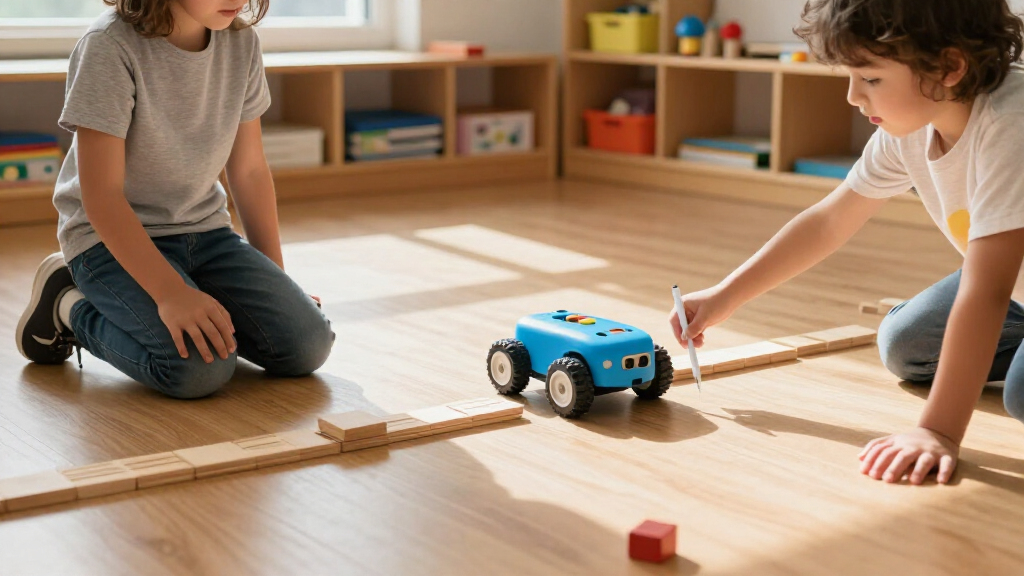
To rank these educational coding robots, I evaluated each product based on age appropriateness, hardware durability, and learning curve. A robot might have impressive features on paper, but if the companion app is buggy or the plastic snaps too easily, it fails as a reliable learning tool. I prioritized devices that offer a clear progression path, allowing children to move from block-based coding to text-based languages or more complex logic puzzles without needing to buy a completely new device.
I also assessed the support ecosystem, including the availability of lesson plans, community forums, and replacement parts. Robots that rely on discontinued software or lack accessible documentation were penalized. The final ranking reflects a balance between initial engagement—how fun the robot is to use immediately—and long-term educational value, ensuring that the robot remains relevant as the child’s coding skills mature over several years.
Factors to Consider When Choosing Educational Coding Robots For Kids
Selecting a coding robot is not just about picking the one with the most features; it is about matching the tool to your child’s developmental stage and your household’s tech habits. Here are the critical factors to weigh before purchasing.Screen-Free vs. App-Based Learning
The first major decision is whether your child needs a screen to interact with the robot. Screen-free robots use physical buttons, cards, or color codes to teach sequencing and logic, making them ideal for young children who are still developing fine motor skills or for parents limiting digital exposure. In contrast, app-based robots offer richer feedback, animation, and complex programming environments, but they require a tablet or phone. The mistake many buyers make is choosing an app-based robot for a toddler, leading to frustration when the child cannot navigate the interface. Conversely, giving a screen-free robot to a 10-year-old may result in boredom, as the logic puzzles lack complexity. Match the interface type to your child’s current ability to focus and interact with digital interfaces.
Age Appropriateness and Skill Progression
Not all coding robots are created equal regarding age suitability. A robot designed for ages 3-5, like the TaleBot Pro, uses simple cause-and-effect mechanics that a five-year-old would find trivial. On the other end of the spectrum, kits like the Makeblock mBot assume a level of reading comprehension and mathematical reasoning that a six-year-old lacks. Look for robots that offer a scalable learning path, starting with block-based coding and allowing a transition to Python or Arduino-based systems. Buying a robot that your child will outgrow in six months is a waste of resources. Instead, choose a platform that grows with them, offering advanced challenges that remain engaging for years.
Hardware Durability and Build Quality
Kids are hard on toys, and coding robots are no exception. I prioritized models with reinforced chassis, protected sensors, and high-quality plastics or metal components. Cheap injection-molded plastics often crack at stress points, such as wheel axles or sensor mounts, after a few weeks of play. A broken robot becomes a source of frustration rather than learning. Check if the manufacturer offers replacement parts or a warranty that covers accidental damage. If a robot has exposed wires or delicate components, it is better suited for supervised desk use rather than floor play. Durability directly impacts the longevity of the educational investment.
Ease of Setup and Parental Involvement
Some coding robots are ready to play right out of the box, while others require assembly and software configuration. For busy parents, the setup friction is a real barrier. If a robot requires downloading multiple apps, creating accounts, and updating firmware before the first use, it may sit in a closet. Conversely, build-it-yourself kits offer a rewarding construction experience but demand significant adult supervision and time. Consider how much time you can dedicate to helping with setup. If you want a gift that works immediately, choose a pre-assembled model. If you enjoy collaborative STEM projects, a kit that requires assembly can be a bonding experience, provided you have the patience for small screws and instruction manuals.
Software Compatibility and Longevity
The longevity of a coding robot depends heavily on its software ecosystem. I examined whether the companion apps are updated regularly and if they support current operating systems. A robot that relies on a discontinued app becomes a paperweight. Look for brands with a active developer community and consistent software updates. Additionally, check if the robot supports standard coding languages like Scratch or Python, which are widely taught in schools. Proprietary languages are fine for early learning, but they do not transfer to broader coding skills. A robot that integrates with widely used educational platforms offers more value for long-term skill development.
Frequently Asked Questions
Do coding robots require a subscription?
Most educational coding robots do not require a paid subscription for basic functionality, but some brands offer premium content libraries for a fee. For example, while the hardware for the Wonder Workshop Dash is a one-time purchase, access to certain advanced lesson plans or cloud-based features might be part of a subscription service. However, the core coding capabilities are typically free. Always check the product details to see if the app is free to download and if the core curriculum is accessible without payment. Avoid robots where the primary learning experience is gated behind a recurring cost, as this limits the long-term value of the hardware.
What is the difference between block-based and text-based coding?
Block-based coding, used in apps like Scratch or Blockly, allows children to drag and drop visual blocks to create commands, reducing syntax errors and focusing on logic. This is ideal for beginners and younger children. Text-based coding, such as Python or C++, requires typing precise commands, which is better for older children who have mastered logic concepts. Many advanced robots, like the Makeblock mBot, support both, allowing a smooth transition. Understanding this distinction helps you choose a robot that matches your child’s current literacy and logical reasoning skills, ensuring they are not overwhelmed by syntax or bored by simplicity.
How do I choose between a robot for ages 4-6 and ages 8-12?
The primary difference lies in the complexity of the logic puzzles and the interface. Robots for ages 4-6, like the Code & Go Robot Mouse, focus on simple sequencing and cause-and-effect without complex loops or conditionals. Robots for ages 8-12 introduce variables, loops, and sensor-based feedback, requiring more abstract thinking. If your child is 7, look for a robot that bridges this gap, such as the Ozobot, which can start with color codes and progress to block-based programming. Choosing a robot that is too advanced leads to frustration, while one that is too simple leads to disengagement. Assess your child’s ability to follow multi-step instructions independently.
Are screen-free coding robots effective for learning real coding concepts?
Yes, screen-free robots are highly effective for teaching foundational computational thinking concepts like sequencing, debugging, and algorithmic planning. They remove the distraction of screens, forcing the child to focus on the physical outcome of their code. While they do not teach syntax, which is specific to computer programming, they build the mental models necessary for any coding language. For young children, this foundational logic is more important than learning specific code structures. Screen-free options are particularly useful for classrooms or homes where digital devices are restricted, proving that coding education does not strictly require a computer screen.
What happens if the robot breaks?
Warranty policies vary widely among manufacturers. Premium brands like Wonder Workshop and Makeblock often offer robust warranties and sell replacement parts individually, such as wheels, sensors, or chassis pieces. Budget brands may not offer spare parts, meaning a single broken component can render the robot useless. Before buying, check the manufacturer’s support page for the availability of replacement components. If the robot is a gift for a young child who may be rough with toys, prioritize models with metal components or those known for high durability. A robot that cannot be repaired is a short-term expense, not a long-term educational tool.
Conclusion
Choosing the right educational coding robot comes down to aligning the hardware with your child’s age and your family’s tech preferences. For the best overall balance of durability, software support, and educational depth, the Wonder Workshop Dash Coding Robot is the top choice for most families with children aged 6 and up. If you prefer a screen-free option for preschoolers, the Learning Resources Code & Go Robot Mouse is unbeatable for teaching basic logic without digital distractions. For older children ready to engage with hardware assembly and text-based coding, the Makeblock mBot offers the best value and scalability. Parents seeking a creative outlet should consider the VinciBot for its drawing capabilities, while those wanting a simple, sturdy introduction for toddlers will find the TaleBot Pro to be the most accessible entry point. Match the robot’s complexity to your child’s current skill level to ensure sustained engagement and effective learning.
Halloween Picks
halloween
As an affiliate, we earn on qualifying purchases.