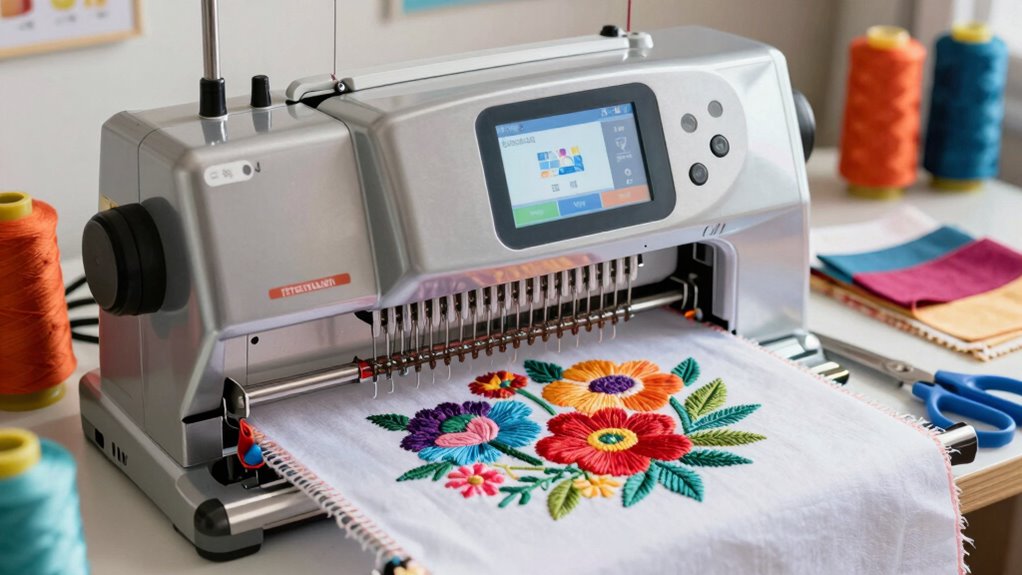
When choosing an embroidery machine, the options range from simple home models to advanced commercial units. The Brother SE2000 stands out as the best overall for its versatility and user-friendly features. The Poolin EOM 15 Needle Commercial Machine is ideal for serious small business use, offering durability and high capacity. Meanwhile, the Brother PE900 provides wireless connectivity at a competitive price point. Readers will face tradeoffs between ease of use, embroidery area size, and price. Continue reading for a detailed breakdown of these options and how to pick the right machine for your needs.

Prime made for students and young adults
- Fast, free delivery for dorm and study essentials
- Prime Video and Amazon Music included
- Member-only deals
Key Takeaways
- Top-performing embroidery machines balance ease of use with versatile features like large embroidery areas and wireless connectivity.
- Commercial models like the Poolin EOM 15 offer durability and high capacity but come with higher price tags and complexity.
- The best value options provide a good mix of features and affordability without sacrificing essential functionality.
- Touch screen interfaces and WiFi transfer significantly simplify the embroidery process for beginners and advanced users alike.
- Size and embroidery area are critical: larger hoops enable more ambitious projects, but also increase the machine’s footprint and price.
| PooLin EOC03 Embroidery Machine with 4×4 & 4×9.25 Inch Embroidery Areas, WiFi Transfer, 130 Built-in Designs, and Starter Kit |  | Best for Beginners | Embroidery Area: 4×4 and 4×9.25 inches | Built-in Designs: 130 | Fonts: 8 | VIEW ON AMAZON | See Our Full Breakdown |
| Brother SE700 Combo Embroidery & Sewing Machine with 4 Embroidery Hoops, Embroidery Thread Set & Accessories |  | Best for Versatile Crafters | Embroidery Field: 5″ x 7″ | Built-in Designs: 135 | Stitches: 103 | VIEW ON AMAZON | See Our Full Breakdown |
| Poolin EOM 15 Needle Commercial Embroidery Machine |  | Best for Small Business & Production | Embroidery Area: 14.2″ x 9.5″ | Number of Needles: 15 | Speed: up to 1,200 SPM | VIEW ON AMAZON | See Our Full Breakdown |
| Brother SE2000 Sewing and Embroidery Machine |  | Best for Creative Professionals | Embroidery Field: 5″ x 7″ | Built-in Designs: 190+ | Downloadable Designs: 50 | VIEW ON AMAZON | See Our Full Breakdown |
| Brother SE700 Sewing and Embroidery Machine with Wireless LAN |  | Best for Small Projects & Beginners Expanding Skills | Embroidery Area: 4″ x 4″ | Built-in Designs: 135 | Built-in Fonts: 10 | VIEW ON AMAZON | See Our Full Breakdown |
| Brother PE900 Wireless Embroidery Machine with WLAN |  | Best Wireless Connectivity for Versatile Embroidery | Embroidery Area: 5″ x 7″ | Built-in Designs: 193 | Lettering Fonts: 13 | VIEW ON AMAZON | See Our Full Breakdown |
| Embroidery Machine with 8 Needles, 7-Inch Touch Screen, 7.8×11.8 Inch Embroidery Area for Home & Small Business |  | Best for Versatility and User-Friendly Operation | Needles: 8 | Touch Screen: 7 inches | Embroidery Area: 7.8 x 11.8 inches | VIEW ON AMAZON | See Our Full Breakdown |
| Poolin EOC06 Large Hoop Embroidery Machine, 11 x 7.9 in Embroidery Area |  | Best Large-Format Embroidery for DIY Enthusiasts | Max Embroidery Area: 11 x 7.9 inches | Hoops Included: 2 x 5.5 x 5.5 inches, 1 x 7.9 x 7.9 inches, 1 x 7.9 x 11 inches | Display: 7-inch color touch screen | VIEW ON AMAZON | See Our Full Breakdown |
| Smartstitch S-1001 Upgraded Commercial Embroidery Machine with 10 Needles and Touch Screen |  | Best for Professional-Grade Precision and Speed | Model Number: S-1001 | Number of Needles: 10 | Max Speed: 1200 SPM | VIEW ON AMAZON | See Our Full Breakdown |
| Brother PE545 Wireless Embroidery Machine 4×4 Hoop LCD |  | Best Compact Wireless Embroidery for Beginners | Embroidery Field: 4″ x 4″ | Touchscreen: 3.7-inch color LCD | Built-in Designs: 135 | VIEW ON AMAZON | See Our Full Breakdown |
| embroidery machine | Connectivity | Embroidery Area | Built-in Designs | Touchscreen |
|---|---|---|---|---|
| PooLin EOC03 Embroidery Machin | WiFi | 4×4 and 4×9.25 inches | 130 | — |
| Brother SE700 Combo Embroidery | Wireless LAN | — | 135 | — |
| Poolin EOM 15 Needle Commercia | — | 14.2" x 9.5" | — | 9-inch InStitch OS4 |
| Brother SE2000 Sewing and Embr | Wireless LAN, USB | — | 190+ | 3.7-inch LCD |
| Brother SE700 Sewing and Embro | Wireless LAN | 4" x 4" | 135 | 3.7-inch LCD |
| Brother PE900 Wireless Embroid | Wireless LAN, USB | 5" x 7" | 193 | 3.7-inch LCD |
| Embroidery Machine with 8 Need | — | 7.8 x 11.8 inches | — | — |
| Poolin EOC06 Large Hoop Embroi | USB, Wireless LAN | — | — | — |
| Smartstitch S-1001 Upgraded Co | USB, WiFi | 9.5" x 14.2" | — | — |
| Brother PE545 Wireless Embroid | Wireless LAN, USB | — | 135 | 3.7-inch color LCD |
More Details on Our Top Picks
PooLin EOC03 Embroidery Machine with 4×4 & 4×9.25 Inch Embroidery Areas, WiFi Transfer, 130 Built-in Designs, and Starter Kit
The PooLin EOC03 stands out for its user-friendly interface and straightforward features, making it ideal for those just starting out in embroidery. Compared with more advanced models like the Poolin EOM 15 Needle, it offers a smaller embroidery area but compensates with easier setup and a lower price point. Its WiFi transfer simplifies design sharing without needing complex connections, though it relies heavily on an internet connection and may present a learning curve for complete novices. The included starter kit and tutorials help new users gain confidence quickly, but its limited size options mean it’s less suited for larger or complex projects. This pick makes the most sense for hobbyists or beginners seeking a simple, approachable machine with ample design options.
Pros:- Intuitive interface ideal for beginners
- Includes a variety of designs and fonts for customization
- WiFi transfer for easy design sharing
- Comprehensive starter kit and tutorials
Cons:- Limited embroidery size compared to professional models
- Requires internet connection for WiFi features
- Potentially steep learning curve for absolute novices
Best for: Beginner hobbyists seeking an affordable, easy-to-use embroidery machine with built-in designs.
Not ideal for: Experienced professionals requiring large embroidery areas or advanced customization features.
- Embroidery Area:4×4 and 4×9.25 inches
- Built-in Designs:130
- Fonts:8
- Connectivity:WiFi
- Included Accessories:Starter kit
Our verdict“This machine is perfect for newcomers who want simplicity and design variety without the complexity of larger, more advanced models.”
Brother SE700 Combo Embroidery & Sewing Machine with 4 Embroidery Hoops, Embroidery Thread Set & Accessories
The Brother SE700 offers a compelling package for users who want both sewing and embroidery in one machine, making it ideal for versatile crafters. Compared to the Brother SE2000, it has a slightly smaller embroidery field but provides a more extensive accessory bundle, including multiple hoops and a large thread set. Its 135 built-in designs and 103 stitches cover a broad range of projects, and the 3.2-inch color LCD makes editing straightforward. However, it needs a reliable wireless network for full functionality and might pose a learning curve for those new to advanced features. Its combination of sewing and embroidery capabilities makes it especially suitable for hobbyists looking to expand their creative options without investing in separate machines.
Pros:- Large 5″ x 7″ embroidery area for bigger designs
- Wireless connectivity simplifies design transfer
- Touchscreen with editing features
- Extensive accessory bundle for diverse projects
Cons:- Requires stable WiFi for full features
- Steep learning curve for users unfamiliar with advanced machines
- Higher price point compared to single-function units
Best for: Crafters wanting a dual-purpose machine for sewing and embroidery with extensive design options.
Not ideal for: Beginner sewists or embroiderers who prefer a simpler, dedicated embroidery-only machine.
- Embroidery Field:5″ x 7″
- Built-in Designs:135
- Stitches:103
- Connectivity:Wireless LAN
- Included Accessories:Hoops, thread set, various feet
Our verdict“This machine suits creative users who want flexibility and a broad array of features for sewing and embroidery without complexity for beginners.”
Poolin EOM 15 Needle Commercial Embroidery Machine
The Poolin EOM 15 Needle is designed for small businesses or serious hobbyists aiming for high-volume, multi-color embroidery. Its large 14.2″ x 9.5″ embroidery area and 15 needles enable complex, multi-color designs with increased efficiency, especially compared to single-needle models like the PooLin EOC03. Features such as automatic color change, thread trimming, and laser positioning streamline production workflows. While its advanced capabilities are impressive, this machine involves a significant investment and a steeper learning curve, making it less suitable for absolute beginners. Its size and complexity demand dedicated space and some technical familiarity, but it’s ideal for those needing to produce professional-quality embroidery consistently.
Pros:- Large embroidery area supports complex projects
- Automatic color change and thread trimming improve efficiency
- Laser positioning ensures precise placement
- Supports WiFi and USB for pattern transfer
Cons:- High initial cost
- Complex setup and operation for beginners
- Requires dedicated space and technical know-how
Best for: Small embroidery businesses or experienced hobbyists seeking high productivity and multi-color embroidery.
Not ideal for: Total beginners or users with limited space and technical experience.
- Embroidery Area:14.2″ x 9.5″
- Number of Needles:15
- Speed:up to 1,200 SPM
- Cap Embroidery Speed:up to 850 SPM
- Touchscreen:9-inch InStitch OS4
- Included Hoops:5 standard, 2 cap hoops
Our verdict“This machine is perfect for established businesses or serious hobbyists focused on multi-color, high-volume embroidery projects.”
Brother SE2000 Sewing and Embroidery Machine
The Brother SE2000 balances large embroidery capacity with comprehensive sewing features, making it an excellent choice for creative professionals. Its 5″ x 7″ embroidery field supports larger, detailed designs, while the 3.7-inch touchscreen facilitates on-screen editing—features that surpass smaller models like the SE700. With over 190 built-in designs and 50 downloadable patterns, it offers extensive options for diverse projects. Its 241 stitches and 13 embroidery fonts add versatility, though it’s primarily designed for those familiar with advanced machine functions. International users should note that it requires a 120V power supply. Overall, this machine combines professional-level capabilities with ease of use, ideal for serious hobbyists or small business owners expanding their creative toolkit.
Pros:- Large 5″ x 7″ embroidery area for complex designs
- Intuitive 3.7-inch LCD touchscreen for editing
- High design capacity with 190+ built-in designs
- Wide variety of stitches and embroidery fonts
Cons:- Requires 120V power, limiting international use
- May involve a learning curve for new users
- Higher price point for advanced features
Best for: Creative professionals and advanced hobbyists seeking a large-capacity embroidery and sewing combo.
Not ideal for: Total beginners or users looking for a simple, compact machine with basic features.
- Embroidery Field:5″ x 7″
- Built-in Designs:190+
- Downloadable Designs:50
- Touchscreen:3.7-inch LCD
- Stitches:241
- Connectivity:Wireless LAN, USB
Our verdict“This machine fits experienced users who want large design capacity and versatile sewing and embroidery functionalities in one package.”
Brother SE700 Sewing and Embroidery Machine with Wireless LAN
The Brother SE700 combines sewing and embroidery with a compact design, making it a solid option for users who want to start small or expand their skills gradually. Its 4″ x 4″ embroidery area is smaller than the SE2000 but sufficient for many beginner projects, and the 3.7-inch touchscreen simplifies design editing. With 135 built-in embroidery designs and 10 fonts, it offers a good starting point, especially for those interested in Artspira app integration. Its wireless connectivity improves design transfer ease, though users should be aware that full features depend on a stable WiFi connection and some functions may need additional purchases. This machine offers a balance of simplicity and functionality ideal for hobbyists venturing into embroidery or small project enthusiasts.
Pros:- Compact 4″ x 4″ embroidery area suitable for small designs
- User-friendly 3.7-inch color touchscreen
- Wireless LAN for easy design transfer
- Includes multiple accessories for diverse projects
Cons:- Limited embroidery size for larger designs
- Full functionality depends on WiFi stability
- Some features may require additional purchases
Best for: Beginners or hobbyists wanting a versatile, easy-to-use machine for small embroidery and sewing projects.
Not ideal for: Advanced users or those needing large embroidery fields for bigger projects.
- Embroidery Area:4″ x 4″
- Built-in Designs:135
- Built-in Fonts:10
- Touchscreen:3.7-inch LCD
- Connectivity:Wireless LAN
- Included Accessories:Embroidery hoop, sewing feet
Our verdict“This machine is a practical choice for newcomers and hobbyists interested in small embroidery projects with simple operation and wireless transfer.”
Brother PE900 Wireless Embroidery Machine with WLAN
The Brother PE900 stands out for its wireless transfer capabilities via mobile app and USB, making it highly convenient for users who frequently switch designs. Its large 5×7 inch embroidery area surpasses many basic models like the Brother PE545, enabling bigger projects without sacrificing ease of use. The 3.7-inch touchscreen simplifies editing, a feature that’s more intuitive than older, button-only interfaces. However, as an embroidery-only machine, it lacks sewing functions, which could be a downside for those wanting a combo machine. Additionally, it’s limited to US voltage, so international buyers need adapters. The requirement to purchase Artspira thread sets separately adds to ongoing costs, but overall, this model is ideal for users prioritizing wireless design transfer and larger embroidery projects.
Pros:- Wireless design transfer via mobile app and USB
- Large embroidery area suitable for bigger projects
- Intuitive 3.7-inch touchscreen for editing
Cons:- Embroidery-only machine, no sewing functions
- Limited to US voltage (120V)
- Requires separate purchase of Artspira thread sets
Best for: Embroidery enthusiasts who value wireless design transfer and larger embroidery areas
Not ideal for: Sewers needing a machine that combines embroidery and sewing functions or international buyers outside the US
- Embroidery Area:5″ x 7″
- Built-in Designs:193
- Lettering Fonts:13
- Touchscreen:3.7-inch LCD
- Connectivity:Wireless LAN, USB
- Compatible App:Artspira
Our verdict“This machine suits advanced hobbyists and small business owners focused on wireless convenience and larger embroidery designs.”
Embroidery Machine with 8 Needles, 7-Inch Touch Screen, 7.8×11.8 Inch Embroidery Area for Home & Small Business
This 8-needle embroidery machine makes a compelling choice for those who want versatility across different materials and projects. Its 7.8×11.8 inch embroidery area is larger than many typical home units like the Brother PE545, accommodating more ambitious designs. The 7-inch touch screen simplifies operation, especially for beginners, and the automatic features reduce manual effort. While this model is suitable for home use and small-scale commercial projects, it may overwhelm complete novices due to its advanced features. It’s not designed for industrial use or heavy-duty production, but its comprehensive accessory package is a plus for immediate use. Overall, this pick makes the most sense for hobbyists stepping into small business or those who need a flexible, easy-to-operate machine with large capacity.
Pros:- User-friendly interface suitable for beginners
- Includes complete accessory package for immediate use
- Versatile for various materials and projects
- Automatic features enhance ease of operation
Cons:- May be complex for absolute novices without prior experience
- Limited to small business and home use, not industrial
Best for: Small business owners and hobbyists seeking a versatile, easy-to-use embroidery machine
Not ideal for: Complete beginners with no prior experience or those seeking an industrial-grade machine
- Needles:8
- Touch Screen:7 inches
- Embroidery Area:7.8 x 11.8 inches
- Materials:Caps, shirts, leather, canvas, denim
Our verdict“This machine is ideal for hobbyists and small entrepreneurs who want a large, flexible embroidery setup with straightforward operation.”
Poolin EOC06 Large Hoop Embroidery Machine, 11 x 7.9 in Embroidery Area
The Poolin EOC06 offers an expansive 11×7.9 inch embroidery area, making it an excellent choice for larger projects compared to the smaller Brother PE545 or PE900. Its 7-inch color touch screen simplifies design editing, and the inclusion of 200 built-in patterns and multiple fonts enhances creative options. Support for wireless LAN and USB transfer broadens usability for DIYers and beginners alike. However, some familiarity with embroidery software or design transfer processes is helpful, and it’s limited to fabrics smaller than 4mm with a 90/14 needle. Its extensive pattern library and large size make it more suitable for dedicated hobbyists or small-scale small business owners rather than casual users or those seeking a compact model. The price point may also be a consideration, but overall, it balances size, features, and ease of use well.
Pros:- Large embroidery area suitable for bigger projects
- User-friendly 7-inch color touch screen
- Includes extensive built-in patterns and fonts
- Supports wireless and USB file transfer
Cons:- Requires some familiarity with embroidery software
- Limited to fabrics smaller than 4mm with size 90/14 needle
Best for: DIYers and small business owners needing a large embroidery area with user-friendly features
Not ideal for: Casual hobbyists with limited space or those unfamiliar with embroidery software
- Max Embroidery Area:11 x 7.9 inches
- Hoops Included:2 x 5.5 x 5.5 inches, 1 x 7.9 x 7.9 inches, 1 x 7.9 x 11 inches
- Display:7-inch color touch screen
- Built-in Patterns:200
- Languages:10
- Connectivity:USB, Wireless LAN
Our verdict“Ideal for users seeking a large-format embroidery machine with a straightforward interface and ample design options.”
Smartstitch S-1001 Upgraded Commercial Embroidery Machine with 10 Needles and Touch Screen
The Smartstitch S-1001 is tailored for professional embroidery work, offering 10 needles and a sizable 9.5×14.2 inch embroidery area, far surpassing typical home models like the Brother PE900 or PE545. Its advanced features, including auto thread trimming, color changing, and laser positioning, streamline complex projects and reduce manual effort. The 7-inch touch screen makes design management straightforward, and support for USB and WiFi connectivity allows seamless file transfer. While its rich feature set and large capacity appeal to serious hobbyists or small commercial operators, it comes with a higher price tag and a steeper learning curve. Its compact size and lightweight design facilitate setup in small workspaces, but novice users might find it overwhelming. This makes it best suited for experienced users or small embroidery businesses demanding high efficiency and precision.
Pros:- Advanced features like auto thread trimming and laser positioning
- Large embroidery area for complex projects
- Supports multiple fabrics and professional quality
- User-friendly with training support and online community
Cons:- Steep learning curve for beginners
- High price for hobbyists
- Requires space for setup and operation
Best for: Professional embroiderers and small business owners needing high-speed, multi-needle automation
Not ideal for: Beginners or hobbyists looking for a simple, budget-friendly machine
- Model Number:S-1001
- Number of Needles:10
- Max Speed:1200 SPM
- Touch Screen:7 inches
- Embroidery Area:9.5″ x 14.2″
- Stitch Memory:Up to 100 million stitches
- Connectivity:USB, WiFi
Our verdict“This machine is best suited for experienced professionals or small-scale commercial users demanding speed, precision, and automation.”
Brother PE545 Wireless Embroidery Machine 4×4 Hoop LCD
The Brother PE545 offers a compact and reliable entry point into embroidery with a 4×4 inch hoop and 135 built-in designs. Its wireless transfer capability from PC or mobile devices makes design management relatively simple, especially compared to wired-only models. The 3.7-inch color LCD touchscreen provides clear previews and easy editing, though it’s smaller than the touchscreens on models like the Poolin EOC06. This machine is ideal for those new to embroidery or with limited space, but its small embroidery field limits the size of projects you can undertake. It’s less suitable for those wanting larger designs or professional-level features. The machine’s simplicity and portability make it a solid choice for beginners, but experienced users may find it restrictive for bigger projects.
Pros:- Wireless transfer from PC and mobile devices
- Compact size ideal for small spaces
- Color touchscreen for easy design editing
- 135 built-in designs and multiple fonts
Cons:- Limited to 4×4 inch embroidery area
- No sewing functions included
- Requires additional software for full wireless transfer
Best for: Beginners or hobbyists seeking a compact, easy-to-use embroidery machine with wireless transfer
Not ideal for: Users needing large embroidery areas or advanced features for complex projects
- Embroidery Field:4″ x 4″
- Touchscreen:3.7-inch color LCD
- Built-in Designs:135
- Fonts:10
- Connectivity:Wireless LAN, USB
- Voltage:120V
Our verdict“This machine makes the most sense for beginners or those with limited space wanting straightforward wireless embroidery capabilities.”

How We Picked
These embroidery machines were evaluated based on performance, usability, build quality, and value. Priority was given to models that balance features with ease of operation, especially for home users and small businesses. Commercial machines were assessed for durability, capacity, and professional features, while consumer models focused on user-friendly interfaces and affordability. The ranking reflects a combination of versatility, reliability, and innovation, ensuring options suitable for different skill levels and needs.| embroidery machine | Connectivity |
|---|---|
| PooLin EOC03 Embroidery Machin | WiFi |
| Brother SE700 Combo Embroidery | Wireless LAN |
| Poolin EOM 15 Needle Commercia | — |
| Brother SE2000 Sewing and Embr | Wireless LAN, USB |
| Brother SE700 Sewing and Embro | Wireless LAN |
| Brother PE900 Wireless Embroid | Wireless LAN, USB |
| Embroidery Machine with 8 Need | — |
| Poolin EOC06 Large Hoop Embroi | USB, Wireless LAN |
| Smartstitch S-1001 Upgraded Co | USB, WiFi |
| Brother PE545 Wireless Embroid | Wireless LAN, USB |
Factors to Consider When Choosing Embroidery Machines
Choosing the right embroidery machine involves considering several key factors. While features like embroidery area size and number of needles matter, broader considerations such as ease of use, connectivity, and maintenance are also critical. Understanding these factors helps avoid common pitfalls, like overspending on features you won’t use or selecting a machine that’s too complex for your skill level.Embroidery Area Size and Design Capacity
Larger embroidery areas enable more ambitious projects, making them ideal for small business or extensive home projects. However, bigger hoops often mean higher costs and a larger footprint. If you mainly work on personal projects or small designs, a smaller embroidery area might suffice and save money. Balancing project size needs with space and budget is key to choosing the right machine.
Number of Needles and Sewing Capabilities
Multi-needle machines, like those with 8 or 10 needles, allow for faster multi-color embroidery without changing threads constantly. These models are better suited for commercial use or serious hobbyists who need efficiency. Conversely, single-needle or 4-needle machines are simpler and more affordable, making them suitable for beginners or occasional use. Consider your project volume and technical comfort level when selecting the number of needles.
Connectivity and Ease of Use
Features like WiFi, wireless transfer, and touch screens significantly streamline the embroidery process. These tools reduce setup time and simplify design uploads, especially for those who frequently change projects. On the other hand, machines lacking connectivity may require manual data transfer via USB or SD cards, which can be less convenient. Prioritize user-friendly interfaces if you want to avoid frustration and maximize creative time.
Build Quality and Maintenance
Durability is vital, especially with commercial or high-frequency use. Well-built machines with quality components tend to last longer and require fewer repairs. Regular maintenance, like cleaning and lubrication, extends machine lifespan, so choose models with accessible parts and clear instructions. Be wary of budget options with cheap parts that might save money upfront but lead to higher costs later.
Price and Overall Value
Embroidery machines span a broad price range, from economical models to high-end commercial units. While investing more often yields advanced features and greater durability, it’s important to buy what suits your actual needs. Budget-friendly models can be perfect for beginners or occasional crafters, but if you plan serious projects or run a business, the extra investment can pay off through reliability and efficiency. Look for a balance of features and price.
Frequently Asked Questions
Can I upgrade my home embroidery machine for commercial use?
Upgrading a home embroidery machine to handle commercial workloads is generally not feasible, as home models tend to lack the durability, capacity, and speed required for frequent, high-volume projects. Commercial machines are built with reinforced components and larger embroidery areas to withstand daily use, making them a better long-term investment if your business expands. However, some mid-range models offer features close to professional standards, so evaluate your needs carefully before investing.
What should I prioritize if I am a beginner with limited space?
For beginners with space constraints, compact and easy-to-use models are ideal. Machines with smaller embroidery areas, fewer needles, and straightforward interfaces help reduce learning curves and fit into tighter spaces. Features like automatic thread cutting and simple design transfer also make the experience smoother. Investing in a model with good support and tutorials can accelerate your learning without overwhelming your workspace.
Are WiFi-enabled embroidery machines worth the extra cost?
Wireless connectivity adds convenience by simplifying design uploads and updates, especially if you frequently switch projects. For hobbyists and small businesses with multiple designs, WiFi can save time and reduce frustration. However, these features come at a higher price, and some users find the technology may occasionally be unreliable. If you value ease of use and plan to work on complex or frequent projects, investing in a WiFi-enabled model can be worthwhile.
How important is the number of needles in choosing an embroidery machine?
The number of needles directly impacts embroidery speed and efficiency. Multi-needle machines, such as those with 8 or 10 needles, can change thread colors automatically and handle intricate designs faster, making them suitable for frequent or commercial use. Single-needle models are simpler, more affordable, and easier to maintain, which makes them perfect for beginners or occasional crafters. Your project volume and budget should guide your choice.
What maintenance does an embroidery machine require?
Regular maintenance includes cleaning lint and dust from the bobbin area, lubricating moving parts, and replacing worn-out needles. Proper maintenance prevents breakdowns and ensures consistent quality. Many models feature accessible parts and clear cleaning instructions, making upkeep straightforward. Investing in a machine with a robust build and easy maintenance routines can extend its lifespan and keep your projects running smoothly.
Conclusion
For those just starting out or working on small projects, a compact, user-friendly machine like the Brother SE2000 offers excellent versatility at a reasonable price. Small business owners needing high capacity and durability should consider the Poolin EOM 15 Needle Commercial Embroidery Machine for its robustness and speed. If you want premium features such as large embroidery areas and wireless connectivity, the Brother PE900 or Brother SE700 are solid choices. Overall, your decision should hinge on your project scope, budget, and experience level, ensuring you select a machine tailored to your specific needs.