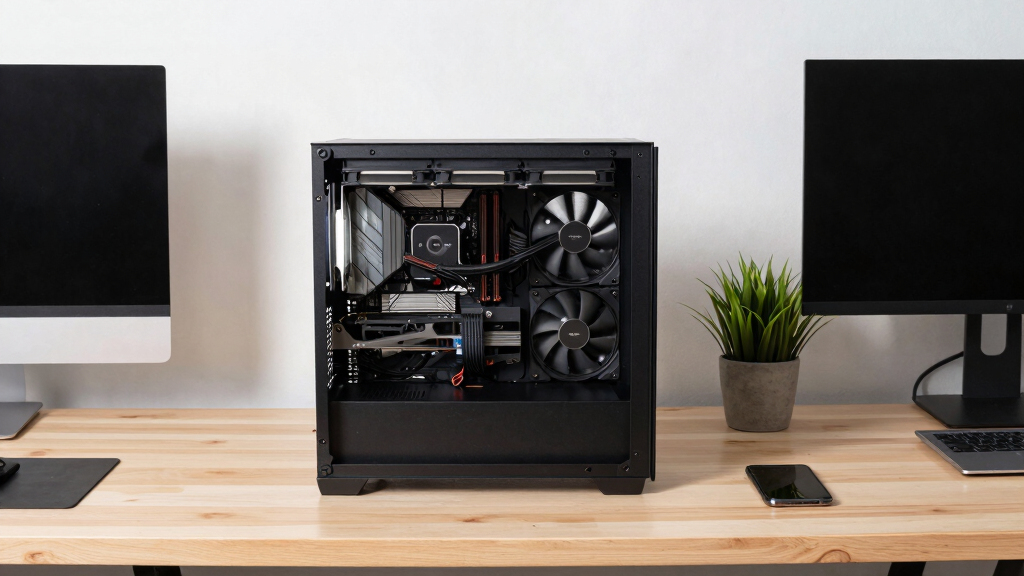
📊 Full opportunity report: Liquid vs Air Cooling for 24/7 Inference Rigs on ThorstenMeyerAI.com — validation score, market gap, and execution plan.

Prime made for students and young adults
- Fast, free delivery for dorm and study essentials
- Prime Video and Amazon Music included
- Member-only deals
TL;DR
For 24/7 AI inference rigs, air cooling generally offers better reliability, lower cost, and quieter operation. Liquid cooling suits high thermal headroom but introduces complexity and potential failure points.
For continuous AI inference systems running 24/7, air cooling remains the preferred choice due to its reliability, simplicity, and lower total cost of ownership, according to experts and recent testing.
Most AI inference rigs operate unattended for long periods, making reliability a key factor. Air coolers, such as dual-tower designs, feature a single moving part—the fan—making them less prone to failure and easier to maintain. They are also more cost-effective, with lower upfront and long-term expenses compared to liquid cooling solutions. Modern high-end air coolers can handle CPU loads comparable to mid-range AIO liquid coolers, dissipating up to 250W effectively. Conversely, liquid cooling, especially large 360mm AIOs, provides superior thermal headroom, capable of handling CPUs with TDPs exceeding 350W, which can be advantageous for overclocked or high-performance setups. However, AIOs have a sealed loop with multiple components, including a pump that can fail over time, and coolant that gradually permeates the tubing, reducing efficiency over years. Maintenance and potential leaks are additional concerns, making liquid cooling less suitable for unattended, long-term operation. Testing indicates that air coolers often operate quieter under sustained loads, with less constant hum than AIOs, which include a pump noise. Overall, for most 24/7 inference systems, air cooling offers a more dependable, cost-effective, and quieter solution, especially when thermal headroom is sufficient for the CPU load.Liquid vs air
for a 24/7 inference rig.
For an always-on machine the question isn’t “which cools better” — it’s which one still works in three years without you thinking about it. That reframing makes air the default for most rigs. Answer three questions in Part 2 to find yours.
- Nothing to fail — fan swaps in minutes
- Lasts a decade+; lower total cost
- Quieter floor — no pump hum (~40–45 dBA)
- Trivial maintenance — wipe & repaste
- Tall — can block RAM, dumps heat in case
- Best headroom — ~360W TDP sustained
- Compact block — fits tight cases, clears RAM
- Exports heat out the radiator & room
- Pump fails at 5–7 yrs; replace whole unit
- Costs 2–3× more over its life; pump hum
- You run it 24/7 and want set-and-forget.
- Your CPU is mainstream-to-high-end (or power-capped).
- A big tower fits your case.
- You value lower cost and a quieter floor.
- Your CPU is too hot for air under sustained all-core load.
- A big tower won’t fit (compact / multi-GPU case).
- You need to export heat out of a warm room.
- RAM clearance is tight.
Why Reliability and Cost Matter for Always-On AI Rigs
Choosing the right cooling method impacts system uptime, maintenance costs, and noise levels for AI inference servers running continuously. Air cooling's simplicity and durability reduce the risk of failure, ensuring consistent operation over years. The lower total cost of ownership makes it especially attractive for large-scale deployments where reliability is critical. Liquid cooling, while offering higher thermal headroom, introduces complexity and potential failure points, which can compromise long-term stability. These factors influence decisions for data centers, research labs, and enterprise AI deployments where unattended operation is essential.
air CPU cooler for high-performance rigs
As an affiliate, we earn on qualifying purchases.
As an affiliate, we earn on qualifying purchases.
Current Trends in Cooling for Continuous AI Workloads
Most recent industry tests and user reports show that high-end air coolers can effectively manage the thermal loads typical of AI inference workloads, which are often CPU-intensive but do not require the extreme cooling capacity of overclocked gaming PCs. Historically, liquid cooling gained popularity for high-performance gaming and overclocking, but the focus for inference rigs is different: reliability and low maintenance. Manufacturers now produce specialized AIOs with warranties of 5–6 years, but their sealed-loop design inherently limits lifespan and increases failure risk over time. The debate continues as some high-performance setups, especially in constrained cases, benefit from AIOs' compactness and heat export capabilities, but these are exceptions rather than the rule for most inference rigs.
"For most 24/7 inference systems, the simplicity and durability of air cooling outweigh the thermal advantages of liquid solutions."
— Thorsten Meyer, AI hardware expert
liquid cooling system for gaming PC
As an affiliate, we earn on qualifying purchases.
As an affiliate, we earn on qualifying purchases.
Long-Term Reliability of Liquid Cooling Systems
It is still unclear how many liquid cooling units will sustain optimal performance over a decade of continuous operation without failure, especially in environments with variable temperatures or dust. While modern AIOs are reliable today, their sealed design and moving parts pose inherent risks over extended periods. Data on failure rates beyond 5–7 years is limited, and real-world long-term studies are ongoing.
24/7 AI inference cooling solutions
As an affiliate, we earn on qualifying purchases.
As an affiliate, we earn on qualifying purchases.
Future Trends in Cooling for AI Inference Hardware
Expect ongoing improvements in both air and liquid cooling technologies, with a focus on enhancing reliability and reducing maintenance. Manufacturers may introduce more durable seals, longer-lasting pumps, and smarter monitoring systems. For large-scale AI deployments, hybrid solutions or innovative cooling methods might emerge to combine the thermal capacity of liquid cooling with the dependability of air systems. Monitoring and predictive maintenance will likely become standard to prevent failures before they occur.
reliable air cooling for server CPUs
As an affiliate, we earn on qualifying purchases.
As an affiliate, we earn on qualifying purchases.
Key Questions
Is liquid cooling necessary for AI inference rigs?
Not generally. For most workloads, high-quality air cooling provides sufficient thermal management, with better reliability and lower cost over time.
How long do AIO liquid coolers last?
Most AIOs are warrantied for around 5–6 years, but their sealed loop can degrade over 3–5 years, potentially reducing cooling performance and risking leaks.
What are the main risks of liquid cooling in always-on systems?
The primary risks include pump failure, coolant permeation, seal degradation, and leaks, which can cause hardware damage and require replacement or repair.
Can air cooling handle high-TDP CPUs under continuous load?
Yes. High-end dual-tower air coolers can dissipate 200–250W effectively, suitable for most inference workloads without overclocking.
What factors should influence the choice between air and liquid cooling?
Consider system reliability, maintenance capacity, case size, thermal headroom needs, noise preferences, and total cost of ownership.
Source: ThorstenMeyerAI.com
Fall Picks
fall essentials
As an affiliate, we earn on qualifying purchases.