The ACEBOTT Smart Robot Car Kit with ESP32 is my best overall pick for teens ready to build and program a mobile robot, while the ELEGOO UNO R3 Smart Robot Car Kit V4 stands out for camera-based projects and the Teach Tech HydroBot Arm offers a hands-on, no-code introduction to hydraulics. The main choice is between learning electronics and programming, assembling multiple models, or exploring a focused mechanical idea. Teens with coding experience may want more control and room to experiment; beginners may get more from clear instructions and simpler first builds. I ranked these options by how well their build experience, learning potential, and age fit serve teen makers. Read on for the full breakdown and help match a kit to the kind of projects your teen wants to make.

Prime made for students and young adults
- Fast, free delivery for dorm and study essentials
- Prime Video and Amazon Music included
- Member-only deals
Key Takeaways
- The ESP32 car is my strongest all-around choice: its programmable controller and mecanum wheels offer more room to explore movement and code than a basic remote-controlled build.
- Camera-equipped kits are for a different kind of project: the ELEGOO car and Conqueror tank add Wi-Fi FPV play, while also bringing more setup and troubleshooting than simpler kits.
- Build variety does not automatically mean deeper robotics: multi-model sets such as the 12-in-1 solar kit focus on constructing different mechanisms, while programmable cars and arms emphasize control and electronics.
- Mechanical learning can be a better first step than coding: the HydroBot Arm uses hydraulics to teach motion through physical assembly, without making programming the entry requirement.
- Age labels and kit names can hide very different experiences: teens should compare the actual controller, instructions, power approach, and project flexibility rather than choosing by model count alone.
| ACEBOTT Smart Robot Car Kit with ESP32 Controller and Mecanum Wheels |  | Best for Omnidirectional Movement | Controller: ESP32 | Wheel type: 6 cm omnidirectional Mecanum wheels | Tutorials: 16 | VIEW LATEST PRICE | See Our Full Breakdown |
| ELEGOO UNO R3 Smart Robot Car Kit V4 with Camera |  | Best for Camera-Based Projects | Controller: ELEGOO UNO R3 | Camera and Wi-Fi module: ESP32-WROVER-based | Sensors: Line-tracking and ultrasonic | VIEW LATEST PRICE | See Our Full Breakdown |
| HiWEEGO 5-in-1 LED-Eyes Robot Building Set, 699 Pieces, Remote and App Controlled |  | Best for Rebuildable Robot Play | Piece count: 699 | Buildable models: Robot, elephant, bulldozer, battle robot, and tracked vehicle | Control: 2.4 GHz remote control and smartphone app | VIEW LATEST PRICE | See Our Full Breakdown |
| ACEBOTT QD106 Programmable Robot Car Kit for Kids |  | Best for Multiple Programming Languages | Controller: ESP32 | Programming languages: Scratch, Arduino, and Python | Tutorials: 16 story-based tutorials | VIEW LATEST PRICE | See Our Full Breakdown |
| Sillbird 12-in-1 Solar Robot Building Kit, 190 Pieces |  | Best for Renewable-Energy Basics | Set: 12-in-1 | Piece count: 190 | Power source: Solar; strong artificial light source for indoor use | VIEW LATEST PRICE | See Our Full Breakdown |
| ACEBOTT 4-in-1 Programmable Robot Arm and Tank Car Kit for Ages 12–16 |  | Best for a Programmable Arm-and-Tank Build | Controller: ESP32 | Robotic arm: 5DOF | Configurations: Robot car, tank robot, robotic arm car, and robotic arm tank | VIEW LATEST PRICE | See Our Full Breakdown |
| Sillbird 5-in-1 Programmable Robot Building Kit with App and Remote Control |  | Best for Rebuildable, App-Controlled Play | Recommended age: 8 years and up | Pieces: 488 | Build options: Robot, car, tank, dinosaur, or custom design | VIEW LATEST PRICE | See Our Full Breakdown |
| Teach Tech HydroBot Arm Hydraulic STEM Building Kit for Ages 12+ |  | Best for Battery-Free Mechanical Learning | Recommended age: 12 years and up | Power source: Water hydraulics | Axes: 6 | VIEW LATEST PRICE | See Our Full Breakdown |
| ELEGOO Conqueror Robot Tank Kit with UNO R3 and Wi-Fi FPV Camera |  | Best for Sensor-Driven Tank Robotics | Controller: UNO R3 | Connectivity: Wi-Fi via ESP32-WROVER module | Chassis material: Stainless steel | VIEW LATEST PRICE | See Our Full Breakdown |
| Butterfly EduFields 40-in-1 STEM Robotics Kit for Kids |  | Best for Broad, No-Code Project Variety | Age range: 8–17 years | Number of projects: 40+ | Number of components: 100+ | VIEW LATEST PRICE | See Our Full Breakdown |
| Sillbird 5-in-1 Programmable STEM Robot Building Kit with App and Remote Control, 488 Pieces |  | Best for Multi-Model Building | Brand: Sillbird | Model: B883 | Pieces: 488 | VIEW LATEST PRICE | See Our Full Breakdown |
| Makeblock mBot Coding Robot Kit for Kids Ages 8–12 | 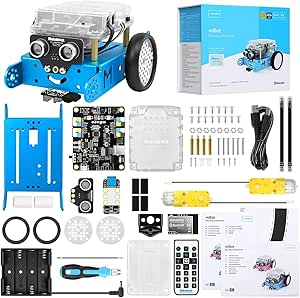 | Best for Learning to Code | Brand: Makeblock | Model: 90053 | Recommended age: 8 years and up | VIEW LATEST PRICE | See Our Full Breakdown |
| Butterfly EduFields 10-in-1 STEM Robotics and Electronics Kit for Kids |  | Best for Exploring Electronics Projects | Brand: Butterfly EduFields | Model number: 506 | Kit type: 10-in-1 STEM robotics and electronics kit | VIEW LATEST PRICE | See Our Full Breakdown |
| ANNISOKA DIY Wooden Robot Arm Kit |  | Best for a Focused Mechanical Build | Brand: ANNISOKA | Material: Wood | Recommended age: 8 years and up | VIEW LATEST PRICE | See Our Full Breakdown |
| ACEBOTT 4-in-1 Programmable Robot Arm and Tank Car Kit |  | Best Advanced Pick for Teens | Brand: ACEBOTT | Model: QD043 | Age range: 12 years and up | VIEW LATEST PRICE | See Our Full Breakdown |
| robotics kits for teen | Recommended age |
|---|---|
| ACEBOTT Smart Robot Car Kit wi | 12 years and up |
| ELEGOO UNO R3 Smart Robot Car | 12 years and up |
| HiWEEGO 5-in-1 LED-Eyes Robot | — |
| ACEBOTT QD106 Programmable Rob | 12 years and up |
| Sillbird 12-in-1 Solar Robot B | 10 years and up |
| ACEBOTT 4-in-1 Programmable Ro | — |
| Sillbird 5-in-1 Programmable R | 8 years and up |
| Teach Tech HydroBot Arm Hydrau | 12 years and up |
| ELEGOO Conqueror Robot Tank Ki | 10 years and up |
| Butterfly EduFields 40-in-1 ST | — |
| Sillbird 5-in-1 Programmable S | 8–16 years |
| Makeblock mBot Coding Robot Ki | 8 years and up |
| Butterfly EduFields 10-in-1 ST | 8–17 years |
| ANNISOKA DIY Wooden Robot Arm | 8 years and up |
| ACEBOTT 4-in-1 Programmable Ro | — |
More Details on Our Top Picks
ACEBOTT Smart Robot Car Kit with ESP32 Controller and Mecanum Wheels
For teens who want a robot car that can move beyond the usual forward-and-turn pattern, this ACEBOTT kit stands out for its Mecanum wheels, which support sideways and diagonal travel as well as rotation. That movement makes experimenting with driving patterns more engaging than with the ELEGOO UNO R3 Smart Robot Car Kit V4, whose listed strengths center on camera, line tracking, and obstacle avoidance. Sixteen tutorials, app control, and an infrared remote give beginners several ways to explore before tackling more involved programming. Cruise, follow, and obstacle-avoidance modes add variety, while optional camera and robotic-arm packs offer room to expand later. The tradeoff is that batteries are not included, and the expansion modules are optional rather than part of the base kit. I’d pick it for motion-focused learning, not for teens seeking a camera in the box.
Pros:- Mecanum wheels allow sideways, diagonal, and rotational movement.
- Sixteen tutorials introduce programming, electronics, and robotics.
- Offers both app and infrared remote control.
- Optional camera, robotic-arm, tank, and solar packs provide expansion paths.
Cons:- Batteries are not included, adding a separate setup requirement.
- The camera and other expansion features require optional packs.
Best for: Teens aged 12 and up who want to explore directional movement and basic programming with a robot car they can control by app or infrared remote.
Not ideal for: Buyers who want a camera-equipped kit or a ready-to-run setup, since batteries are not included and the camera is an optional expansion.
- Controller:ESP32
- Wheel type:6 cm omnidirectional Mecanum wheels
- Tutorials:16
- Control methods:App and infrared remote
- Movement modes:Forward, sideways, diagonal, and rotation
- Features:Cruise, obstacle avoidance, and follow modes
- Expansion options:Camera, robotic arm, tank, and solar packs
- Recommended age:12 years and up
- Batteries:Not included
Our verdict“Choose this ACEBOTT when unusual movement and guided learning matter more than having a camera included.”
ELEGOO UNO R3 Smart Robot Car Kit V4 with Camera
The ELEGOO is the strongest fit here for teens who want their robot car to send back video, not just respond to driving commands. Its FPV camera and Wi-Fi module complement line tracking and ultrasonic obstacle avoidance, giving a learner several distinct behaviors to explore through Arduino IDE projects. Compared with the ACEBOTT QD001, which focuses on omnidirectional movement and tutorials, this kit puts more emphasis on sensing and camera-assisted experimentation. It also includes a rechargeable battery, avoiding the extra battery purchase required by several kits in this roundup. The tradeoff is a more involved build: assembly and programming are part of the experience, and the listing suggests adult guidance for first-time builders. I’d favor it over simpler solar builds for teens ready to work with code and sensors, but not for those who want minimal setup.
Pros:- FPV video, line tracking, and ultrasonic obstacle avoidance support varied projects.
- Includes both app and infrared remote control.
- Rechargeable 2000 mAh lithium-ion battery is included.
- Keyed connectors and guided tutorial support the assembly process.
Cons:- Requires assembly and programming, which may be demanding for first-time builders.
- Adult guidance is suggested for beginners.
Best for: Teens aged 12 and up who want to learn Arduino programming through camera video, line tracking, and obstacle-avoidance projects.
Not ideal for: First-time builders seeking a simple, low-setup activity; assembly and programming may call for adult guidance.
- Controller:ELEGOO UNO R3
- Camera and Wi-Fi module:ESP32-WROVER-based
- Sensors:Line-tracking and ultrasonic
- Control methods:ELEGOO app and infrared remote
- Battery:2000 mAh rechargeable lithium-ion
- Programming platform:Arduino IDE
- Dimensions:8 x 7 x 6 inches
- Weight:1.23 kg
- Recommended age:12 years and up
Our verdict“Pick the ELEGOO if a teen is ready to build and program a camera-equipped car with multiple sensor projects.”
HiWEEGO 5-in-1 LED-Eyes Robot Building Set, 699 Pieces, Remote and App Controlled
Where the ELEGOO and ACEBOTT kits center on programming a single robot car, this HiWEEGO set makes rebuilding the main attraction: its 699 pieces form five models, from a robot to an elephant, bulldozer, battle robot, or tracked vehicle. The remote and app offer driving, gravity-sensing, path, and programming modes, so play can move from direct control toward planned behavior. LED expressions and sound give the robot a more character-driven feel than the sensor-focused ELEGOO car, and the mist-emitting accessory adds another playful feature. The tradeoff is that the listing provides an instruction manual but does not describe a coding platform or specific programming language, so this is a weaker choice for teens seeking structured coding lessons. App use also requires a download via the supplied QR code. I’d choose it for hands-on model variety over a focused electronics curriculum.
Pros:- 699-piece set can be rebuilt into five different models.
- Provides four control modes, including path and programming modes.
- LED expressions, sounds, and a mist-emitting accessory add playful feedback.
- Remote control has a listed operating range of up to 50 m.
Cons:- No specific programming platform or language is identified.
- App control requires downloading the app using the provided QR code.
Best for: Teens aged 12 and up who enjoy assembling different motorized models and want app or remote-controlled play with some programming mode.
Not ideal for: Teens whose main goal is learning Arduino or another clearly specified coding platform, since no programming language or platform is listed.
- Piece count:699
- Buildable models:Robot, elephant, bulldozer, battle robot, and tracked vehicle
- Control:2.4 GHz remote control and smartphone app
- Control modes:Driving, gravity sensing, path, and programming
- Maximum operating range:50 m
- Features:Changeable LED expressions, sounds, and mist-emitting accessory
- Age range:12 years and up
- Included components:Instruction manual
Our verdict“Choose HiWEEGO for teens who value rebuilding and characterful robot play more than a clearly defined coding curriculum.”
ACEBOTT QD106 Programmable Robot Car Kit for Kids
The QD106 earns its place for teens who want a path from visual coding toward text-based programming without changing kits. It supports Scratch, Arduino, and Python, a broader language range than the ELEGOO UNO R3, which is centered on Arduino IDE. Its 16 story-based tutorials, illustrated instructions, and assembly videos make that flexibility more approachable, while the no-soldering build keeps the hardware work accessible. App and infrared remote controls give teens a way to operate the car before or alongside programming it. Compared with the ACEBOTT QD001, this model emphasizes programming choice rather than Mecanum-wheel movement; the QD001’s sideways and diagonal driving is its distinctive advantage. The QD106’s main practical drawback is that batteries are not included. It suits teens who want coding progression, but less so buyers focused on camera features or specialized movement.
Pros:- Supports Scratch, Arduino, and Python for different coding experience levels.
- Compatible with computers, laptops, tablets, and smartphones.
- No-soldering assembly is supported by illustrated instructions and HD videos.
- Includes 16 story-based tutorials plus app and infrared remote control.
Cons:- Batteries are not included.
- The listed recommended age is 12 years and up, so it may not suit younger builders.
Best for: Teens aged 12 and up who want to begin with Scratch and have the option to progress to Arduino or Python on a computer or mobile device.
Not ideal for: Buyers looking for camera-based projects or a battery-included kit; neither is listed as part of this package.
- Controller:ESP32
- Programming languages:Scratch, Arduino, and Python
- Tutorials:16 story-based tutorials
- Compatible devices:Computers, laptops, tablets, and smartphones
- Control methods:iOS/Android app and included infrared remote
- Assembly:No soldering required
- Recommended age:12 years and up
- Batteries:Not included
Our verdict“Choose the QD106 for a teen who wants one robot car kit that supports a progression from Scratch to Arduino or Python.”
Sillbird 12-in-1 Solar Robot Building Kit, 190 Pieces
This Sillbird set takes a simpler route than the programmable car kits: its solar-powered builds introduce teens to how light can drive a small mechanism, rather than app control, sensors, or coding. With 190 pieces and 12 possible models, it also offers a range of rebuilds at a lower technical complexity than the HiWEEGO 699-piece set. That makes it a sensible choice for a younger teen or a family activity centered on assembly and renewable-energy concepts. The tradeoff is that its power source is also its main limitation: outdoor sunlight is the clearest fit, while indoor operation calls for a strong artificial light source. It has no battery, and the product data does not list a controller or programming features. I’d choose it for hands-on mechanical learning, not for teens seeking app-guided robotics or coding practice.
Pros:- Offers 12 build options from a 190-piece set.
- Solar power introduces renewable-energy concepts through hands-on building.
- Multiple difficulty levels can support developing assembly skills.
- Step-by-step instructions support independent or family building.
Cons:- Indoor operation requires a strong artificial light source.
- No battery or programmable controller is listed, limiting control and coding projects.
Best for: Teens aged 10 and up who want a straightforward build-and-rebuild activity about solar power, engineering, and problem-solving.
Not ideal for: Teens seeking programmable movement, app control, or reliable indoor operation without a strong light source.
- Set:12-in-1
- Piece count:190
- Power source:Solar; strong artificial light source for indoor use
- Material:ABS
- Recommended age:10 years and up
- Educational focus:Engineering, renewable energy, dexterity, and problem-solving
- Dimensions:10.24 x 7.87 x 2.56 inches
- Battery:No battery
Our verdict“Pick this Sillbird kit for solar-powered building and mechanical basics, rather than app-based control or coding.”
ACEBOTT 4-in-1 Programmable Robot Arm and Tank Car Kit for Ages 12–16
This is the strongest fit for teens who want to combine a programmable robot arm with a moving vehicle rather than focus on just one kind of build. Its four configurations pair a 5DOF arm with car and tank setups, giving Arduino or Scratch projects room to change as skills grow. Compared with the Teach Tech HydroBot Arm, ACEBOTT adds mobile builds and electronic programming, while the HydroBot offers a battery-free, lever-operated way to explore hydraulics. App and IR-remote control make it possible to start with driving before moving into coding, and the 16 tutorials provide a useful route into assembly and programming. The tradeoff is a more involved build and learning curve; teens seeking a quick, single-session project may find the setup demanding.
Pros:- Four configurations combine a 5DOF arm, car, and tank-style builds.
- Supports both Scratch and Arduino programming.
- Includes 16 guided tutorials and assembly videos.
- Offers app and IR-remote control, with rubber tracks designed for varied surfaces.
Cons:- Assembly and programming call for patience and sustained effort.
- Its age recommendation makes it a poor fit for younger children.
Best for: Ages 12–16 who want to practice Scratch or Arduino while rebuilding a robotic arm into different tracked and wheeled vehicles.
Not ideal for: Younger beginners or teens who want a ready-to-run robot with little assembly or programming time.
- Controller:ESP32
- Robotic arm:5DOF
- Configurations:Robot car, tank robot, robotic arm car, and robotic arm tank
- Programming:Arduino and Scratch
- Control:iOS/Android app and IR remote
- Tutorials:16 guided tutorials
- Age range:12–16 years
- Track material:Rubber
Our verdict“Choose this for a teen ready to pair coding practice with a multi-configuration arm-and-tank project.”
Sillbird 5-in-1 Programmable Robot Building Kit with App and Remote Control
The Sillbird is a good bridge between construction play and basic robot control: teens can assemble a robot, car, tank, dinosaur, or custom design from 488 pieces, then drive models by app or remote. Compared with the ACEBOTT 4-in-1 Robot Arm and Tank Car, this kit offers more character-driven rebuilds and a younger starting age, but it does not offer the same stated Arduino and Scratch programming path or robotic arm work. That makes Sillbird a more approachable choice for teens who enjoy rebuilding and controlling models more than coding behaviors. The rechargeable battery and illustrated instructions help keep setup straightforward, though a 40-minute maximum play time can interrupt longer sessions, and the piece count means assembly is still a commitment.
Pros:- Five listed build options plus the freedom to create a custom design.
- Bluetooth app and remote control offer two ways to operate models.
- Step-by-step instructions support assembly across the different builds.
- Rechargeable battery provides up to 40 minutes of play per charge.
Cons:- Up to 40 minutes of play per charge may limit longer sessions.
- Assembly involves sorting and connecting 488 pieces.
- The listed features focus on model building and control rather than advanced coding.
Best for: Younger teens and families who want a rebuildable construction set with app and remote control, without making text-based coding the main activity.
Not ideal for: Teens seeking Arduino-level programming, sensors, or a more advanced robotics curriculum.
- Recommended age:8 years and up
- Pieces:488
- Build options:Robot, car, tank, dinosaur, or custom design
- Controls:Bluetooth app and remote control
- Battery:Rechargeable
- Play time:Up to 40 minutes
- Color:Blue
- Item dimensions:10 x 8 x 2
Our verdict“Pick Sillbird for a younger teen who values frequent rebuilds and easy model control over deeper programming.”
Teach Tech HydroBot Arm Hydraulic STEM Building Kit for Ages 12+
The HydroBot takes a more mechanical route than the electronic kits in this group: teens assemble a six-axis hydraulic arm and operate it with levers, using water rather than batteries. That makes cause and effect visible as the arm moves, with no app or code layer between the user and the mechanism. Compared with ACEBOTT’s programmable arm-and-tank kit, HydroBot is narrower in scope but gives the build a clear focus on hydraulics and manual control. Its rotating base, wrist joint, and replaceable gripper or suction components offer several ways to explore movement and object handling. The tradeoff is limited lifting capacity—50 g—and a multi-hour assembly process; it is not the pick for teens who want autonomous driving, coding projects, or heavy-duty grabbing.
Pros:- Water hydraulics operate the arm without batteries.
- Six axes and a rotating base provide multiple directions of movement.
- Lever controls make the arm’s mechanical operation directly understandable.
- Interchangeable gripper and suction components allow different object-handling experiments.
Cons:- Assembly can take multiple hours.
- The 50 g lifting capacity limits the objects it can handle.
- Suction components are intended for smooth-surface objects.
Best for: Teens aged 12 and up who want a hands-on introduction to hydraulic mechanics and manual robotic-arm movement without batteries.
Not ideal for: Teens looking for programmable behaviors, mobile robot builds, or an arm that can lift heavier objects.
- Recommended age:12 years and up
- Power source:Water hydraulics
- Axes:6
- Base rotation:270 degrees
- Wrist joint rotation:180 degrees
- Vertical reach:16.35 in
- Horizontal reach:12.42 in
- Lifting capacity:50 g
- Gripper opening:47 mm
Our verdict“Choose HydroBot for mechanical and hydraulic learning, not for app control or programmable robotics.”
ELEGOO Conqueror Robot Tank Kit with UNO R3 and Wi-Fi FPV Camera
For teens who want a tracked robot that can do more than respond to steering, the Conqueror brings together FPV driving, obstacle avoidance, line tracking, and auto-follow. Its UNO R3 supports Arduino IDE projects, while the ElegooKit app provides a visual block-coding entry point. That gives it a more sensor-focused path than the Sillbird 5-in-1 Programmable Robot Building Kit, which emphasizes rebuilding models and remote control rather than navigation behaviors. The stainless-steel chassis and included tools and instructions make this a substantial build, and no soldering is required. The tradeoffs are assembly time and dependence on a compatible phone for the Wi-Fi camera feed; teens wanting a simple, ready-made driving toy may prefer a less involved kit.
Pros:- Five modes cover FPV driving, IR control, obstacle avoidance, line tracking, and auto-follow.
- Supports visual block coding and Arduino IDE programming.
- Wi-Fi camera provides a live view with an adjustable angle.
- Includes tools and illustrated instructions, with no soldering required.
Cons:- The robot requires assembly before use.
- FPV video requires a compatible phone.
- Its 3.4-pound build is less suited to buyers seeking a lightweight, highly portable kit.
Best for: Teens aged 10 and up who want to build a tracked vehicle, explore sensors, and progress from visual blocks to Arduino programming.
Not ideal for: Buyers seeking a simple construction toy, or teens who cannot use a compatible phone for FPV video.
- Controller:UNO R3
- Connectivity:Wi-Fi via ESP32-WROVER module
- Chassis material:Stainless steel
- Modes:FPV driving, IR remote control, obstacle avoidance, line tracking, and auto-follow
- Programming:ElegooKit app block coding and Arduino IDE
- Recommended age:10 years and up
- Dimensions:8.58 x 8.78 x 7.4 inches
- Weight:3.4 pounds
- Battery:7.4 V
Our verdict“Choose the Conqueror for a teen ready to build and program a sensor-rich tracked robot with camera driving.”
Butterfly EduFields 40-in-1 STEM Robotics Kit for Kids
Butterfly EduFields is the broadest project sampler here: its 40+ builds and 100+ components include a line-following car, drawing robot, and home-automation projects. The plug-and-play approach keeps soldering, tools, and coding out of the initial setup, so it is more accessible than the Arduino-focused ELEGOO Conqueror. That same simplicity is its main limitation for teens who want to write code or refine autonomous behaviors; the listed format centers on guided assembly and basic engineering concepts. Multiple sensors, including IR, flame, touch, and LDR, give learners varied ways to explore inputs. Battery planning matters: AA batteries are required and not included, and the supplied holder is not compatible with Duracell batteries.
Pros:- Offers more than 40 projects across robotics and home automation.
- Includes over 100 components and several sensor types.
- Plug-and-play design requires no soldering, tools, or coding.
- Instructions and concept manuals support guided learning.
Cons:- AA batteries are required and are not listed as included.
- The battery holder is not compatible with Duracell batteries.
- No coding requirement makes it less suited to teens seeking programming practice.
Best for: Ages 8–17 who want to sample many basic robotics and electronics projects through guided, no-code assembly.
Not ideal for: Teens focused on Arduino or Scratch programming, or families who want a kit that arrives ready to power without sourcing batteries.
- Age range:8–17 years
- Number of projects:40+
- Number of components:100+
- Sensors:IR, flame, touch, LDR, and others
- Power requirement:AA batteries
- Material:Wood
- Dimensions:8 x 5 x 1 inches
- Weight:0.8 kg
Our verdict“Pick Butterfly EduFields for wide-ranging guided projects, but choose another kit if coding is the main goal.”
Sillbird 5-in-1 Programmable STEM Robot Building Kit with App and Remote Control, 488 Pieces
Five build options give this Sillbird kit a clear advantage for teens who like rebuilding rather than mastering one robot. The 488 pieces can form a robot, dinosaur, car, tank, and other models, while illustrated instructions help make the first assembly more approachable. Once built, teens can use Bluetooth app control or the remote for movement and basic programming, including path controls. Compared with the Makeblock mBot, Sillbird puts more emphasis on changing the physical build; mBot offers a clearer route into Scratch, Arduino, and expandable electronics. The tradeoff is that repeated model changes mean more hands-on assembly, and each charge provides up to 40 minutes of play. I’d choose it for variety, not for a deeper coding curriculum or long uninterrupted sessions.
Pros:- Five model options offer more physical variety than a single-form robot kit.
- App and remote control provide two ways to operate the finished build.
- Basic programming, path, and movement controls introduce simple robot behaviors.
- Illustrated instructions support assembly across 488 pieces.
Cons:- Up to 40 minutes of play per charge can limit uninterrupted use.
- Changing between models requires substantial disassembly and rebuilding.
- Programming features are basic compared with the Makeblock mBot’s Scratch and Arduino options.
Best for: Teens who want several rebuildable models, guided assembly, and a first taste of app-based robot control.
Not ideal for: Teens focused on progressing through structured Scratch or Arduino projects, or builders who want long sessions without recharging.
- Brand:Sillbird
- Model:B883
- Pieces:488
- Buildable models:Robot, dinosaur, car, tank, and more
- Control methods:Bluetooth app and remote control
- Features:Basic programming, path, and movement controls
- Battery life:Up to 40 minutes per charge
- Recommended age:8–16 years
Our verdict“Choose this Sillbird kit if rebuilding different robot forms matters more than advanced coding or extended battery life.”
Makeblock mBot Coding Robot Kit for Kids Ages 8–12
The mBot is the strongest choice here for a teen whose main goal is learning how code affects a robot. It introduces electronics and robotics alongside Scratch, Arduino, and mBlock, with tutorials, coding cards, and apps supporting project work. Its remote control, line following, and obstacle avoidance give beginners visible results before they tackle more complex programs. Assembly takes about 15 minutes, so it gets to the coding sooner than the 488-piece Sillbird kit, which is more centered on rebuilding different models. The tradeoff is that the mBot offers less build variety out of the box, and its batteries are not included. Its compatibility with 100+ electronic modules and 500+ platform parts leaves room to expand, but buyers should expect to supply power and may need add-ons for broader projects.
Pros:- Supports Scratch, Arduino, and mBlock for a clear progression into coding.
- Remote control, line following, and obstacle avoidance provide varied ways to explore robot behavior.
- About 15 minutes of assembly gets beginners to the programming stage quickly.
- Compatible with a broad range of Makeblock modules and platform parts.
Cons:- Four AA batteries and one CR2025 remote battery are required but not included.
- Offers less model-rebuilding variety than the Sillbird 5-in-1 kit.
- Further exploration through the compatible parts ecosystem may require additional components.
Best for: Teens who want a guided first step into Scratch or Arduino robotics and may later add compatible electronics modules.
Not ideal for: Builders who prioritize multiple physical models or want a kit ready to run without sourcing batteries.
- Brand:Makeblock
- Model:90053
- Recommended age:8 years and up
- Programming platforms:Scratch, Arduino, and mBlock
- Functions:Remote control, line following, and obstacle avoidance
- Assembly time:About 15 minutes
- Robot batteries:4 AA batteries, not included
- Compatibility:100+ electronic modules and 500+ Makeblock platform parts
Our verdict“Pick the mBot for a teen who wants coding pathways and expandable electronics more than a collection of rebuildable models.”
Butterfly EduFields 10-in-1 STEM Robotics and Electronics Kit for Kids
For teens who would rather explore several small engineering activities than focus on one polished robot, this kit offers 10 project options and over 100 components. Its wires, switches, connectors, and LED lights make the electronics side more visible than in the Sillbird 5-in-1, whose appeal leans toward rebuilding and controlling different robot forms. Butterfly EduFields also lists line following and obstacle avoidance, giving sensor concepts a practical role in the projects. Illustrated instructions are a plus for independent assembly, though the product details do not clarify which parts each project needs or whether any extras must be supplied. The stated 15-minute build time may not fit every activity or builder. I’d rank it for hands-on project variety, while the mBot is a better-defined choice for a coding path.
Pros:- Ten project options let teens explore more than one type of robotics or electronics build.
- Over 100 components include wires, switches, connectors, and LED lights.
- Illustrated step-by-step instructions support guided assembly.
- Line following and obstacle avoidance introduce sensor-controlled behavior.
Cons:- The product details do not specify which components are required for each project or whether extras are needed.
- The stated 15-minute build time may vary by project and builder.
- Its described focus is project and electronics variety rather than the Scratch and Arduino learning path offered by the mBot.
Best for: Teens who want to sample multiple robotics and electronics builds with illustrated guidance and sensor-based functions.
Not ideal for: Buyers who need a clearly documented coding curriculum, a precise list of project-specific requirements, or a single advanced robot to develop over time.
- Brand:Butterfly EduFields
- Model number:506
- Kit type:10-in-1 STEM robotics and electronics kit
- Components:Over 100
- Included component types:Wires, switches, connectors, and LED lights
- Recommended age:8–17 years
- Instructions:Illustrated, step-by-step manual
- Robot functions:Line following and obstacle avoidance
Our verdict“Choose Butterfly EduFields for varied, component-based STEM activities, but favor the mBot if a defined coding progression is the priority.”
ANNISOKA DIY Wooden Robot Arm Kit
This ANNISOKA kit takes a more focused route than the multi-model Sillbird and ACEBOTT kits: the project is a wooden robotic arm, built to explore motors, circuits, and mechanical movement. That single-purpose format can suit teens who want to understand how a mechanism comes together rather than switch between cars, tanks, and other forms. The kit includes assembly accessories and a tutorial, and no soldering is required, which keeps one common electronics hurdle out of the build. The tradeoff is a challenging assembly that may call for patience, plus six AA batteries that are not included. Unlike the ACEBOTT 4-in-1, this is not presented as a programmable vehicle or a multi-configuration platform, so it makes more sense as a hands-on arm project than as a broad coding kit.
Pros:- Wooden arm construction gives the project a distinct mechanical focus.
- Motors, a microcontroller board, and wires introduce circuits and movement together.
- No soldering is required.
- Includes assembly accessories and a tutorial.
Cons:- Assembly is described as challenging and may require patience.
- Six AA batteries are needed but not included.
- Offers a single arm project rather than the multiple vehicle configurations and programming options of the ACEBOTT kit.
Best for: Teens who enjoy patient, hands-on construction and want to explore motors and mechanical movement through a dedicated robot-arm project.
Not ideal for: Teens looking for app control, coding compatibility, multiple robot configurations, or a build that avoids a challenging assembly process.
- Brand:ANNISOKA
- Material:Wood
- Recommended age:8 years and up
- Power requirement:6 AA batteries, not included
- Assembly:DIY; no soldering required
- Dimensions:6.8 x 4.48 x 4.3 inches
- Educational objectives:Creative skills, logical thinking, motor skills, problem-solving, and STEM
Our verdict“Choose ANNISOKA for a focused mechanical-arm build, not for a programmable, multi-configuration robotics platform.”
ACEBOTT 4-in-1 Programmable Robot Arm and Tank Car Kit
This ACEBOTT kit is the most advanced choice in this group for teens ready to combine vehicle building, coding, and a working manipulator. Its four configurations cover a robot car, tracked tank, arm car, and arm tank; the programmable 5DOF arm adds a task beyond driving by letting the robot grab, lift, and place objects. An ESP32 controller and Arduino and Scratch compatibility give it a more substantial coding angle than the basic programming controls on the Sillbird 5-in-1. Sixteen guided tutorials help structure the learning, but assembly and coding may challenge younger or less experienced builders. Tutorials and code downloads also require visiting the manufacturer’s website. Compared with ANNISOKA’s focused wooden arm, ACEBOTT brings more configurations and programming, at the cost of a steeper learning curve.
Pros:- Four configurations provide vehicle and tracked-tank build options, including versions with an arm.
- Programmable 5DOF arm can grab, lift, and place objects.
- ESP32 controller supports Arduino and Scratch compatibility.
- Sixteen guided tutorials provide structured project support.
Cons:- Assembly and coding may be challenging for younger or inexperienced beginners.
- Tutorials and code downloads require visiting the manufacturer’s website.
- Its broader capabilities bring more learning steps than the focused ANNISOKA wooden arm kit.
Best for: Teens aged 12 and up with some patience for assembly who want to combine Scratch or Arduino coding with a programmable robot arm and tracked vehicle.
Not ideal for: Younger beginners seeking a simple first build, or buyers who want tutorials and code supplied without needing to visit a manufacturer website.
- Brand:ACEBOTT
- Model:QD043
- Age range:12 years and up
- Robot arm:Programmable 5DOF
- Controller:ESP32
- Build options:Robot car, tracked tank, robotic arm car, and robotic arm tank
- Programming compatibility:Arduino and Scratch
- Control methods:iOS and Android app, and IR remote
- Tutorials:16 guided tutorials
Our verdict“Choose ACEBOTT for an experienced teen ready to combine coding, a multi-configuration vehicle, and a programmable arm in one kit.”
How We Picked
I ranked these robotics kits for teens by how much useful building and learning they offer at a teen-appropriate level. I weighed the depth of programming or electronics, the range of projects, how clearly the format fits a beginner or experienced maker, and whether the core build encourages experimentation rather than only remote-control play. I also considered practical tradeoffs such as setup complexity, dependence on an app or camera, and whether the kit’s mechanical focus can hold interest after assembly.
The order reflects learning potential and fit, not feature count. Programmable platforms with room to adjust behavior rank ahead of kits focused mainly on model variety or a single mechanical demonstration. Camera features and multiple builds can be compelling, but they do not automatically make a kit a better learning tool; I treated them as advantages for specific interests, balanced against added setup or narrower use. The lineup spans different styles, so the best choice depends on whether a teen wants to code, build, control, or understand how a mechanism works.
Factors to Consider When Choosing Robotics Kits For Teens
Before choosing, I would start with the experience the teen wants after the first assembly. Robotics kits can emphasize coding, electronics, mechanical movement, or repeated model building, and the same feature list can suit one learner while frustrating another. These broader checks help separate a kit that matches a teen’s interests from one that merely sounds advanced.
Choose the Learning Goal Before the Build Style
Decide whether the main goal is programming, electronics, mechanics, or construction; these are related skills, but a kit rarely gives equal depth to all of them. A programmable car can make code feel tangible because changes affect movement, while a hydraulic arm makes force and motion easier to observe without software. Multi-model sets may keep assembly fresh, yet a high model count does not guarantee more coding lessons. Ask what the teen would like to explain or change after building: a route, a sensor response, a linkage, or a different robot shape. This question often reveals a better fit than age labels or dramatic product names. Avoid buying a code-heavy kit for someone who mainly wants a physical build, or a construction set for someone eager to program autonomous behavior.
Match Coding Demands to Current Confidence
A teen who has never programmed may benefit from guided steps and visible cause and effect before working with open-ended code. More experienced learners may prefer a controller and project format that lets them adjust behavior and troubleshoot, even if the first setup takes longer. Check whether instructions teach concepts or simply tell the builder which steps to follow; those experiences lead to different levels of independence. App-based control can make early play approachable, but it is not the same as learning to program. For a shared gift, ask whether the kit can grow from basic control into coding rather than assuming that any programmable label means a gentle learning curve. A beginner can still enjoy an advanced platform with support, but the adult helping should be ready for setup and debugging.
Look Past the Number of Builds
Multiple configurations sound versatile, but the meaningful question is how much each build changes the mechanism or challenge. Some sets offer a series of distinct shapes; others focus on one robot that can be modified through code, sensors, or attachments. Rebuilding can extend play for a teen who enjoys following construction plans, though repeated assembly may feel less rewarding to someone who wants one polished project to program. Look for signs that a kit encourages independent variations, not only a list of preset models. Also check whether parts are shared across builds, since that can make switching projects convenient but may mean disassembling a previous one. Choose variety for a builder and depth for a tinkerer rather than treating them as interchangeable benefits.
Account for Setup, Devices, and Troubleshooting
Camera, Wi-Fi, and app features can add an engaging control experience, but they also bring more points of failure than a purely mechanical build. Before buying, check the product’s stated device and software requirements, how it connects, and whether the teen has access to a compatible phone or computer. Consider who will handle pairing, charging, and initial configuration if the builder is new to electronics. A kit that depends on a particular app may offer a different long-term experience from one that can be programmed through a familiar environment. Teens who enjoy debugging may welcome those layers; others may prefer a direct build that starts working with fewer setup steps. Treat connectivity as a tradeoff, not a bonus that automatically improves the learning value.
Check Age Fit, Patience, and Adult Support
Age guidance is a starting point, not a reliable measure of skill or patience. Teen builders may handle small parts and detailed assembly well, but experience with tools, diagrams, and debugging varies widely. Think about whether the teen likes careful step-by-step work or prefers quick feedback; a complex kit can be rewarding for the first group and discouraging for the second. A younger beginner may do better with a clear first project and an adult nearby, while an older hobbyist may want room to modify the design. Check the instructions and support expectations before assuming the build will be self-guided. The best fit is a challenge that leaves room to learn without making setup the main activity.
Separate Learning Value from Display and Play Value
A robot can be fun to steer or show off without teaching much about how it works, and that is not automatically a problem if entertainment is the main aim. For a learning-focused purchase, look for a link between assembly and experimentation: can the teen change a mechanism, test an idea, or alter the robot’s behavior? Remote control can be a useful first step, but it may offer less ongoing challenge than programming or mechanical modification. Conversely, a focused hydraulic or wooden build can explain a clear concept even if it has fewer electronic features. Decide how the kit will be used after the first session, then prioritize replayable experimentation over a long feature list. This prevents paying for capabilities the teen is unlikely to use.
Frequently Asked Questions
Which type of robotics kit makes the most sense for a teen who has never coded?
Start by checking whether the kit offers guided control or a clear first build before asking the teen to write code. A mechanical option such as a hydraulic arm can teach how parts create movement without introducing software at the same time. If the teen wants to learn programming, a robot car with structured instructions can make code changes visible through movement. Avoid assuming that app control itself teaches coding; remote operation and programming are different activities. If an adult can help with setup, a more capable platform may still suit a beginner who is curious and patient.
Is a camera-equipped robot a better choice for learning robotics?
A camera can add a compelling way to see and control a robot, but it does not by itself add programming depth. Its value depends on whether the teen wants a Wi-Fi FPV project and is comfortable handling device pairing and troubleshooting. For learning how code changes movement, controller and programming options matter more than the camera alone. A simpler programmable car may be a better fit for a teen focused on sensors and behavior. Choose camera features for the control experience, not as a shortcut for judging educational value.
Should I choose a multi-build kit or one programmable robot?
Choose a multi-build kit if the teen enjoys constructing different shapes and learning through repeated assembly. Pick a single programmable robot if they are more interested in changing behavior, testing code, or refining one project over time. A large model count can make a kit sound more versatile than it feels if the builds share similar mechanisms. On the other hand, one robot may have limited appeal if the teen’s main pleasure is seeing a new structure take shape. Think about what they are likely to do after completing the instructions, not just how many configurations are listed.
What should I check before buying a kit that uses an app or Wi-Fi?
Confirm the required phone, tablet, or computer and check whether the connection method suits the household’s devices. Look for details on app availability and setup instructions, since a kit can be frustrating if pairing becomes the first major challenge. Consider whether the teen wants a guided control app, a coding tool, or both; those functions are not interchangeable. Wi-Fi and camera features can make play more engaging while adding troubleshooting steps. If simple assembly is the priority, a kit with fewer digital dependencies may provide a smoother start.
How can I tell whether a kit will still interest an older or experienced teen?
Look for room to modify the build or its behavior beyond following the included steps. A kit with a programmable controller may offer more ongoing challenges than a fixed model, while a mechanically focused set can still suit an experienced teen who wants to study how a mechanism works. Read the stated age range alongside the actual project demands, rather than treating age as a measure of sophistication. Ask whether the teen prefers code, electronics, mechanical design, or construction; experience in one area does not always mean they want all four. A good fit leaves a clear next experiment after the first build is complete.
Conclusion
For a teen who wants the broadest blend of building and programming, I’d choose the ACEBOTT Smart Robot Car Kit with ESP32 as best overall. The Sillbird 12-in-1 Solar Robot Building Kit is my best value-style pick for someone who wants multiple construction projects, while the ELEGOO Conqueror Robot Tank is my premium-feature choice for a teen drawn to Wi-Fi FPV control and a more involved setup. For beginners who would rather learn through a physical mechanism than code, I’d start with the Teach Tech HydroBot Arm. If the specific goal is camera-based driving, compare the ELEGOO car and tank; for programmable arm-and-vehicle builds, look at the ACEBOTT 4-in-1 kits. The right choice comes down to what the teen wants to do after assembly: code a robot, build several forms, operate a camera-equipped vehicle, or understand a moving mechanism.