🔍 Read the full analysis: 10 Best Drawing Tablets For Digital Art: What Artists Should Consider on ThorstenMeyerAI.com

Prime made for students and young adults
- Fast, free delivery for dorm and study essentials
- Prime Video and Amazon Music included
- Member-only deals
TL;DR
This buying guide compares 10 devices for different uses, including computer-connected pen tablets, pen displays, a standalone model and LCD writing boards. It identifies the Wacom Intuos Pro Medium as its top choice for desktop digital art, but offers no independent test data or current price comparison.
A buying guide from ThorstenMeyerAI.com compares 10 drawing tablets and writing devices, as detailed in the original analysis, naming the Wacom Intuos Pro Medium its preferred option for many desktop artists and the HUION Kamvas 13 (Gen 3) its screen-based pick. The comparison matters because the products do not all serve the same job: some require a computer, one is described as standalone, and two are basic LCD writing boards rather than full digital-art tablets.
The guide groups the choices by how artists work, a useful distinction also explored in another drawing-tablet guide. Pen tablets, including Wacom Intuos and HUION Inspiroy models, have no built-in drawing screen and need a connected device. Pen displays, such as the Kamvas and XP-Pen Artist models, show the artwork beneath the pen but still rely on a computer, according to the source.
The guide recommends the Intuos Pro Medium for a desktop setup, citing its work area, wireless connection and Pro Pen 3. It describes the Kamvas 13 (Gen 3) as a compact display option and the Inspiroy H1060P as a screen-free tablet with a generous active area and many shortcut controls. The source does not provide test measurements or comparative performance data to independently verify those judgments.
The remaining entries address narrower needs: the Wacom Intuos Small and HUION Inspiroy H640P favor compact setups; the Frunsi RubensTab T11 Pro is presented as a standalone option; and the TQU LCD writing tablet 4-pack and 12-pack are framed as tools for notes and casual doodling, not pressure-sensitive digital illustration. The guide also includes XP-Pen Artist display models but does not give their exact model names in the supplied text.
The 10 picks
- 1
 Wacom Intuos Pro Medium Bluetooth Drawing Tablet with Pro Pen 3View on Amazon →
- 2
 HUION Kamvas Pro 16 Drawing Tablet with ScreenView on Amazon →
- 3
 HUION Kamvas 13 (Gen 3) Pen Display Drawing Tablet, 13.3-inch, BlackView on Amazon →
- 4
 XP-Pen Artist 13.3 Pro Drawing Tablet with ScreenView on Amazon →
- 5
 Frunsi RubensTab T11 Pro Standalone Drawing TabletView on Amazon →
- 6
 HUION Inspiroy H1060P Graphics Drawing Tablet, 10 × 6.25 in, 12 Press Keys an…View on Amazon →
- 7
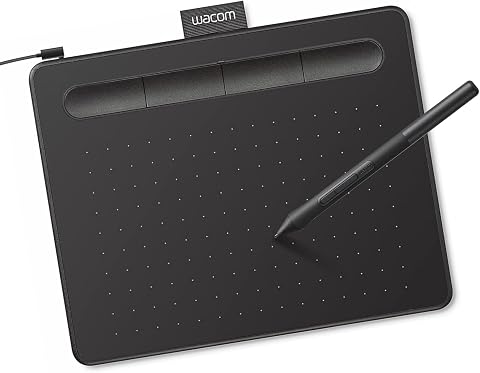 Wacom Intuos Small Wired Drawing Tablet with PenView on Amazon →
- 8
 HUION Inspiroy H640P 6 x 4 Inch Drawing TabletView on Amazon →
- 9
 TQU 8.5-Inch LCD Writing Tablets for Kids, 12-PackView on Amazon →
- 10
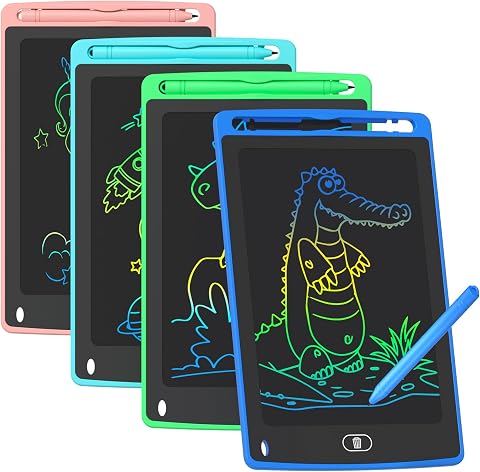 TQU 8.5-Inch LCD Writing Tablets for Kids, 4-PackView on Amazon →
Match the Tablet to the Workflow
The central purchasing distinction is not simply which tablet has the longest feature list, but what it connects to and how the artist draws. A screen-free tablet can suit someone comfortable drawing on one surface while looking at a monitor. A display may feel more direct, but it occupies desk space and still needs a compatible computer. A standalone device avoids that connection during use, although its operating system and available apps can constrain a workflow.
That distinction can prevent two common mismatches: paying extra for a display when a pen tablet would work, or buying a writing board that cannot run art software. The guide advises checking active drawing area, portability, shortcut placement, software compatibility and ports before purchase. It does not establish which device is best for every artist; its rankings reflect stated use cases, not a universal performance test.
Popular right now

KitchenAid Artisan 5-Qt Tilt-Head Stand Mixer – Dried Rose (KSM150PS)

Dyson V8 Cyclone Cordless Vacuum

Ninja CREAMi 7-in-1 Ice Cream Maker, NC301
As an affiliate, we earn on qualifying purchases.
Three Device Types, Different Tradeoffs
The comparison separates products into screen-free pen tablets, pen displays and standalone devices. On a pen tablet, the user draws on the tablet while watching a separate monitor. On a pen display, the drawing surface is also a screen, but a separate computer remains part of the setup. A standalone model can operate without that computer connection, though buyers still need to check its software and file-handling options.
The guide says its order favors versatility for digital art and clarity of fit. It places the Intuos Pro Medium first, followed by display options, while smaller or simpler pen tablets rank lower for their more limited work areas or feature sets. The TQU LCD sets are categorized separately because they are intended for simple writing rather than pressure-sensitive work in art applications.
Evidence Behind the Rankings
The supplied source does not state when the comparison was published or tested, and it gives no prices, hands-on test results, scoring system, or measured comparisons of pen performance. It is therefore unclear whether the rankings reflect current availability, recent software or driver updates, or long-term use. The source describes product features and its selection criteria, but does not identify independent testing or external expert interviews.
Some product details also remain incomplete in the supplied material. It refers to XP-Pen Artist models without naming them, and does not spell out the standalone model’s software capabilities. Buyers should verify each product’s current specifications, compatibility and included cables with the manufacturer or retailer before making a decision.
Check Compatibility Before Buying
The next step for readers is to identify the software and computer they plan to use, then confirm operating-system support, available ports and connection requirements for the exact tablet model. Artists should compare usable active area—not just the device’s outside dimensions—and decide whether a screen, portability or shortcut controls matter most to their work.
Because the supplied comparison does not include current prices or dated availability, those details should be checked separately before purchase. The source provides no announced follow-up testing or update schedule, so it is not clear when its recommendations may be revised.
Key Questions
Which tablet does the guide recommend for desktop digital art?
It names the Wacom Intuos Pro Medium as its leading desktop choice, citing its work area, wireless connection and Pro Pen 3. That is the guide’s recommendation, not a finding supported by published comparative test results in the supplied material.
Do pen displays work without a computer?
Not in the setup described by the guide. The HUION Kamvas and XP-Pen Artist displays let users draw on-screen but still depend on a connected computer. Check the exact model’s requirements before buying.
What is the difference between a pen tablet and a pen display?
A pen tablet has no built-in drawing screen; the user looks at a separate monitor. A pen display puts the image under the pen, but generally adds screen configuration, desk space and a computer connection.
Are the TQU LCD tablets suitable for digital illustration?
The guide describes the TQU LCD writing boards as suitable for notes and casual doodling, not as replacements for pressure-sensitive tablets used with digital-art software.
What should buyers check before choosing a model?
Confirm software and operating-system compatibility, connection needs, active area and portability. Also consider whether the device is computer-connected or standalone and whether its shortcut layout fits your working habits.
Source: ThorstenMeyerAI.com